|
|
|
Home | Forums |
Downloads | Gallery |
News & Articles | Resources |
Jobs | FAQ |
| Join |
Welcome !
|
4 Users Online (2 Members):
Show Users Online
- Most ever was 626 - Mon, Jan 12, 2015 at 2:00:17 PM |
Forums
|
Forums >> Revit Structure >> Technical Support >> Vertical bracing line
|
|
|
active
Joined: Mon, May 20, 2013
10 Posts
No Rating |
In my project template, i have my detail level set to medium in plan views. When i model vertical bracing i want to show a dashed line to show the vertical bracing position in plan just like if i was to set my detail level to course.
Im really looking to see how everybody else goes about this ?
Do you add a model to youre beam family so it shows up in plan ? or do you just draw a detail line in plan to show vertical bracing position  dont really think this is the right way because if youre bracing moves the line wnt move with it) or is there a way to make youre beam family show up in a course view in a medium detail level ? dont really think this is the right way because if youre bracing moves the line wnt move with it) or is there a way to make youre beam family show up in a course view in a medium detail level ?
hope this makes sense ! Just want to know what the best way is going about this ?
Can anybody help ?
Thank you
|
This user is offline |
|
 | |
|
|
site moderator|||

Joined: Fri, Nov 12, 2010
1749 Posts
 |
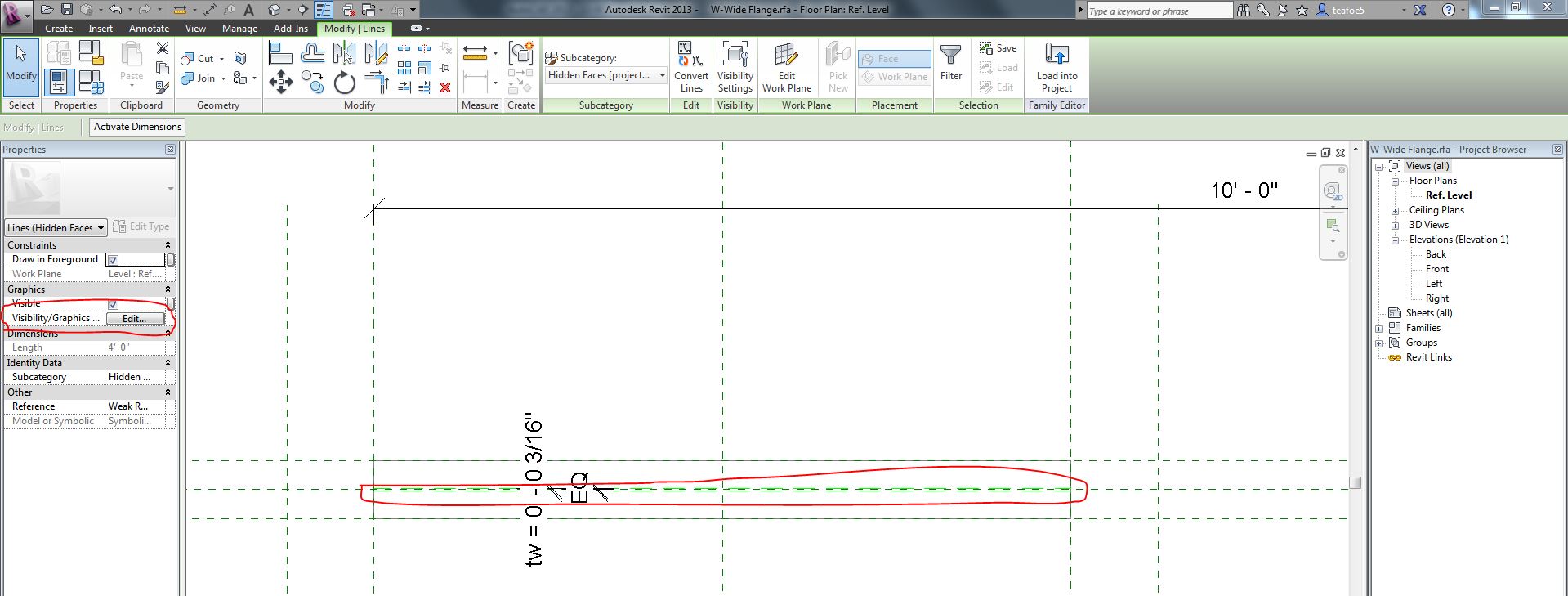
You need to edit the family and select what you want to see and in your Properties under Visibility/Graphic Overrides chose the scales at which you want the object to show. If you just want the symbolic line to show at medium click on it and choose corse and medium and then click on the extrusion and change it so it only shows in fine detail.
|
This user is offline |
View Website
|
|
|
active
Joined: Mon, May 20, 2013
10 Posts
No Rating |
Can you show me a picture on how to select the symbolic line in a beam family ?
|
This user is offline |
|
|
|
active
Joined: Mon, May 20, 2013
10 Posts
No Rating |
do you have to draw a new symbolic line in the beam family ?
|
This user is offline |
|
|
|
site moderator|||
Joined: Fri, Nov 12, 2010
1749 Posts
|
The lime green lines are the symbolic lines. These are already built in to the out of the box revit families (depening on what family you are using). If you created your own family you will need to add the symbolic lines.
|
This user is offline |
View Website
|
|
|
active
Joined: Wed, Sep 12, 2012
8 Posts
No Rating |
the symbolic line does not show up if one end of my bracing is higher than the other (diagonal bracing).
It only shows up if the bracing is level.
Is there a way to make the symbolic line show up with diagonal bracing ?
|
This user is offline |
|
|
|
Similar Threads |
|
Vertical bracing symbolic line ??? |
Revit Structure >> Technical Support
|
Tue, Jun 4, 2013 at 7:33:50 AM
|
3
|
|
Revit 2014 Vertical Bracing Problems |
Revit Building >> Technical Support
|
Thu, Feb 20, 2014 at 10:26:00 AM
|
0
|
|
vertical bracing problem / bug |
Revit Structure >> Technical Support
|
Wed, Jan 18, 2012 at 3:13:12 AM
|
2
|
|
Vertical and horizontal bracing connections |
Revit Structure >> Technical Support
|
Mon, Jun 24, 2013 at 7:18:38 AM
|
5
|
|
Vertical bracing in plan question |
Revit Structure >> Technical Support
|
Wed, Sep 26, 2012 at 1:01:35 AM
|
4
|
|
|
Site Stats
Members: | 2161655 | Objects: | 23325 | Forum Posts: | 152479 | Job Listings: | 3 |
|
 Search