|
|
|
Home | Forums |
Downloads | Gallery |
News & Articles | Resources |
Jobs | FAQ |
| Join |
Welcome !
|
3 Users Online (1 Members):
Show Users Online
- Most ever was 626 - Mon, Jan 12, 2015 at 2:00:17 PM |
Forums
|
Forums >> Community >> Newbies >> Underground Car Park
|
|
|
active
Joined: Sun, Apr 21, 2013
5 Posts
No Rating |
Hey there everybody,
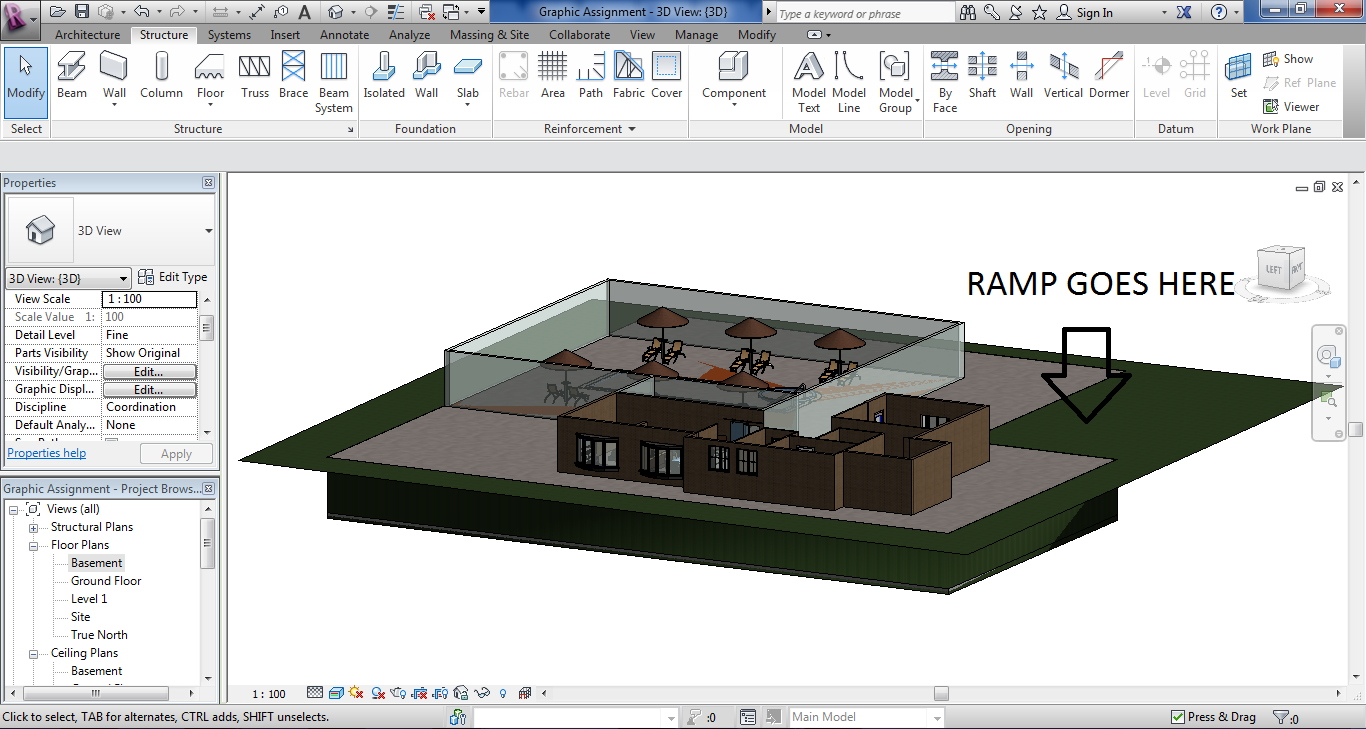
I'm trying to build an underground car park but am having trouble, could you please help me? So the plan is that it's an underground car park under a house (Yes, I said an underground car park under a house, but more like a mansion). So I've made the hole in the ground by doing the building pad and I've also made a floor plan called "Basement". I just need to know how to make a ramp going up to the "Ground Floor" so that the cars could obviously get out. Also, does anyone know how to make Revit only see the "Basement" and not the "Ground Floor", as I can't see anything.
In the following picture the pool is covered by the slab. How do I fix that? Also, is the Building pad in the correct place to make the ramp? Please help me!
Thanks.
|
This user is offline |
|
 | |
|
|
active
Joined: Sun, Apr 21, 2013
5 Posts
No Rating |
It obviously doesn't look like a mansion now because I haven't completed it but the aim is to make it a mansion. 
|
This user is offline |
|
|
|
site moderator|||
Joined: Tue, May 16, 2006
13079 Posts
 |
Make two topographies. Add a ramp to the one you have. Then add a new site sketched around your upper structure and just over your pad area. And read this: http://www.revitcity.com/forums.php?action=viewthread&thread_id=11258
|
This user is offline |
|
|
|
Similar Threads |
|
car ramps - visual dilemma.... |
Revit Building >> Technical Support
|
Thu, Aug 10, 2006 at 8:16:06 AM
|
3
|
|
Placing objects on ramps |
Revit Structure >> Technical Support
|
Fri, Aug 15, 2008 at 9:08:24 AM
|
1
|
|
newbie - needing help with grids |
Revit Building >> Technical Support
|
Sat, Jan 5, 2008 at 9:55:04 AM
|
0
|
|
City Park |
Community >> Newbies
|
Fri, Jan 6, 2017 at 9:51:48 AM
|
1
|
|
How do you change car colors (properties)? |
Revit Building >> Technical Support
|
Wed, Mar 9, 2005 at 5:21:53 PM
|
1
|
|
|
Site Stats
Members: | 2161655 | Objects: | 23325 | Forum Posts: | 152479 | Job Listings: | 3 |
|
 Search