|
|
|
Home | Forums |
Downloads | Gallery |
News & Articles | Resources |
Jobs | FAQ |
| Join |
Welcome !
|
3 Users Online (1 Members):
Show Users Online
- Most ever was 626 - Mon, Jan 12, 2015 at 2:00:17 PM |
Forums
|
Forums >> Community >> Newbies >> Unable to have same elevation view names
|
|
|
active
Joined: Tue, May 29, 2012
49 Posts
 |
Greetings,
I have an office fit out job and am setting up seperate sheets for each area that needs detailing, ie; Staff Kitchen, WCs, Meeting Rooms etc.
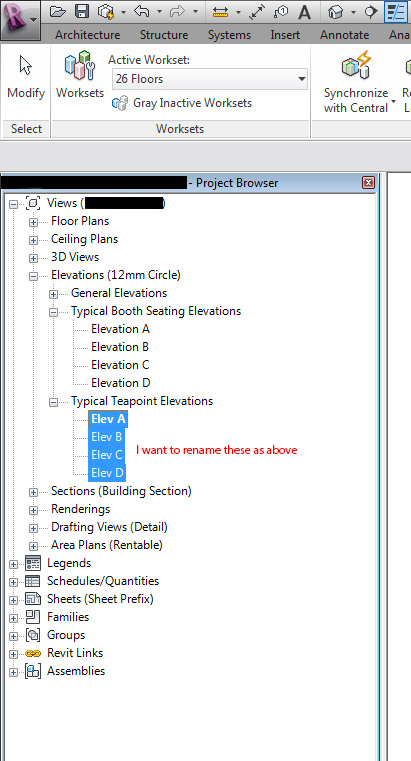
Now for each room there will be 4 elevations and I'd like to be able to maintain a sensible naming discipline, ie; Elevation A/B/C/D etc. However when I try to rename a new set of elevations for a different room Revit (Arch 2013 ) tells me that the view name is "already in use and to choose a unique name". I can rename the name of each elevation view by adding the room name to make each view unique, but this makes the title long and very repetitive especially when you have 4 elevations on one sheet, the client does not need to see 'Kitchen elevation 1.....Kitchen elevation 2 etc when he is already looking at the kitchen drawing sheet. I have played around with adding a project parameter and organising my project browser (as attached image).
Any ideas on how I can have 'Kitchen Elevations A,B,C,D' and 'Staff WCs Elevations A,B,C,D' would be appreciated.
Many thanks,
CM.
|
This user is offline |
|
 | |
|
|
site moderator|||

Joined: Fri, Nov 12, 2010
1749 Posts
 |
You cant have the same VIEW name in your project browser however if you click on the view and look in your properties you will see a Title On Sheet section and you can name your view whatever you want on the sheet.
|
This user is offline |
View Website
|
|
|
active
Joined: Tue, May 29, 2012
49 Posts
|
I see, thank you very much for the tip and for the quick response.
CM.
|
This user is offline |
|
|
|
active
Joined: Wed, Apr 25, 2018
0 Posts
No Rating |
Hi,
Yeah, section marks appearing in every view can be really annoying, especially when they're not relevant and just clutter things up. Revit shows section markers by default in all views where the section line intersects the view range, which is why they pop up everywhere. Common workarounds include adjusting the view scale (since markers might hide at certain scales) or using visibility/graphics overrides to filter them out based on type or parameters.
If you're tired of manually hiding them or setting up filters each time, I created a free add-in called Sections Hider for the Revit community. It makes it quick to hide unwanted section markers in specific views without generating new filters or toggling them on/off for every section – simplifies the process a lot. It's compatible with Revit 2025 and later, lightweight, and no strings attached; just wanted to give back something useful.
Check it out here: https://apps.autodesk.com/RVT/en/Detail/Index?id=9178681668701145560&appLang=en&os=Win64
Let me know if that helps or if you have more details on your setup!
|
This user is offline |
|
|
|
Similar Threads |
|
view names in building sections are missing |
Revit Structure >> Technical Support
|
Wed, Apr 2, 2008 at 6:19:24 AM
|
7
|
|
Hiding View Name in Elevation View Tags |
General Discussion >> Revit Project Management
|
Fri, Jan 21, 2011 at 6:47:39 PM
|
9
|
|
Unable to duplicate a view |
Revit Building >> Technical Support
|
Tue, Sep 13, 2011 at 6:44:21 PM
|
3
|
|
Project Browser organization . . .Sheet - detail number? |
Revit Structure >> Technical Support
|
Mon, Aug 29, 2011 at 9:53:14 AM
|
0
|
|
Interior Elevation Tag |
Revit Building >> Technical Support
|
Wed, Dec 19, 2012 at 2:25:25 PM
|
9
|
|
|
Site Stats
Members: | 2161655 | Objects: | 23325 | Forum Posts: | 152479 | Job Listings: | 3 |
|
 Search