|
Forums >> Revit Structure >> Technical Support >> Rendering Issue
|
|
|
active
Joined: Sun, Mar 31, 2013
4 Posts
No Rating |
I am designing a 2 story house in Revit 2013. When I render the project, nothing above level one renders. All of level 1 renders as it should. For instance, the roof on the attached 1 story garage will render as the green tin roof, but the matching roof attached to level 2 on the house does not. Is there some sort of setting I need to change to fix this?
|
This user is offline |
|
 |
|
|
|
site moderator|||

Joined: Fri, Nov 12, 2010
1749 Posts
 |
What do you mean it doesn't render? Attach an image of the problem before and after the rendering.
|
This user is offline |
View Website
|
|
|
active
Joined: Sun, Mar 31, 2013
4 Posts
No Rating |
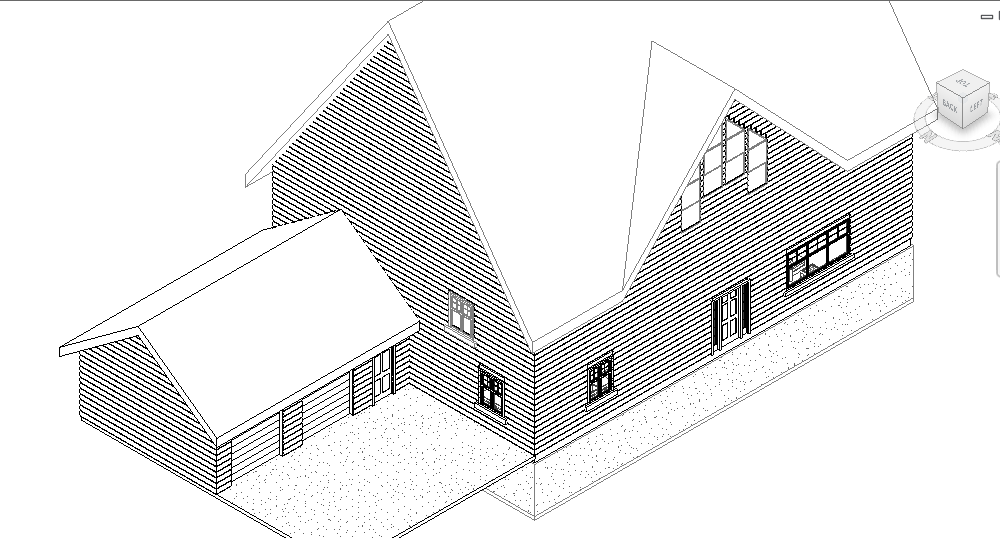
Attached should be a before and after of the render. In the before, you can maybe see that the components above level one (with the exception of the log siding sweep) have a grey outline instead of a black one. This could have something to do with the problem?
|
This user is offline |
|
|
|
active

Joined: Thu, Mar 17, 2005
1231 Posts
 |
This is a very weird one.
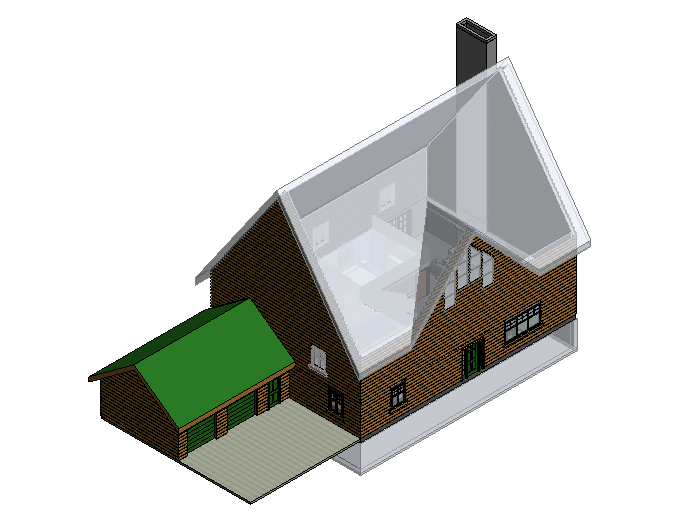
Only level 1 elements are rendering. The roof, 2nd floor windows and foundation are not rendering.
What does 'Realistic' view show ?
-----------------------------------
.
FULL 'DOWNLOAD ACCESS' to all 850+ CADclips videos for only $150
|
This user is offline |
View Website
|
|
|
active
Joined: Sun, Mar 31, 2013
4 Posts
No Rating |
The realistic view is shown in the attachment. Level 2 components seem to be transparent, but I can't find any transparency settings that solve the problem.
|
This user is offline |
|
|
|
site moderator|||
Joined: Tue, May 16, 2006
13079 Posts
|
ARe you playing around with phases?
I think you have some sort of applied filter.
Delete the view and create a new one. Make sure no view teplates are assigned to the view.
|
This user is offline |
|
|
|
active
Joined: Sun, Mar 31, 2013
4 Posts
No Rating |
I dont think I have played with any phases. How do I delete the view and create a new one? Re-build the second level?
|
This user is offline |
|
|
|
site moderator|||
Joined: Fri, Nov 12, 2010
1749 Posts
|
It sounds like phases to me. Not you don't need to delete the second level. Just click on the view in your list and delete it. Then just create a new 3d view or camera view, whichever you were using. Read your help on how this is done if your not familiar with it.
|
This user is offline |
View Website
|
|
|
active

Joined: Mon, Nov 19, 2007
93 Posts
|
Do you have a solid object sitting in the middle of the building. Maybe a concept shape you used to begin with but accidentally kept and turned off and forgot about?
-----------------------------------
__________I'm the guy they come to when they didn't follow my recommended workflows.__________ |
This user is offline |
|
|
|
Similar Threads |
|
09' Rendering Issue |
Revit Building >> Technical Support
|
Wed, Jun 3, 2009 at 4:22:51 PM
|
11
|
|
rendering issue |
Revit Building >> Technical Support
|
Mon, May 21, 2007 at 1:39:08 PM
|
1
|
|
Rendering Issue |
Revit Building >> Technical Support
|
Wed, Nov 30, 2011 at 10:21:49 AM
|
1
|
|
issue with rendering |
Revit Building >> Technical Support
|
Tue, Nov 24, 2009 at 6:18:48 AM
|
1
|
|
Complete Rendering |
General Discussion >> Revit Project Management
|
Tue, Mar 27, 2012 at 6:12:31 PM
|
6
|
|

 Search