|
|
|
Home | Forums |
Downloads | Gallery |
News & Articles | Resources |
Jobs | FAQ |
| Join |
Welcome !
|
22 Users Online (20 Members):
Show Users Online
- Most ever was 626 - Mon, Jan 12, 2015 at 2:00:17 PM |
Forums
|
Forums >> Revit Building >> Technical Support >> Door Marks linked to Room Numbers
|
|
|
active

Joined: Mon, Aug 11, 2008
6 Posts
No Rating |
Project Manager Request:
When you insert a door, that the door number (mark) is linked to the room number. Example, when you placed a door in Room 100, the door number would automatically come in as 100. I already see an issue when more that one door is placed in the room, normally the numbering would be 100A, 100B and etc... Do not know if this can be done, any information would be appreciated.
|
This user is offline |
|
 | |
|
|
site moderator|||

Joined: Fri, Nov 12, 2010
1749 Posts
 |
You can change your door numbers to whatever you want after you place it
|
This user is offline |
View Website
|
|
|
site moderator|||
Joined: Tue, May 16, 2006
13079 Posts
 |
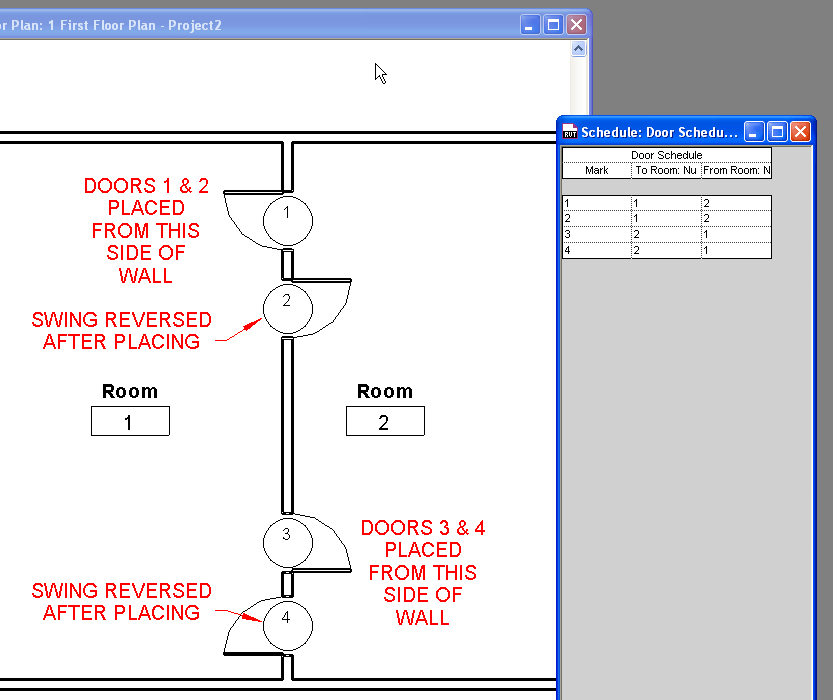
Door numbers are set to be sequential upon placement. As teafoe says, they can be renumbered and you can find apps to help you renumber them.
Doors do have from to properties and they can be controlled based on placement. See my attached images.
|
This user is offline |
|
|
|
active

Joined: Wed, Sep 26, 2007
162 Posts
|
"
Project Manager Request:
... Do not know if this can be done, any information would be appreciated.
"
At the moment (Revit 2013), room numbers and door numbers are not associated. Other similar associations have been requested, but don't exist yet, unfortunately. There might be some third party applications that help on this.
-----------------------------------
Planta1 Revit Online Consulting | info@planta1.com |
This user is offline |
View Website
|
|
|
active
Joined: Mon, Aug 11, 2008
6 Posts
No Rating |
trafoe5, thanks for the response, however I knew that all ready.
WW, thanks for the response and a good tip. However, it does not link the door and roon numbers. How have you been?
alfmedina, that was what I tought and need to send in for Wish List Item. Will look to see if there is a third party app.
|
This user is offline |
|
|
|
Similar Threads |
|
Window and Assemblies in one schedule |
General Discussion >> Revit Project Management
|
Fri, Oct 14, 2016 at 5:05:58 PM
|
2
|
|
Cant load Curtain Wall Door |
Revit Building >> Technical Support
|
Wed, Oct 26, 2011 at 3:41:44 PM
|
4
|
|
Door Schedule - showing duplicate floor levels and doors not included on plans - |
Revit Building >> Technical Support
|
Thu, Nov 3, 2016 at 8:49:38 AM
|
2
|
|
Copy/Monitor / workaround HELP PLEASE! |
Revit Building >> Technical Support
|
Wed, Oct 19, 2011 at 1:16:11 PM
|
4
|
|
Building with repetitive roms |
Revit Building >> Technical Support
|
Tue, Apr 10, 2018 at 10:08:45 AM
|
1
|
|
|
Site Stats
Members: | 2161655 | Objects: | 23325 | Forum Posts: | 152479 | Job Listings: | 3 |
|
 Search