|
Forums >> Community >> Newbies >> Can not get Vertical siding on ground floor and horizontal on second floor?
|
|
|
active
Joined: Sun, Feb 10, 2013
6 Posts
No Rating |
When I change the the surface pattern to vertical for one wall it then changes the surface pattern to vertical on any other wall that is set with siding/clapboard. Why is this?
|
This user is offline |
|
 |
|
|
|
site moderator|||

Joined: Tue, May 22, 2007
5921 Posts
 |
Because it's a TYPE parameter (check your HELP for "Instance / Type" parameters).
To avoid that, you have 2 options:
1) - use MODEL patterns, in this way you can ROTATE your pattern in an elevation view (only in that wall)
2) - select the wall and in your "Properties" tab goto "Edit", duplicate the wall and give another name, now you can Edit and rotate the pattern.
-----------------------------------
I Hope and I Wish to LEARN more, and more, and more.... REVIT |
This user is offline |
|
|
|
active
Joined: Sun, Feb 10, 2013
6 Posts
No Rating |
Thanks for the quick response, I got it figured out later that night.
|
This user is offline |
|
|
|
active
Joined: Sun, Feb 10, 2013
6 Posts
No Rating |
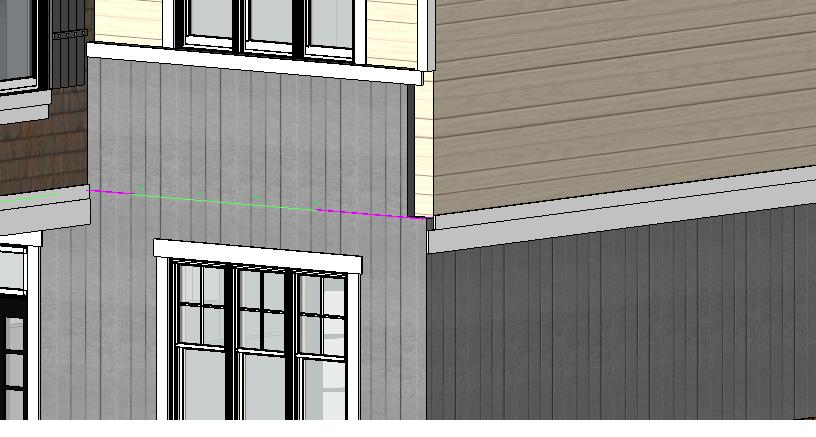
Maybe you can help me with this other probllem, I have the front wall cladding higher than the second floor by about 4 ft. and the side wall makes an ugly join how to fix this? I have attached a pic.
|
This user is offline |
|
|
|
site moderator|||
Joined: Tue, May 22, 2007
5921 Posts
|
TRIM the walls
-----------------------------------
I Hope and I Wish to LEARN more, and more, and more.... REVIT |
This user is offline |
|
|
|
active
Joined: Sun, Feb 10, 2013
6 Posts
No Rating |
Do you mean use a corner trim that will cover? Or by using the trim command?
|
This user is offline |
|
|
|
site moderator|||
Joined: Tue, May 16, 2006
13079 Posts
 |
He meant - use the wall trim command. But there are more problems here.
Revits wall trims don't work well with stacked walls or any walls that don't align the same wall type / thickness. You may have to splt a wall horizontally to allow it to join differently at your junctions.
|
This user is offline |
|
|
|
active
Joined: Sun, Feb 10, 2013
6 Posts
No Rating |
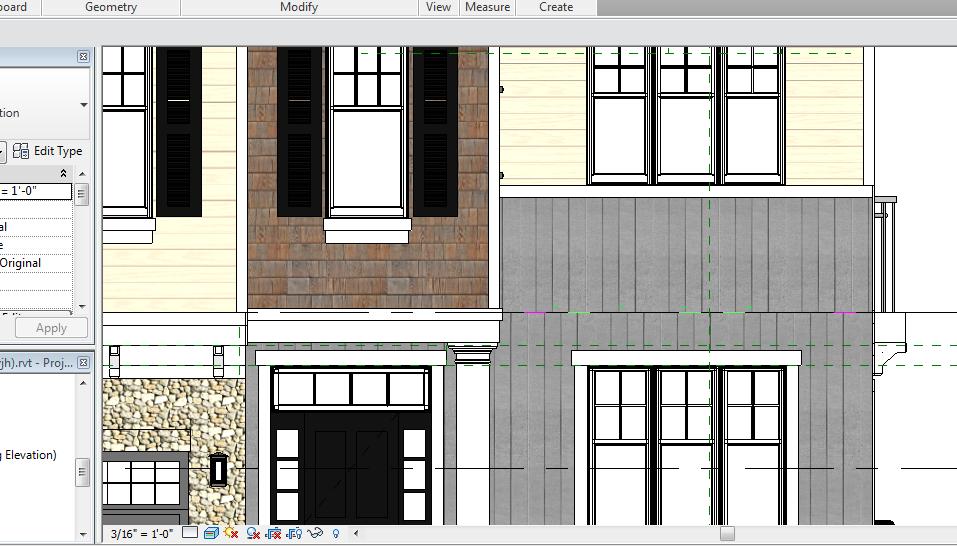
Ive done a stacked wall now on the second floor with horizontal on top and vertical on the bottom, how can I get the vertical siding lines to match up from first to second floor?
|
This user is offline |
|
|
|
site moderator|||
Joined: Tue, May 22, 2007
5921 Posts
|
Use the "Align" tool
-----------------------------------
I Hope and I Wish to LEARN more, and more, and more.... REVIT |
This user is offline |
|
|
|
active
Joined: Sun, Feb 10, 2013
6 Posts
No Rating |
I've tried to to align the two edges, tried the center of top wall and profile edge line of bottom nothing changes. Could you elaborate on what to lines I should be aligning? I appreciate all the help!
|
This user is offline |
|
|
|
|
|
site moderator|||
Joined: Tue, May 22, 2007
5921 Posts
|
You have to align the PATTERN lines and not the wall, use the TAB key to help you.
-----------------------------------
I Hope and I Wish to LEARN more, and more, and more.... REVIT |
This user is offline |
|
|
|
Similar Threads |
|
First floor slab or ground floor ceiling? |
Revit Building >> Technical Support
|
Fri, Aug 30, 2013 at 7:41:03 AM
|
1
|
|
Window from floor above showing on ground floor plan |
Revit Building >> Technical Support
|
Mon, Oct 10, 2016 at 7:13:10 AM
|
2
|
|
Ground Floor info. appearing on Second Floor |
Revit Building >> Technical Support
|
Thu, Jun 9, 2016 at 2:24:40 PM
|
6
|
|
Faint lines showing from ground floor on first floor |
Revit Building >> Technical Support
|
Sat, Mar 10, 2012 at 4:40:33 PM
|
2
|
|
PFC + horizontal plate beam |
Revit Structure >> Technical Support
|
Fri, Nov 5, 2010 at 12:08:52 AM
|
0
|
|

 Search