|
|
|
Home | Forums |
Downloads | Gallery |
News & Articles | Resources |
Jobs | FAQ |
| Join |
Welcome !
|
7 Users Online (5 Members):
Show Users Online
- Most ever was 626 - Mon, Jan 12, 2015 at 2:00:17 PM |
Forums
|
Forums >> Revit Building >> Technical Support >> Shape Handles (Grips) not showing in 3D
|
|
|
site moderator|||

Joined: Fri, Nov 12, 2010
1749 Posts
 |
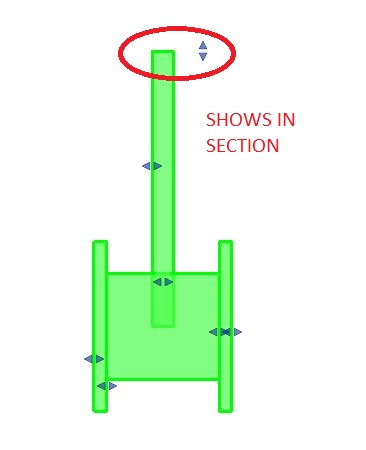
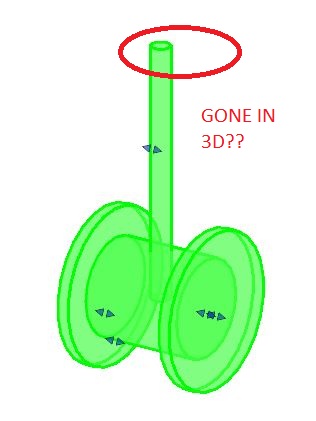
I have a family that I created and I want to be able to drag part of the extrusion in a 3D view. When I cut a section in the project looking at the object I can see all of the grips the way I want but when I go to a 3D view there is one grip that is not showing. Any idea why it would not be showing in 3D but shows in a section?
|
This user is offline |
View Website
|
 | |
|
|
site moderator|||
Joined: Fri, Nov 12, 2010
1749 Posts
|
Changed the reference plane to a reference line and it now works.
|
This user is offline |
View Website
|
|
|
active
Joined: Mon, Aug 21, 2017
0 Posts
No Rating |
After hunt a solution for two hours, this tip save my day! Thanks to teafoe5 for the great suggestion.
|
This user is offline |
|
|
|
Similar Threads |
|
Roof Shape Handles |
Revit Building >> Technical Support
|
Fri, Feb 6, 2015 at 10:28:04 AM
|
4
|
|
Parts Shape Handles |
Revit Building >> Technical Support
|
Tue, May 19, 2015 at 12:03:06 PM
|
3
|
|
Parts shape handles Revit 2012 |
Revit Building >> Technical Support
|
Wed, May 9, 2012 at 2:00:55 PM
|
6
|
|
instance parameter without shape handles |
Revit Building >> Technical Support
|
Fri, Aug 31, 2007 at 6:48:45 AM
|
2
|
|
Door handle not on a door plane |
Revit Building >> Technical Support
|
Wed, Apr 5, 2017 at 11:18:14 PM
|
1
|
|
|
Site Stats
Members: | 2161655 | Objects: | 23325 | Forum Posts: | 152479 | Job Listings: | 3 |
|
 Search