|
|
|
Home | Forums |
Downloads | Gallery |
News & Articles | Resources |
Jobs | FAQ |
| Join |
Welcome !
|
3 Users Online (1 Members):
Show Users Online
- Most ever was 626 - Mon, Jan 12, 2015 at 2:00:17 PM |
Forums
|
Forums >> Revit Building >> Technical Support >> Window grilles break down when new types are added.
|
|
|
active
Joined: Wed, Sep 30, 2009
7 Posts
No Rating |
Hello all. Our firm uses window families that include a nested grille which allows us to select either a 2-lite, 4-lite, 6-lite, or 9-lite grille pattern. We've tried modifying the grille family to also include a 3-lite pattern, but as soon as it is loaded into the window family and the 3-lite option is selected, we recieve an error message telling us that the constraints aren't satisfied. It's quite frustrating since the new pattern has been created in exactly the same way as the originals (same techniques, same reference planes, same constraints, etc.) and still it breaks down. I've attached a simple casement window family and the grille family (including the 3-lite option) below. If anyone has any advice on what the problem might be or can direct me to another resource of information on this subject, my sanity just might be saved. Thanks in advance for any help you can provide!
Sincerely,
-Jason
|
This user is offline |
|
 | |
|
|
active
Joined: Thu, Mar 29, 2012
113 Posts
 |
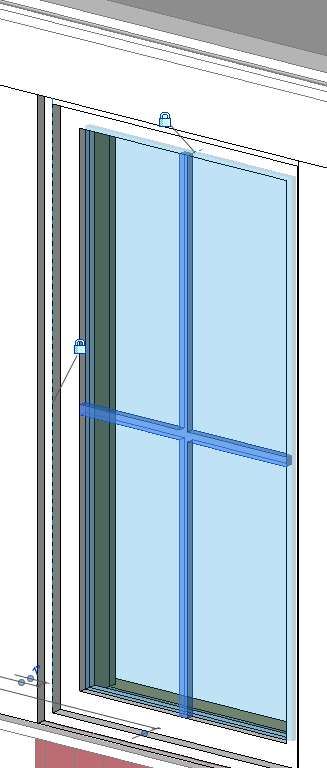
unlock the top constraints? see attached photo
im not sure how you want to lock your references/position your you grille...
but i think face based generic model is easier to position (on your window frame face or glass panel face then lock it with the front/back and left/right reference lines) rather than just using a generic model.. hope this helps.
-----------------------------------
** dont be mad, i dont have much... i am homeless |
This user is offline |
|
|
|
Similar Threads |
|
Poblems extending window grilles :-( |
Revit Systems >> Technical Support
|
Mon, Jan 7, 2013 at 7:03:36 PM
|
1
|
|
Break Line & Weld sybol families |
Community >> The Studio
|
Wed, Apr 28, 2010 at 9:18:41 PM
|
6
|
|
Help wanted! Window size issues |
Revit Building >> Technical Support
|
Thu, Sep 17, 2009 at 3:25:59 PM
|
4
|
|
Door and Window types |
Revit Building >> Technical Support
|
Thu, Nov 23, 2017 at 11:19:52 AM
|
3
|
|
To Window Tag or not to Window Tag...? |
Community >> Newbies
|
Thu, May 21, 2009 at 12:33:24 PM
|
4
|
|
|
Site Stats
Members: | 2161655 | Objects: | 23325 | Forum Posts: | 152479 | Job Listings: | 3 |
|
 Search
 114279_Csmt-1.rfa