|
|
|
Home | Forums |
Downloads | Gallery |
News & Articles | Resources |
Jobs | FAQ |
| Join |
Welcome !
|
7 Users Online (5 Members):
Show Users Online
- Most ever was 626 - Mon, Jan 12, 2015 at 2:00:17 PM |
Forums
|
Forums >> Revit Building >> Technical Support >> Can I have Revit do this? See Image - Formula Question
|
|
|
active
Joined: Mon, Mar 5, 2012
29 Posts
No Rating |
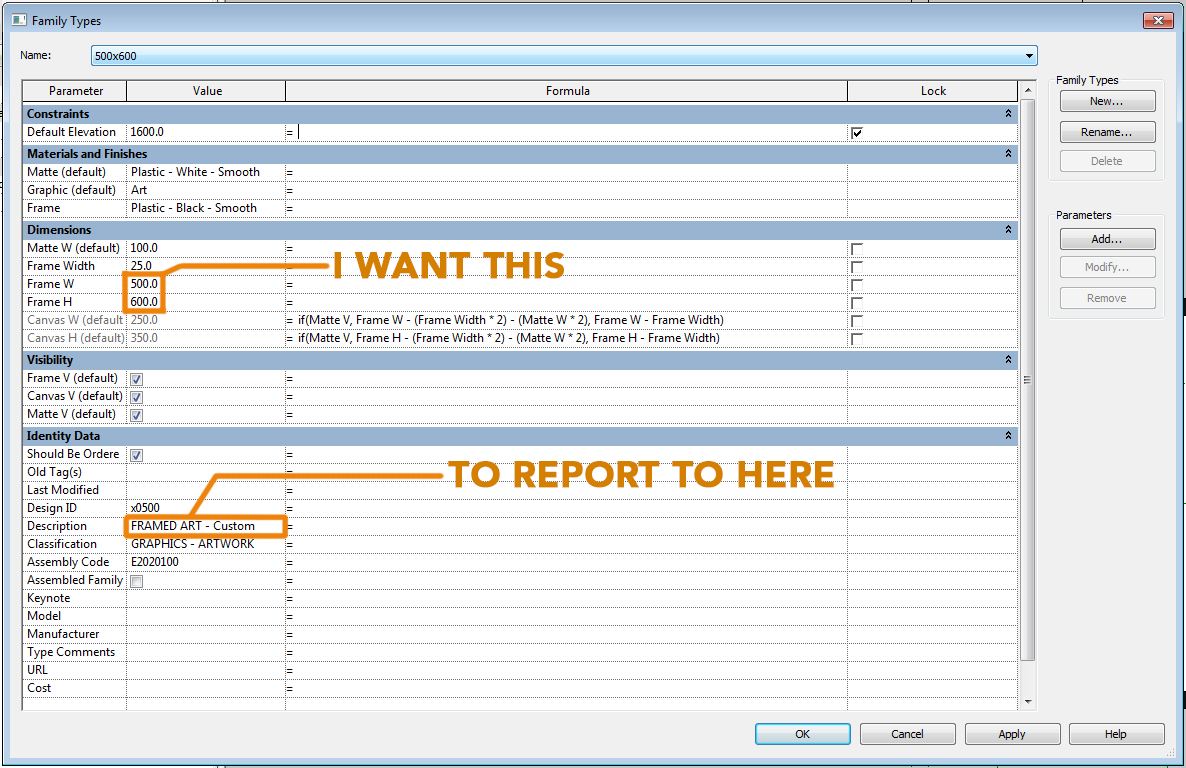
Please see the attached image.
I want my description field to report the Parameters Dimensions to be in the schedule. Right now we either are not specifiying artwork frame size or are manually inputing . . . either are not effective. The information is RIGHT there . . .
|
This user is offline |
|
 | |
|
|
site moderator|||
Joined: Tue, May 16, 2006
13079 Posts
 |
Paramter types are important in Revit. Text in text parameters, length's in length parameters and length formulas and there is no text formulas available like "concat".
|
This user is offline |
|
|
|
active
Joined: Mon, Mar 5, 2012
29 Posts
No Rating |
. . . Sigh this is what I thought in my readings. Seems so simple and easy to have done. A field is a field and Revit knows what those values are anyway and storing as a name which can be called upon. So basically, it cannot be done? Do you have a suggestion for making this show up in my schedules?
|
This user is offline |
|
|
|
Similar Threads |
|
basic formula question regarding parameter use |
Community >> Newbies
|
Wed, Jun 16, 2010 at 5:34:23 PM
|
4
|
|
Revit 2010 family parameters formula and room tag |
Revit Building >> Technical Support
|
Fri, Aug 7, 2009 at 4:28:34 PM
|
4
|
|
Using schedule total in formula? |
Revit Building >> Technical Support
|
Fri, Apr 4, 2014 at 10:29:50 AM
|
9
|
|
One family parameter has formula one has none |
General Discussion >> Revit Project Management
|
Wed, Jun 25, 2014 at 1:05:54 PM
|
7
|
|
Parameter Formula |
Revit Building >> Technical Support
|
Tue, Feb 27, 2007 at 7:12:50 PM
|
7
|
|
|
Site Stats
Members: | 2161655 | Objects: | 23325 | Forum Posts: | 152479 | Job Listings: | 3 |
|
 Search