|
Forums >> Community >> Newbies >> Ceiling dependent lighting
|
|
|
active
Joined: Wed, May 9, 2012
4 Posts
No Rating |
What is ceiling dependent lighting and how do I find it? I am having a hard time dropping lights in my reflected ceiling plan. Why wouldn't troffer lights be ceiling dependent. I have check my visibility graphics. Just shows as a black box and my cursor turns to a circle with a line through it? New to drafting, new to revit, going grayer faster than I need to.
|
This user is offline |
|
 |
|
|
|
site moderator|||

Joined: Tue, May 22, 2007
5921 Posts
 |
"...and my cursor turns to a circle with a line through it?" - Because that light is not "Ceiling Based" family...
-----------------------------------
I Hope and I Wish to LEARN more, and more, and more.... REVIT |
This user is offline |
|
|
|
active
Joined: Wed, May 9, 2012
4 Posts
No Rating |
I check the family template and this is a ceiling dependent light? Where else should I look/check? I have the constraints set at my ceiling height. I can't get any fixture to drop in to the ceiling other than the lights in the soffit. thanks for your thoughts.
|
This user is offline |
|
|
|
site moderator|||
Joined: Tue, May 22, 2007
5921 Posts
|
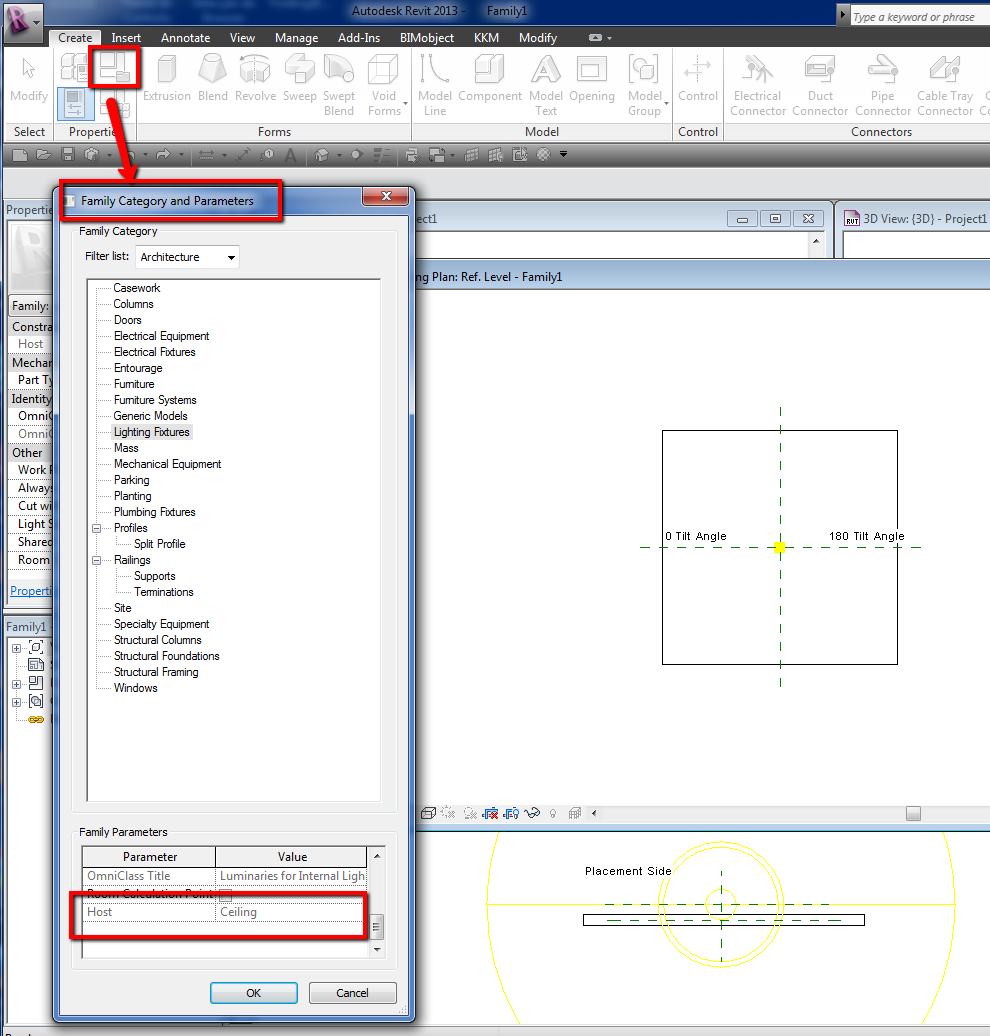
Open that family, goto "Family category and parameter" and check if that light is ceiling based, Host must be "Ceiling"
-----------------------------------
I Hope and I Wish to LEARN more, and more, and more.... REVIT |
This user is offline |
|
|
|
active
Joined: Wed, May 9, 2012
4 Posts
No Rating |
Yes. Did that. Yes ceiling is host. I am at a loss.
|
This user is offline |
|
|
|
site moderator|||
Joined: Tue, May 16, 2006
13079 Posts
 |
The obvious question is - do you really have a ceiling to host this light?
Are you really in a reflected ceiling plan - not a floor plan called ceiling plan?
|
This user is offline |
|
|
|
active
Joined: Wed, May 9, 2012
4 Posts
No Rating |
Double checked both things. (I have been known to be a dope in the past). Finally took someone elses advice and am dropping them in in 3d mode and then moving them around. They load in fine in 3d. I can manipulate them in the ceiling plan. Still don't know why. Thanks.
|
This user is offline |
|
|
|
site moderator|||
Joined: Tue, May 16, 2006
13079 Posts
|
To place something in a view, you have to be "in the view". Many people switch to say a RCP from a different view and they see the RCP but until they actually click in the view window, they are not "in the view". Understand? That may have been your problem.
|
This user is offline |
|
|
|
active
Joined: Tue, Dec 18, 2007
146 Posts
 |
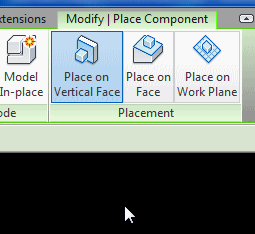
When you are about to place a ceiling light, check the placement options on the placement ribbon and choose "place on face." for some reason known only to Autodesk, the defaut placement option is Place on Vertical Face, as if most things in a building are mounted on a wall. (See attached image.) This might fix the problem for you.
By the way, you want to use generic face-based lighting fixture families, not ceiling hosted. The reason for this is that ceiling hosted families can't be hosted to the ceiling of a linked model, so if you are working with a linked model, that could also be part of the problem.
-----------------------------------
jlights |
This user is offline |
View Website
|
|
|

 Search