|
|
|
Home | Forums |
Downloads | Gallery |
News & Articles | Resources |
Jobs | FAQ |
| Join |
Welcome !
|
6 Users Online (4 Members):
Show Users Online
- Most ever was 626 - Mon, Jan 12, 2015 at 2:00:17 PM |
Forums
|
Forums >> Revit Building >> Technical Support >> 3D CAD export from Revit is incorrect
|
|
|
active
Joined: Thu, Sep 13, 2007
63 Posts
 |
Hey everyone,
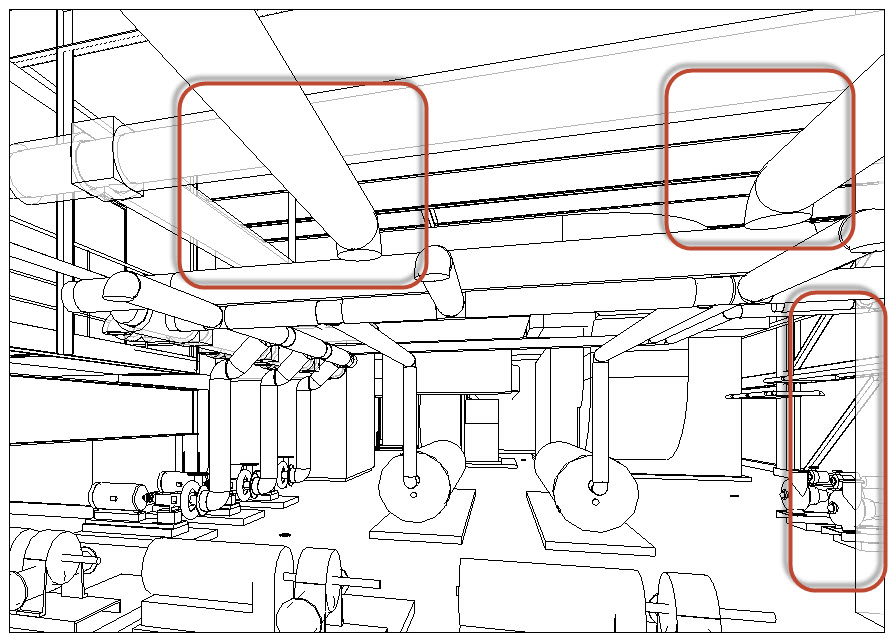
Having a heck of a time figuring out why Revit is distorting my CAD export. I would like to get a flattened CAD file for use in Autodesk Impression. So I am placing the view on a sheet and exporting it. Please take a look at the attached images. The white background is from Revit and the black is from CAD. I've circled in red some of the obvious problems. Does anyone know why it would be coming out distorted from what I see in Revit? I'm using Revit 2012 but this also happens in 2013. Thanks.
Edited on: Mon, Oct 1, 2012 at 9:56:42 AM
|
This user is offline |
|
 |
 |
Similar Threads |
|
Revit Export to CAD |
General Discussion >> Revit Project Management
|
Mon, Jul 21, 2014 at 8:35:51 AM
|
3
|
|
Revit export to CAD |
General Discussion >> Revit Project Management
|
Mon, Oct 4, 2010 at 4:43:05 PM
|
3
|
|
I can“t export from revit to cad. |
General Discussion >> Revit Project Management
|
Fri, Jan 18, 2013 at 9:10:32 AM
|
1
|
|
export to CAD from isolated view |
Revit Building >> Technical Support
|
Fri, Aug 1, 2008 at 9:25:47 AM
|
3
|
|
Export the Point cloud file to Auto CAD with Revit |
General Discussion >> Revit Project Management
|
Wed, Apr 2, 2014 at 4:38:32 PM
|
2
|
 |
|
Site Stats
Members: | 2161655 | Objects: | 23325 | Forum Posts: | 152479 | Job Listings: | 3 |
|