|
|
|
Home | Forums |
Downloads | Gallery |
News & Articles | Resources |
Jobs | FAQ |
| Join |
Welcome !
|
5 Users Online (3 Members):
Show Users Online
- Most ever was 626 - Mon, Jan 12, 2015 at 2:00:17 PM |
Forums
|
Forums >> Revit Building >> Technical Support >> Remove Model Filled Region @ Fixtures
|
|
|
active
Joined: Mon, Jun 29, 2009
32 Posts
No Rating |
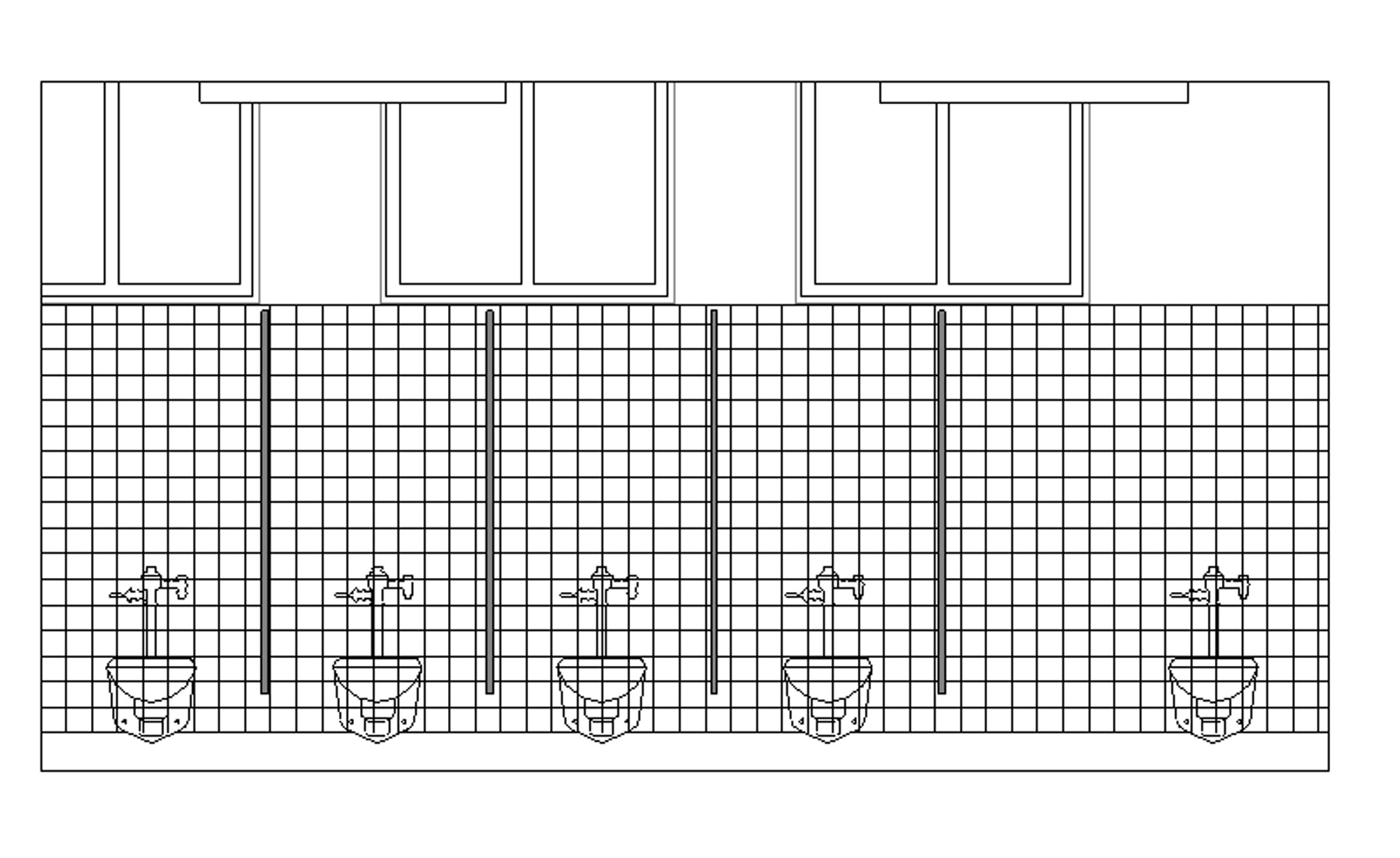
I created a model filled region for 4"x4" tile. I am trying to trim the filled region around the water closets, but Revit won't let me select the outline of the component. The only way I know how is to manually draft a semi-accurrate outline of the water closet in the filled region to subtract the area out.
I modeled the toilet component with a masking region ontop, and tried moving the filled region to the back, but it does nothing.
Does anyone of a better way? See image attached.
-----------------------------------
USING REVIT ARCHITECTURE 2013 |
This user is offline |
|
 | |
|
|
site moderator|||

Joined: Fri, Nov 12, 2010
1749 Posts
 |
As far as I have seen the only way is as you said, manually draft a semi-accurrate masking region outline of the water closet in the filled region to subtract the area out. The other way would be to do the pattern as drating lines which may be more time consuming.
|
This user is offline |
View Website
|
|
|
site moderator|||
Joined: Tue, May 16, 2006
13079 Posts
 |
The easist way is to either split the wall face an paint your tile material or add a thin tile wall against your wall. Either way works and the fixtures will be outlined automatically.
|
This user is offline |
|
|
|
Similar Threads |
|
Deleting Types From Filled Region Families |
Community >> The Studio
|
Tue, Sep 9, 2008 at 6:56:41 PM
|
10
|
|
Need Family w/ scaled Filled Region and Label |
Revit Building >> Technical Support
|
Fri, Oct 25, 2013 at 6:44:04 AM
|
5
|
|
filled region pattern color changes when drawing scale changes |
Revit Building >> Technical Support
|
Thu, Apr 14, 2016 at 7:32:06 AM
|
4
|
|
How to show plumbing fixtures on site plan? |
Revit Building >> Technical Support
|
Fri, Jan 9, 2009 at 2:08:52 AM
|
3
|
|
FILLED REGION IN 3D VIEW OR PERSPECTIVE VIEW |
Community >> The Studio
|
Wed, Jan 26, 2011 at 5:10:05 PM
|
7
|
|
|
Site Stats
Members: | 2161655 | Objects: | 23325 | Forum Posts: | 152479 | Job Listings: | 3 |
|
 Search