|
|
|
Home | Forums |
Downloads | Gallery |
News & Articles | Resources |
Jobs | FAQ |
| Join |
Welcome !
|
5 Users Online (3 Members):
Show Users Online
- Most ever was 626 - Mon, Jan 12, 2015 at 2:00:17 PM |
Forums
|
Forums >> Revit Building >> Technical Support >> Discipline showing to light
|
|
|
site moderator|||

Joined: Fri, Nov 12, 2010
1749 Posts
 |
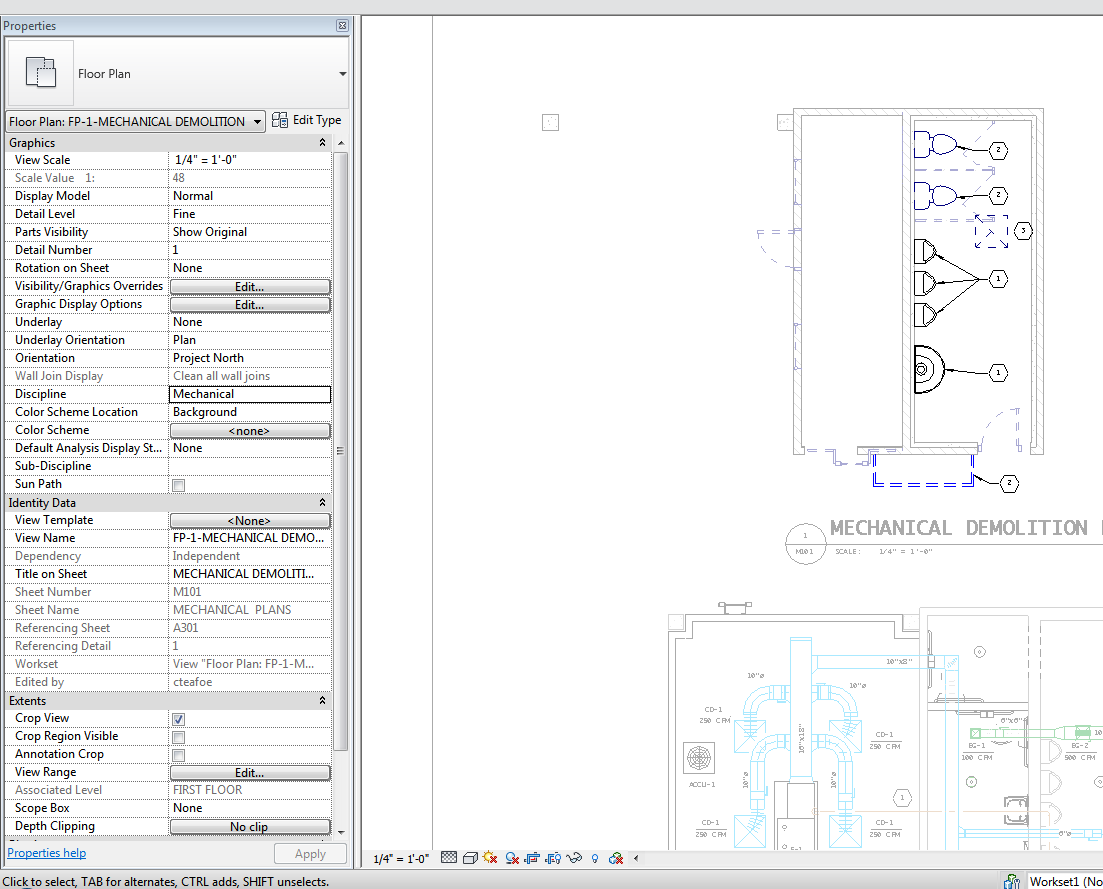
I have a mechanical plan which is set to the Mechanical Discipline and the architectural elements (walls etc) are showing up light which is good but they are showing up a little bit to light. I can change the discipline to Coordinate and that makes all of the lines the same darkness which isn't what I want. Is there a way to change the architectural/other disciplines to show up just a bit darker when the mechanical discipline is being used?
I attached a photo of my settings and plan.
|
This user is offline |
View Website
|
 | |
|
|
site moderator|||
Joined: Tue, May 16, 2006
13079 Posts
 |
Not sure but isn't this your halftone settings? Manage tab/additional settings - halftone & underlays
|
This user is offline |
|
|
|
site moderator|||
Joined: Fri, Nov 12, 2010
1749 Posts
|
Thats it thanks!
|
This user is offline |
View Website
|
|
|
Similar Threads |
|
"Discipline" settings effecting two models differently |
Revit Systems >> Technical Support
|
Mon, Aug 17, 2015 at 1:19:25 PM
|
3
|
|
Controlling Display setting per Discipline |
Revit Building >> Technical Support
|
Fri, Feb 17, 2012 at 12:33:04 PM
|
2
|
|
Lighting fixture not showing ANY light |
Revit Building >> Technical Support
|
Fri, Apr 10, 2009 at 12:30:55 PM
|
8
|
|
Sub Discipline under Views? |
Revit Building >> Technical Support
|
Fri, Apr 17, 2009 at 2:21:21 PM
|
3
|
|
Linked walls not showing up |
Revit Building >> Technical Support
|
Thu, Sep 20, 2012 at 11:13:20 AM
|
5
|
|
|
Site Stats
Members: | 2161655 | Objects: | 23325 | Forum Posts: | 152479 | Job Listings: | 3 |
|
 Search