Forums
|
Forums >> Revit Building >> Technical Support >> Bi-Fold doors parametrics for opening and closing 3d panels by percentage?
|
|
|
active
Joined: Sun, Dec 11, 2011
2 Posts
No Rating |
Hello everyone. I have a question about opening and closing parametric bi-fold doors so that the 3d panels are operable for views. I want to be able to open and close the 3d panels via percentage. I have placed the bi-fold door family within a curtain wall system as the curtain wall panel (Will this be an issue?) The door I am currently using has 4 door panels.
Ideally I would like to create the option to fold the door panels 2+2 or 4+0, with percentage opening between closed and 100% open.
Would be so grateful if someone could help me. There are no tutorials posted on the web currently that cover this.
I have attached the door that I am curently using. The door panel is nested within the bi-fold door family.
Thanks
Slejj.
Edited on: Mon, May 14, 2012 at 5:38:22 AM
|
This user is offline |
|
 | |
|
|
site moderator|||

Joined: Fri, Nov 12, 2010
2709 Posts
 |
I believe you would need to put an angle parameter dimension on your doors. The file that you attached does not open your family.
|
This user is offline |
View Website
|
|
|
site moderator|||
Joined: Tue, May 16, 2006
19889 Posts
 |
Revit does not work dynamically so either the door will be shown according to how it is set it to show from the family. Typically, most users show the door open in plan (might be adjustable) using symbolic line work and closed in elevation and 3D views using model elements.
You could create type based families that have different settings for the angle of the model components. You can also to do this with instant parameters using different model components that are switched on/off or with adjustable angles. << Some users have made these for door open / closed. But in all cases, it will be a static setting.
To create a family that partially opens that has multiple leaves will be difficult because the hinge point moves. Download the Families Guide from the AutoDESK website. It will show you how to use reference lines to control angles of elements in families. I must warn you. This can be quirky at 90degrees.
Edited on: Mon, May 14, 2012 at 1:32:07 PM
|
This user is offline |
|
|
|
active
Joined: Wed, Oct 7, 2009
654 Posts
|
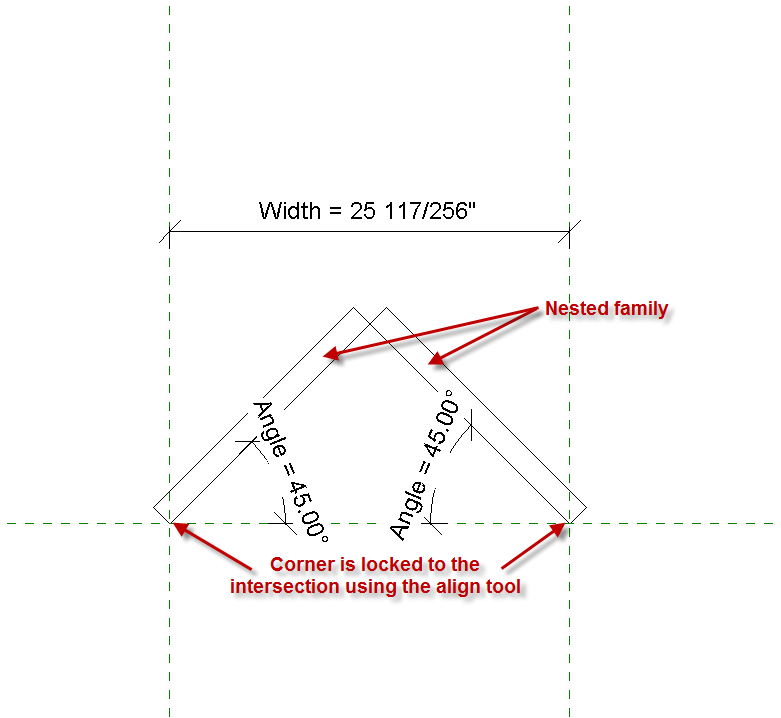
I did a quick test, and it does look like it's possible to create a parametric bi-fold. I only tried it with two panels, but that worked, and adding more should be possible. I used nested families for the panels, and locked them to ref plane intersections, not to each other (see attachement). Then I used some trig in the formula to drive the Width parameter (in a full family this would be a separate 'panel open width' parameter). It seems to work just fine.
As WWHub said, Revit doesn't seem to like 90° and 0° angles, but that seems to be confined to testing inside the family. Once the family is loaded into a project, it seems to (generally) work ok. If any angle other than 90 or 0 is working in the family, 90 and 0 will probaly work in the project.
|
This user is offline |
|
|
|
site moderator|||

Joined: Tue, May 22, 2007
5921 Posts
|
I created this door in Mar 2010, maybe this can help you: http://www.revitcity.com/downloads.php?action=view&object_id=9052
You can open and close in any view, it's 100% parametric, 0° angle to open completly or 90° to close.
-----------------------------------
I Hope and I Wish to LEARN more, and more, and more.... REVIT |
This user is offline |
|
|
|
active
Joined: Thu, Mar 9, 2006
122 Posts
 |
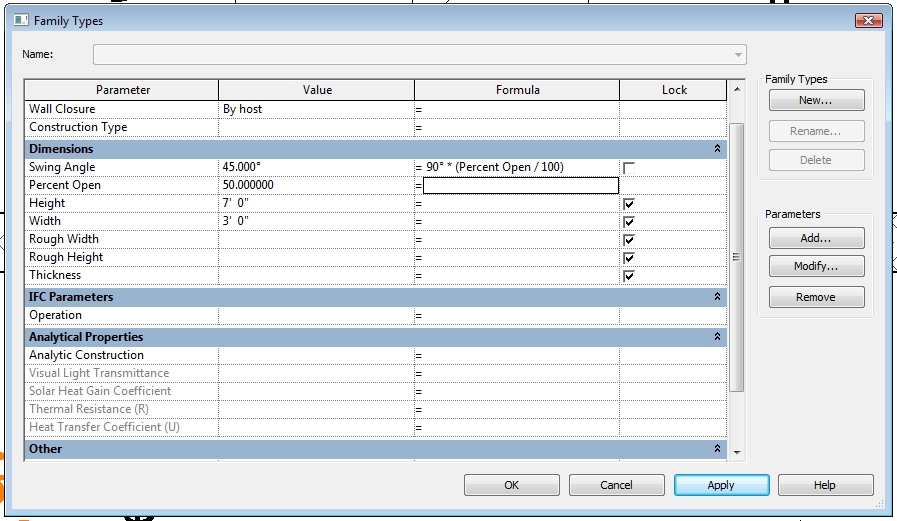
The formula for a door swing based on a percentage value is simple. See the attached image. This assumes 90 degress is 100% open.
Edited on: Tue, May 15, 2012 at 10:05:47 AM
|
This user is offline |
View Website
|
|
|
active
Joined: Sun, Dec 11, 2011
2 Posts
No Rating |
Thanks a lot to everyone who replied to my thread. I really appreciate your help. Thanks Typhoon for the door file. Thanks Tkennedy and
jterrell for the formulas and diagrams. I will combine those and try make a 4+0 with my own family.
Cheers
Slej
|
This user is offline |
|
|
|
Similar Threads |
|
design fee |
Community >> The Studio
|
Wed, Mar 31, 2010 at 3:55:23 PM
|
1
|
|
Light and Ventilation Schedule |
Revit Building >> Technical Support
|
Thu, Dec 27, 2007 at 3:01:34 PM
|
9
|
|
Cant load Curtain Wall Door |
Revit Building >> Technical Support
|
Wed, Oct 26, 2011 at 3:41:44 PM
|
4
|
|
Revit - Curtain Panels Mitre Joint Issue! Please Help! |
Revit Building >> Technical Support
|
Tue, May 28, 2013 at 8:58:14 PM
|
1
|
|
Butt Glazing Non-System Curtain Panels |
Revit Building >> Technical Support
|
Wed, Nov 12, 2014 at 1:28:25 PM
|
0
|
|
|
Site Stats
Members: | 2188366 | Objects: | 23399 | Forum Posts: | 152462 | Job Listings: | 0 |
|

 Search
 106320_Obj_removed.txt