|
|
|
Home | Forums |
Downloads | Gallery |
News & Articles | Resources |
Jobs | FAQ |
| Join |
Welcome !
|
4 Users Online (2 Members):
Show Users Online
- Most ever was 626 - Mon, Jan 12, 2015 at 2:00:17 PM |
Forums
|
Forums >> Revit Building >> Technical Support >> Walls layers + phase filters display problem
|
|
|
active
Joined: Sat, Aug 6, 2005
241 Posts
 |
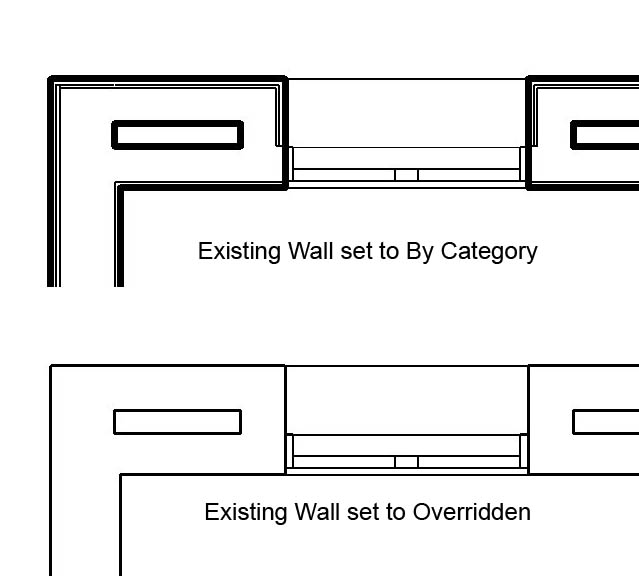
There are no Coarse/Medium/Fine options in phase filters so why does an Existing wall act like I'm viewing it in Coarse mode when all I did was change the phase filter options for Existing from By Category to Overridden?
Post edited on 2005-12-20 16:32:00
|
This user is offline |
|
 | |
|
|
active
Joined: Sat, Aug 6, 2005
241 Posts
|
Here's the image.
|
This user is offline |
|
|
|
site moderator|||

Joined: Mon, Jan 12, 2004
2889 Posts
 |
This is because the entire wall is now applied the existing overridden material as applied in your phase filters. If its existing how important is the individual wall layer information anyway??
|
This user is offline |
View Website
|
|
|
active
Joined: Sat, Aug 6, 2005
241 Posts
|
The same thing hapens to new walls so it can be important. I tried applying NO MATERIAL to the phase filter and now the detail shows fine. Thanks for the help.
|
This user is offline |
|
|
|
Similar Threads |
|
Phase Filters and wall finishes |
Revit Building >> Technical Support
|
Thu, Jul 19, 2007 at 12:54:04 PM
|
1
|
|
phase filters |
Community >> The Studio
|
Thu, Mar 27, 2008 at 11:07:54 AM
|
1
|
|
phase filters and lineweights |
Revit Building >> Technical Support
|
Fri, May 22, 2009 at 3:15:11 PM
|
5
|
|
Future Phase |
Revit Building >> Technical Support
|
Tue, Sep 9, 2008 at 2:18:29 PM
|
5
|
|
Display Phase I & Phase II Room Names Together |
Revit Building >> Technical Support
|
Fri, Jan 11, 2013 at 2:53:39 PM
|
3
|
|
|
Site Stats
Members: | 2161655 | Objects: | 23325 | Forum Posts: | 152479 | Job Listings: | 3 |
|
 Search