|
|
|
Home | Forums |
Downloads | Gallery |
News & Articles | Resources |
Jobs | FAQ |
| Join |
Welcome !
|
15 Users Online (13 Members):
Show Users Online
- Most ever was 626 - Mon, Jan 12, 2015 at 2:00:17 PM |
Forums
|
Forums >> Revit Building >> Technical Support >> Anti Climb Railing Modelling
|
|
|
active
Joined: Thu, Jun 9, 2011
45 Posts
No Rating |
Hi Guys,
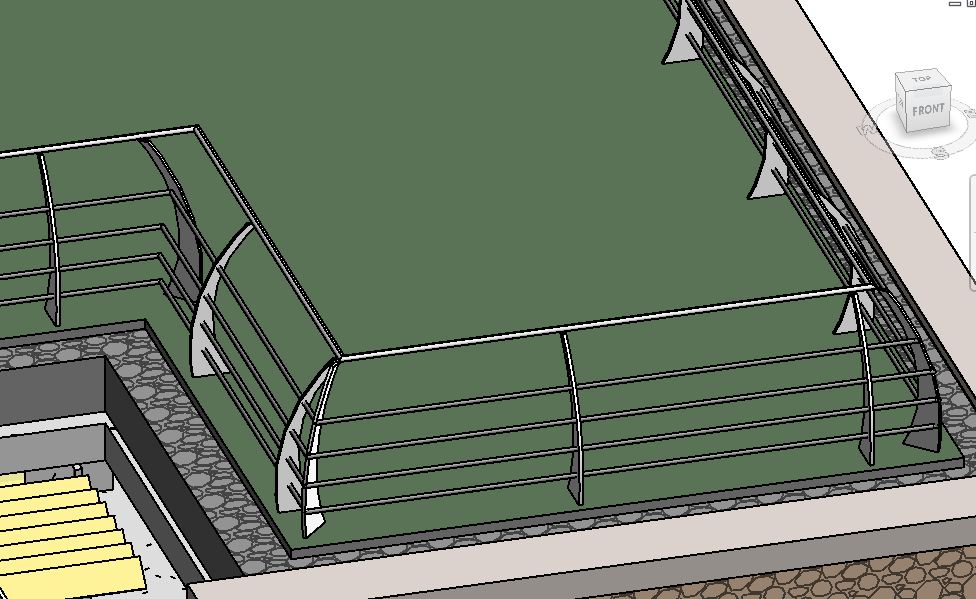
Another quick question. Trying to model some anti climb railings. Ie. railings where the top handrail is set forward to the lower railings. I'm very much a beginner at this but to do this I made a custom profile balustrade and then offset the various railings so that they fitted the new profile. My first problem was that the design requires corner posts so I then modelled another balustrade at a 45degree angle to use at the corners however this is only works propely on the external corners, the internal corners are angled the wrong direction - anything I can do to correct this?
Second problem is that dispite going through all the settings I cant seem to get the balustrades spaced nicely between the corner posts. What settings should I be using?
I've attached an image to help.
Many Thanks
Simon
|
This user is offline |
|
 | |
|
|
active
Joined: Thu, Jun 9, 2011
45 Posts
No Rating |
Revit 2012 by the way
|
This user is offline |
|
|
|
site moderator|||
Joined: Tue, May 16, 2006
13079 Posts
 |
Remember, you can have more than one railing in the same place and you can also have separate families. So your rails could be one railing. And your posts might be several separate railing segments that give you the proper post spacings. You might have to place the corner posts as independent elements.
|
This user is offline |
|
|
|
Similar Threads |
|
Railing not shown in list |
Revit Building >> Technical Support
|
Mon, Jun 30, 2014 at 4:25:56 PM
|
4
|
|
rectangular railing |
Community >> Newbies
|
Mon, Nov 26, 2012 at 7:30:07 AM
|
4
|
|
Railing Turns Into Transparent Red |
Revit Building >> Technical Support
|
Thu, Aug 10, 2017 at 2:06:41 AM
|
1
|
|
Railing and Baluster Profiles not inserting on centerline? |
Revit Building >> Technical Support
|
Fri, Oct 5, 2012 at 2:26:20 PM
|
0
|
|
Anti-aliased Revit/WIndows interface? |
Revit Building >> Technical Support
|
Tue, May 22, 2007 at 1:27:45 PM
|
13
|
|
|
Site Stats
Members: | 2161655 | Objects: | 23325 | Forum Posts: | 152479 | Job Listings: | 3 |
|
 Search