|
|
|
Home | Forums |
Downloads | Gallery |
News & Articles | Resources |
Jobs | FAQ |
| Join |
Welcome !
|
2 Users Online (0 Members):
Show Users Online
- Most ever was 626 - Mon, Jan 12, 2015 at 2:00:17 PM |
Forums
|
Forums >> Revit Structure >> Technical Support >> Snaping to Lines
|
|
|
active
Joined: Tue, Feb 22, 2011
28 Posts
No Rating |
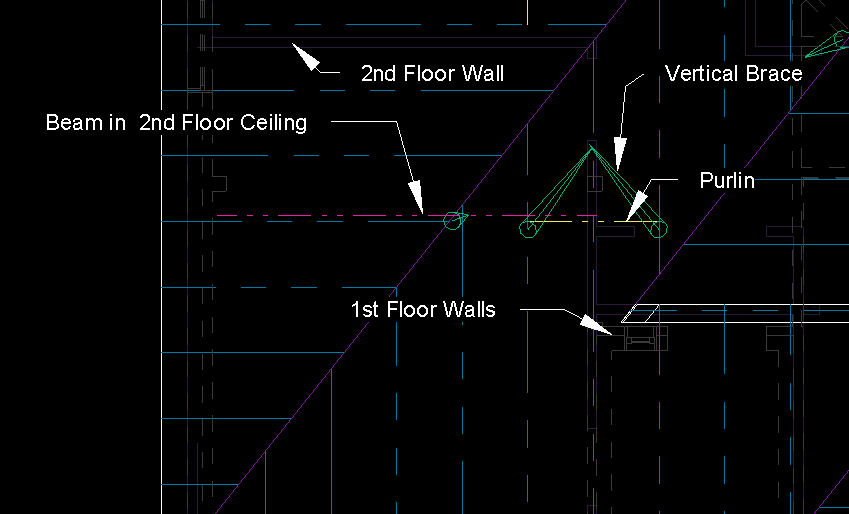
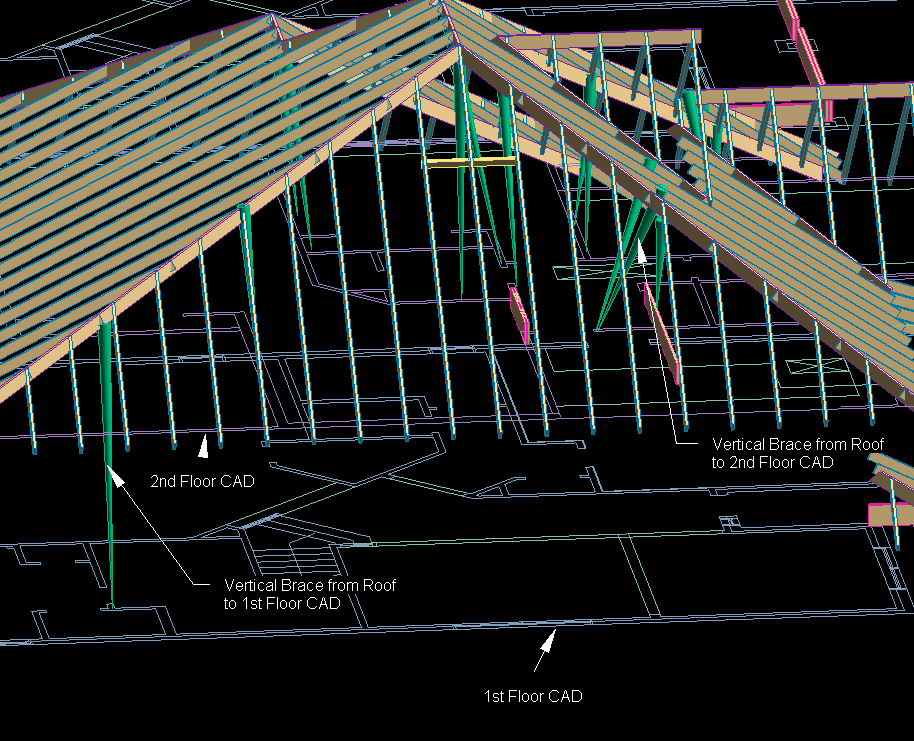
Is it possible to snap to CAD lines in 3D? or any view for that matter? I am trying to cut my times down on 2d residential framing. I have the idea of importing my CAD which has all of the wall, window and door references already laid out. I want to skip putting up my walls in Revit and just frame up the ceilings and roofs over the imported CAD so when printed it looks like any other frame. My problem is my vertical bracing. I am still making my roof in 3d and positioning the CAD on the appropriate level in the model so my bracing will have the correct lengths and angles when placed. My problem is I need to be able to snap to the wall lines in the CAD when placing my vertical bracing. Is it possible to snap a beam end to a CAD line? What steps need to be taken?
|
This user is offline |
|
 | |
|
|
site moderator|||
Joined: Tue, May 16, 2006
13079 Posts
 |
You want to cut your time down? Do it all in Revit.
To do what you want, I think you will have to work in elevated or section views where your workplane and CAD import are the same - that is the CAD import has been placed on that work plane. Then the lines will snap.
|
This user is offline |
|
|
|
active
Joined: Tue, Feb 22, 2011
28 Posts
No Rating |
I wish it all could be done in Revit in a timely fashion, but sadly our customers designs are all in AutoCAD and for these specific jobs, puting in walls and windows and doors will take a longs time. I am working toward being able to get what basically comes down to 40+ redidential homes done per day. and walls and openings will just consume too much time even though that is the best way to get these braces to snap. I will see if I can add a few images of what is being done, it is working out so far, but I know that if I can get these to snap, then I wont worry and double check each one so often. I feel sectional views will also be one of those time eaters in my current situation. Take a look and see if anything springs up. Thank you very much for your help.
|
This user is offline |
|
|
|
active

Joined: Fri, Sep 22, 2006
759 Posts
 |
I am very surprised you are not using trusses.
|
This user is offline |
|
|
|
active
Joined: Tue, Feb 22, 2011
28 Posts
No Rating |
Trusses would be preffered, but this is what the customer wants
|
This user is offline |
|
|
|
active
Joined: Tue, Feb 22, 2011
28 Posts
No Rating |
Here in Texas its a sawn lumber and stick frame market.
|
This user is offline |
|
|
|
Similar Threads |
|
how can I prevent revit from snaping to the pattern ?? |
Revit Building >> Technical Support
|
Thu, Apr 4, 2019 at 1:12:59 PM
|
3
|
|
dimensioning gridlines |
Revit Structure >> Technical Support
|
Sat, Nov 4, 2006 at 10:27:59 AM
|
1
|
|
Internal Elevation Views in 2009 |
Revit Building >> Technical Support
|
Thu, Sep 11, 2008 at 6:17:54 PM
|
0
|
|
Dimension Error Invalid Reference |
Community >> Newbies
|
Thu, Jul 31, 2008 at 10:20:21 AM
|
0
|
|
Can you convert model lines to detail lines? |
Revit Building >> Technical Support
|
Wed, Mar 31, 2010 at 12:45:23 PM
|
4
|
|
|
Site Stats
Members: | 2161655 | Objects: | 23325 | Forum Posts: | 152479 | Job Listings: | 3 |
|
 Search