|
|
|
Home | Forums |
Downloads | Gallery |
News & Articles | Resources |
Jobs | FAQ |
| Join |
Welcome !
|
7 Users Online (5 Members):
Show Users Online
- Most ever was 626 - Mon, Jan 12, 2015 at 2:00:17 PM |
Forums
|
Forums >> Revit Structure >> Technical Support >> Ambient Shadows
|
|
|
active
Joined: Mon, Dec 19, 2011
2 Posts
No Rating |
Hello,
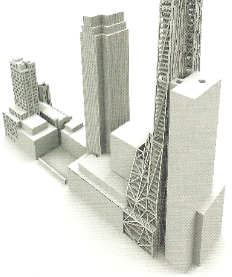
i'm using Revit Architecture 2012 and it now has the Ambient Shadows option, which makes the model look like an watercolour but much more defined in the faces and edges. I like the aspect and would like to render my models in a way that i can keep the look of the ambient shadows.
Can anyone help me doing it, please?
All my rendering images are too white, burnt and with the volumes not so well defined.
I attached an image so you can see what i'm looking for. The idea is to create renders simulating project models.
Hope someone can help.
Thank you all.
|
This user is offline |
|
 | |
|
|
site moderator|||

Joined: Tue, May 22, 2007
5921 Posts
 |
Maybe this can help you: http://wikihelp.autodesk.com/Revit/enu/Community/Tips_and_Tricks/Views%2c_Visibility%2c_Graphics/Revit_2012_Visualization_Tips
-----------------------------------
I Hope and I Wish to LEARN more, and more, and more.... REVIT |
This user is offline |
|
|
|
Similar Threads |
|
Show Ambient Shadows Greyed Out |
Revit Building >> Technical Support
|
Fri, Jan 18, 2019 at 4:59:23 AM
|
3
|
|
Walk Through Editing |
Revit Building >> Technical Support
|
Thu, May 3, 2012 at 1:03:20 PM
|
1
|
|
Ghosting of transparent surfaces - Bug or feature? |
Workflow & Implementation >> Hardware
|
Thu, Nov 8, 2012 at 2:54:28 AM
|
0
|
|
ambient occlusion |
Revit Building >> Technical Support
|
Mon, Jun 7, 2010 at 1:10:33 PM
|
2
|
|
Ambient LIght |
Revit Building >> Technical Support
|
Fri, Dec 2, 2005 at 11:21:17 PM
|
2
|
|
|
Site Stats
Members: | 2161655 | Objects: | 23325 | Forum Posts: | 152479 | Job Listings: | 3 |
|
 Search