|
|
|
Home | Forums |
Downloads | Gallery |
News & Articles | Resources |
Jobs | FAQ |
| Join |
Welcome !
|
65 Users Online (63 Members):
Show Users Online
- Most ever was 626 - Mon, Jan 12, 2015 at 2:00:17 PM |
Forums
|
Forums >> Revit Building >> Technical Support >> Object outlined in blue or cyan color
|
|
|
active
Joined: Tue, Mar 8, 2011
1 Posts
No Rating |
I'm using Revit Archtiecture 2011.
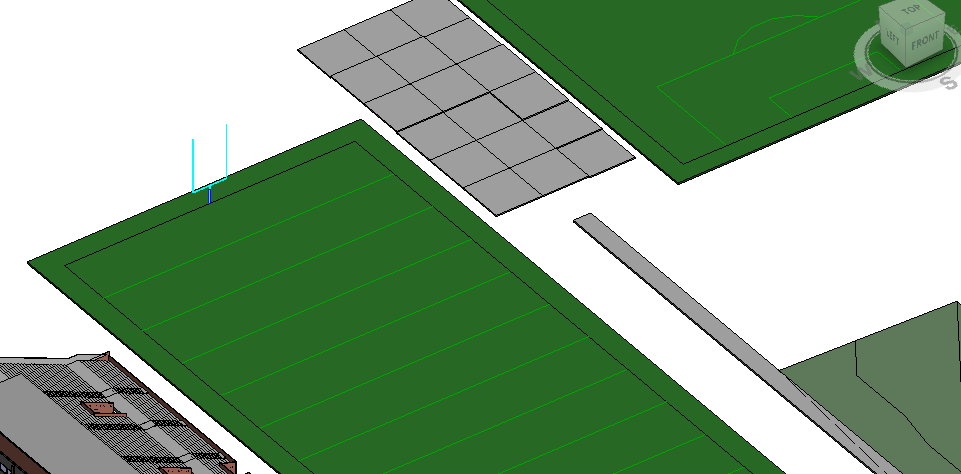
I downloaded an object from RevitCity and when I view in Shaded mode, the object has a blue/cyan border around the entire thing.
Is there a way I can get rid of this? (it has this cyan outline even when it isn't selected.)
I'll attach a pciture of it - the object i'm talking about is the field goal post.
Thanks
Edited on: Fri, Dec 2, 2011 at 2:58:58 PM
|
This user is offline |
|
 | |
|
|
site moderator|||

Joined: Tue, May 22, 2007
5921 Posts
 |
That's because that family is not a true Revit Object/family, it's a imported object from other software like Autocad or Sketchup onto a revit family
-----------------------------------
I Hope and I Wish to LEARN more, and more, and more.... REVIT |
This user is offline |
|
|
|
Similar Threads |
|
Blue Line - Visibility/Graphics Issues in Floor Plan |
Revit Building >> Technical Support
|
Tue, Nov 6, 2018 at 7:56:57 AM
|
10
|
|
What is the purpose of the dashed blue window when using the move command? |
Community >> Newbies
|
Thu, Apr 2, 2015 at 1:18:06 PM
|
6
|
|
Revit 2010 default highlight selection color |
Revit Building >> Technical Support
|
Fri, May 8, 2009 at 5:11:01 PM
|
2
|
|
Object Style not showing unless object highlighted |
Community >> Newbies
|
Thu, Jun 8, 2017 at 3:29:24 AM
|
2
|
|
change one object’s color several others change |
Revit Building >> Technical Support
|
Wed, Oct 5, 2005 at 5:53:07 PM
|
2
|
|
|
Site Stats
Members: | 2161655 | Objects: | 23325 | Forum Posts: | 152479 | Job Listings: | 3 |
|
 Search