|
|
|
Home | Forums |
Downloads | Gallery |
News & Articles | Resources |
Jobs | FAQ |
| Join |
Welcome !
|
4 Users Online (2 Members):
Show Users Online
- Most ever was 626 - Mon, Jan 12, 2015 at 2:00:17 PM |
Forums
|
Forums >> Revit Building >> Technical Support >> Lights in MEP or Achitecture
|
|
|
active
Joined: Mon, Oct 25, 2010
21 Posts
No Rating |
Has anyone come across the issue of whether to model lights in an Architectural model or MEP model?
I need them to be in Architectural for rendering etc but also in MEP for power connection.
Duplicating them i feel might lead to scheduling issues. ive tried copy monitoring them but i cant as i dont want my ceilings in the Architectural model.
Anyone come across this? Your advice would be appreciated.
Dave
|
This user is offline |
|
 | |
|
|
active

Joined: Fri, Jun 17, 2011
220 Posts
 |
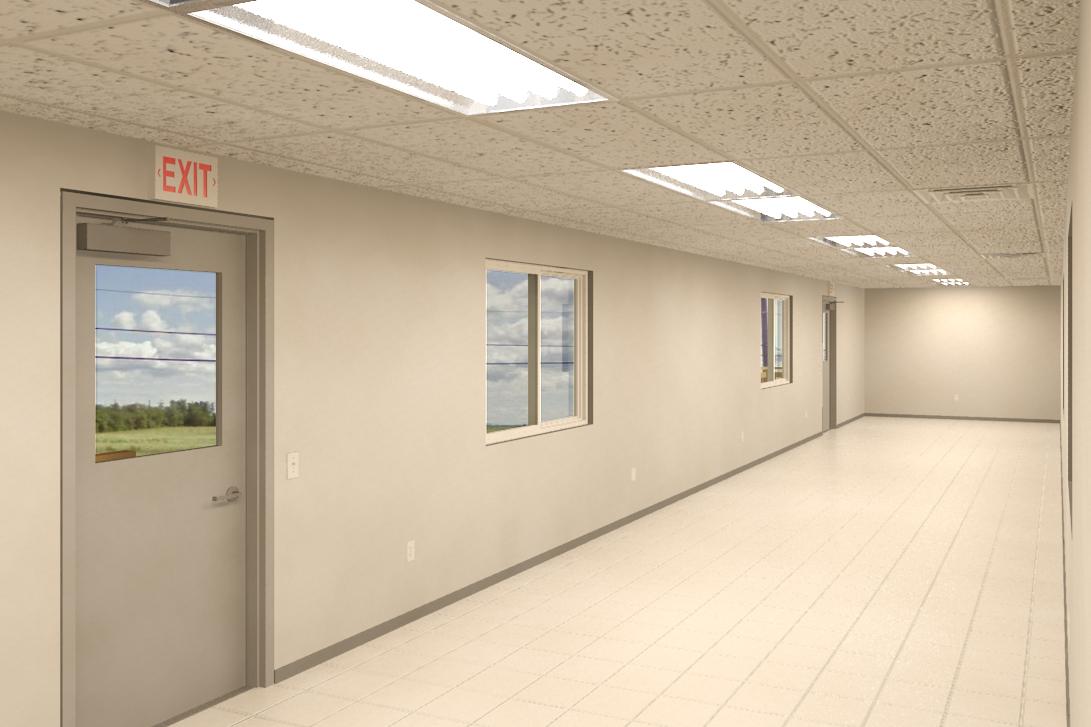
I do all my ceilings and lights in MEP in then just link them in to the Architectural model. They can still be scheduled in architectural (as long as you click the box to include links) and work good in renderings (see attached image, these lights are linked in) and can also be hidden easily if I don't want to see them. The problem is that you can't turn off certain groups of lights from the linked model. Why don't you want ceilings in the Architectural?
|
This user is offline |
|
|
|
active
Joined: Mon, Oct 25, 2010
21 Posts
No Rating |
Looks Good
Sorry probably havent explained it clearly. My lights and ceilings are currently in the architectural model. I need to keep my ceilings in the Architectural model but need to be able to connect up my lights in the MEP model.
From a Facilities Management perspective my lights should be in the MEP but need my ceilings in the Arch model.
I have copy/monitored them from Arch to MEP and applied a curcuit to them which has now solved that problem.
My issue now is when scheduling lights in MEP, they are scheduling the copied lights fine but they arent recognising the associated rooms in MEP which i have inserted. When I 'include elements in linked files' they recognise the rooms fine but not the copied ones.
I have rooms in both MEP and Arch models.
Have you come across this before?
|
This user is offline |
|
|
|
active
Joined: Fri, Jun 17, 2011
220 Posts
|
I haven't ever tried to schedule by room so I can't help you there. I still hate the idea of having duplicate components between your models. Having two ceilings floating around may complicate things. If your sure that you want the ceiling in your architectural model, use a face based light family in your MEP which will host to the linked in ceiling, you shouldn't need to have both. Then when you relink back into your architectural, delete all your duplicate lights. Although this sounds like a large project and that you may be in too deep for this to be reasonable.
If you don't have faced based families, describe what you need, if I have something similar, I'll upload to this thread.
|
This user is offline |
|
|
|
active
Joined: Mon, Oct 25, 2010
21 Posts
No Rating |
Its a number of university buildings so there are lots of different types of lights from troffers to suspended linear lights.
I already have all of the lights in the architectural model so might just have to use the copy / monitor tool and use the create connection function in MEP.
Thanks for the help though. Its nice to know others have difficulties like this.
Dave
|
This user is offline |
|
|
|
Similar Threads |
|
Attach MEP lights to Arch Grid |
Revit Building >> Technical Support
|
Tue, Feb 9, 2021 at 8:26:08 AM
|
5
|
|
MEP Lighting fixture |
Revit Systems >> Technical Support
|
Wed, Aug 1, 2007 at 12:05:49 PM
|
0
|
|
Copy/Monitor Lights to Revit Architecture 2012 |
Revit Building >> Technical Support
|
Wed, Oct 17, 2012 at 3:05:52 PM
|
1
|
|
Can individual Objects be bound in Arch then changed in MEP |
Revit Systems >> Technical Support
|
Thu, Jun 7, 2012 at 1:37:23 PM
|
10
|
|
Ceiling Fans in MEP? |
Revit Systems >> Technical Support
|
Tue, Mar 24, 2009 at 5:32:49 AM
|
3
|
|
|
Site Stats
Members: | 2161655 | Objects: | 23325 | Forum Posts: | 152479 | Job Listings: | 3 |
|
 Search