|
|
|
Home | Forums |
Downloads | Gallery |
News & Articles | Resources |
Jobs | FAQ |
| Join |
Welcome !
|
5 Users Online (3 Members):
Show Users Online
- Most ever was 626 - Mon, Jan 12, 2015 at 2:00:17 PM |
Forums
|
Forums >> Revit Building >> Technical Support >> True North / Project North creating export problems
|
|
|
active

Joined: Wed, Feb 11, 2009
50 Posts
 |
Hi All,
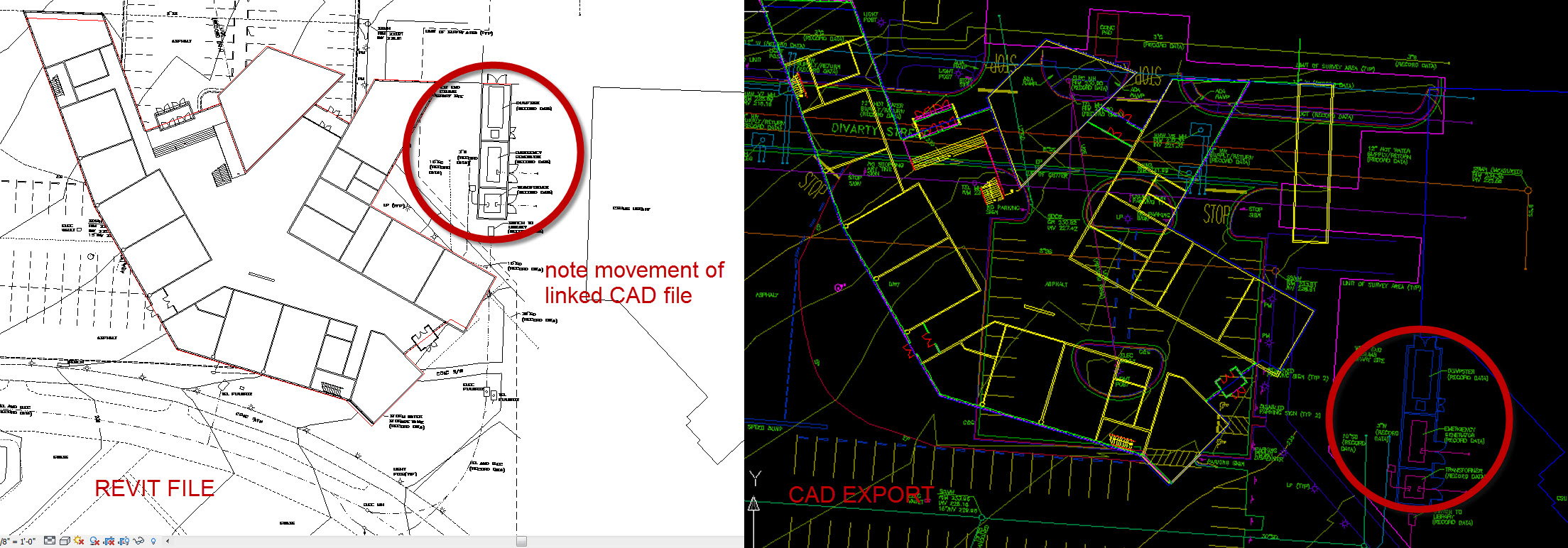
So, we are currently in the schematic design phase of a project, which was created in Revit on top of a linked CAD site plan. The site plan was drawn slightly off 90 degrees, which we assumed to be a mistake, so we rotated the drawing to be straight up and down, then linked it into our Revit file and began modeling. After a week or so we recieved additonal survey drawings confirming that the site was in fact laid out slightly (3 degrees) off 90 degrees. So, we then went back to our Revit file and changed the true north to be 87 degrees, left project north at 90 degrees, and imported the newer, angled site plan. Now, everything appears perfect in Revit, site plan is angled to true north, floor plans are striaght up and down on our project north. The problem comes when we try and export a new site plan DWG out of Revit. Attached is an image of what our site plan looks like in Revit, then what it looks like when we export a DWG of the exact same view. As you can see, the linked CAD file moves substantially when exported, but the Revit model seems to stay in the same place. Any ideas as to what might be causing this?
Thanks!
Revit 2011 - Windows 7 Enterprise
Edited on: Tue, Jun 14, 2011 at 5:43:32 PM
|
This user is offline |
|
 | |
|
|
active

Joined: Fri, Sep 22, 2006
759 Posts
|
Sounds kinda complicated the way you are going about this. What I do is create my own boundary line using the table, to match what the surveyor has provided, then I align my boundary with that of the surveyors as an underlay. Then select the view window and rotate it to align the way I want to draw my building to fit the site. North is almost never north, in boundary surveying. Note that rotating the view port may seem to be in the opposite direction.
Edited on: Fri, Jun 17, 2011 at 5:55:12 PM
|
This user is offline |
|
|
|
Similar Threads |
|
EXPORTING TO FBX TO TRUE NORTH |
Revit Building >> Technical Support
|
Wed, Sep 9, 2015 at 7:36:58 AM
|
3
|
|
Export fbx to 3D Max with True North |
General Discussion >> Revit Project Management
|
Wed, May 21, 2014 at 3:30:23 AM
|
0
|
|
Project North doesn't rotate back after changed to True North |
Revit Building >> Technical Support
|
Fri, May 7, 2010 at 3:24:14 AM
|
0
|
|
export 3d true north |
Revit Building >> Technical Support
|
Thu, Mar 16, 2017 at 9:18:30 AM
|
6
|
|
True North vs Project North Linked dwgs |
Revit Building >> Technical Support
|
Thu, Mar 10, 2016 at 10:02:26 AM
|
4
|
|
|
Site Stats
Members: | 2161655 | Objects: | 23325 | Forum Posts: | 152479 | Job Listings: | 3 |
|
 Search