|
|
|
Home | Forums |
Downloads | Gallery |
News & Articles | Resources |
Jobs | FAQ |
| Join |
Welcome !
|
5 Users Online (3 Members):
Show Users Online
- Most ever was 626 - Mon, Jan 12, 2015 at 2:00:17 PM |
Forums
|
Forums >> Revit Building >> Technical Support >> Rendering problem: not real colours
|
|
|
active
Joined: Mon, Jan 17, 2011
97 Posts
No Rating |
R2011/12....
I've searched these forums, & not found a similar problem.
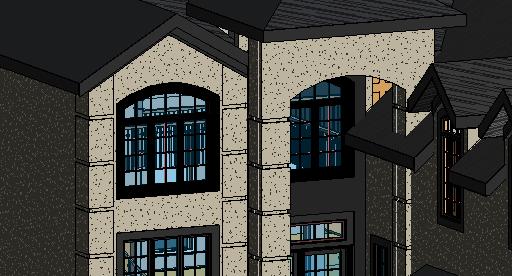
I'm having difficulty getting the model to render true to the colours that I have selected.
I've created a new material paint colour (for every family & item)... I've tried painting the surfaces (of the extrusions within the families). I've set the material rendering appearance to the colour I want, then ticked the "use render appearance for shading" box.
I've tried everything that I can think of, but am obviously missing something.
If anyone can offer hints or advice, I'd appreciate it.
I've attached the 3-D model view as well as what I get when rendering the same view.
|
This user is offline |
|
 | |
|
|
active

Joined: Tue, Jan 16, 2007
1009 Posts
 |
is it the window frame and mullions that are the issue. they look black and are rendering to look like wood?
|
This user is offline |
View Website
|
|
|
active
Joined: Mon, Jan 17, 2011
97 Posts
No Rating |
Yeah, that is why I changed the render appearances. Then chose the graphics to use render appearance for shading.
|
This user is offline |
|
|
|
active
Joined: Thu, Jun 21, 2007
3 Posts
No Rating |
Does anyone have a solution to this problem im having the same issue, colours look correct in 'realistic/shaded' view but when it renders i get completely diffrent colours, i have changed everything i know possible to the same colour too, same goes for Images such as Stonework, renders a completely different colour.
|
This user is offline |
|
|
|
site moderator|||

Joined: Mon, Jan 12, 2004
2889 Posts
 |
Are you sure you don't have a phase filter in the view overriding the material?
-----------------------------------
Regards,
Chris.
Co-Founder | BIM Consultant | Software Designer  B. Arch) B. Arch)
Xrev Revit API Addins | Revit Rants |
This user is offline |
View Website
|
|
|
active
Joined: Thu, Jun 21, 2007
3 Posts
No Rating |
No Just checked all that changing between new/demo/existing etc, didnt know that stuff existed till now just learnt phasing off youtube  still a bit fresh to Revit. still a bit fresh to Revit.
|
This user is offline |
|
|
|
site moderator|||
Joined: Tue, May 16, 2006
13079 Posts
|
Remember, the project rules! Once a family is loaded into a project, the materials assigned are controlled in the project. Changing them is the familty doesn't matter unless you remove the family from the project and then reload it.
|
This user is offline |
|
|
|
Similar Threads |
|
Rendering (difened colours) |
General Discussion >> Revit Project Management
|
Sat, Oct 24, 2015 at 10:06:58 AM
|
1
|
|
Rendering Back Painted Spandrel Glass in Revit |
Revit Building >> Technical Support
|
Mon, Sep 19, 2011 at 10:19:20 PM
|
1
|
|
Colours |
Revit Building >> Technical Support
|
Sun, Feb 14, 2010 at 7:40:31 AM
|
1
|
|
Windows and Door Come Out Wrong Colour After Rendering |
Revit Building >> Technical Support
|
Sun, Jul 12, 2009 at 2:30:25 PM
|
3
|
|
RAL colours |
Revit Building >> Technical Support
|
Fri, Sep 11, 2015 at 3:32:21 AM
|
2
|
|
|
Site Stats
Members: | 2161655 | Objects: | 23325 | Forum Posts: | 152479 | Job Listings: | 3 |
|
 Search