Forums
|
Forums >> General Discussion >> Wishlist >> Tin Roof
|
|
|
active
Joined: Thu, May 5, 2011
18 Posts
No Rating |
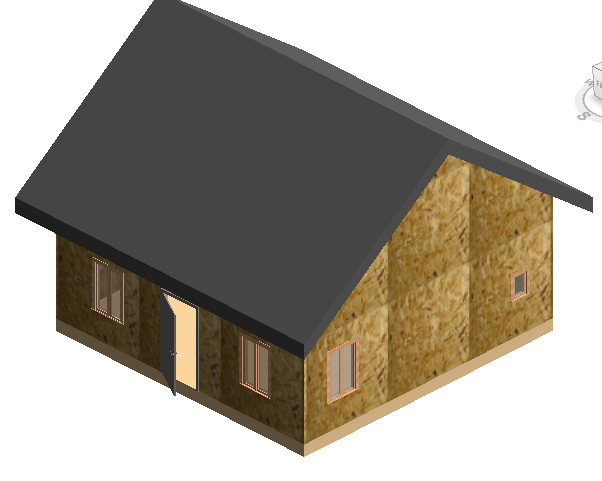
Hi, i want to put a tin roof on my little house. I got a roof on but under materials, I don't see it.
|
This user is offline |
|
 | |
|
|
site moderator|||

Joined: Tue, May 22, 2007
5921 Posts
 |
This questions is not very clear to me, can you elaborate your question a little more please?
-----------------------------------
I Hope and I Wish to LEARN more, and more, and more.... REVIT |
This user is offline |
|
|
|
active
Joined: Thu, May 5, 2011
18 Posts
No Rating |
Hi, well, I just built a square 24 x 24 walls. Then I put my first roof on. It's gray. even though I do have it set on realistic.
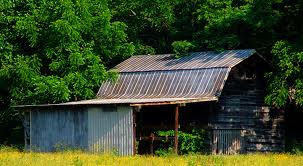
You know the tin roofs that is on the farm houses? I'd like to make it look like that.
Edited on: Mon, May 9, 2011 at 2:14:29 PM
|
This user is offline |
|
|
|
site moderator|||
Joined: Tue, May 16, 2006
13079 Posts
 |
How is revit supposed to know this is a tin roof? Read these in your HELP:
- Compound Structure
- Materials in Compound Geometry
- Materials
|
This user is offline |
|
|
|
active
Joined: Thu, May 5, 2011
18 Posts
No Rating |
Thanks, I read those. Then I clicked on my roof, materials, Roofing-Metal Standing Seam, Render Appearance tab, replace, Roofing>>
Then I see the list of shigles, spanish tiles etc. But I don't see the tin roof I want. Is there a way to make that pattern and put it there?
|
This user is offline |
|
|
|
active
Joined: Sun, Jun 14, 2009
68 Posts
|
SEE link below for shaun van rooyens nice work on profiled roofs
http://revitfamilies.blogspot.com/
cheers
geoffm
|
This user is offline |
|
|
|
active
Joined: Thu, May 5, 2011
18 Posts
No Rating |
Thanks, that’s exactly what I am looking for.
|
This user is offline |
|
|
|
active
Joined: Thu, May 5, 2011
18 Posts
No Rating |
ok, I give. I have tried.
I opened profile Family template. Drew the drawing (profile) exactley liked the picture and saved. then I opened up Structural Framing - Beams and Braces.rft. I loaded the profile. It shows up in the project browser under families, profiles.
Next I deleted the rectangular that was provided. then drew a rectangular the size of the profile and extrued it. The I clicked sweep. under the sweep, the profile drop down menu is empty. What do I do next?
|
This user is offline |
|
|
|
Similar Threads |
|
exposed rafter tails |
Revit Building >> Technical Support
|
Mon, Aug 4, 2008 at 7:38:57 AM
|
4
|
|
Offset roof by accident |
Revit Building >> Technical Support
|
Wed, May 18, 2011 at 1:11:42 PM
|
10
|
|
Exporting topography points from Revit to AutoCad |
Revit Building >> Technical Support
|
Thu, May 16, 2013 at 7:15:44 AM
|
2
|
|
Rendering Issue |
Revit Structure >> Technical Support
|
Tue, Apr 9, 2013 at 4:35:53 PM
|
1
|
|
Roof design problems |
Revit Building >> Technical Support
|
Fri, Jul 9, 2010 at 7:30:00 AM
|
12
|
|
|
Site Stats
Members: | 2161655 | Objects: | 23325 | Forum Posts: | 152479 | Job Listings: | 3 |
|

 Search