|
|
|
Home | Forums |
Downloads | Gallery |
News & Articles | Resources |
Jobs | FAQ |
| Join |
Welcome !
|
7 Users Online (5 Members):
Show Users Online
- Most ever was 626 - Mon, Jan 12, 2015 at 2:00:17 PM |
Forums
|
Forums >> Revit Building >> Technical Support >> Curtain walls
|
|
|
active
Joined: Tue, Sep 29, 2009
6 Posts
No Rating |
For some unknown reason, my curtain walls are thick as hell. I can't get into any editor to change that. I enven looked in the management tab without success. I tried to make a different wall and choose a 1 layer material: glass. Unfortunately i can't add a mullion to it. I tried copy pasting from other project, but it changes to the thickness in the current project. I googled it and seems either i didn't choose the right words or no1 has runned into this kind of situation before. Any suggestions/ sollutions?!
|
This user is offline |
|
 | |
|
|
site moderator|||

Joined: Tue, May 22, 2007
5921 Posts
 |
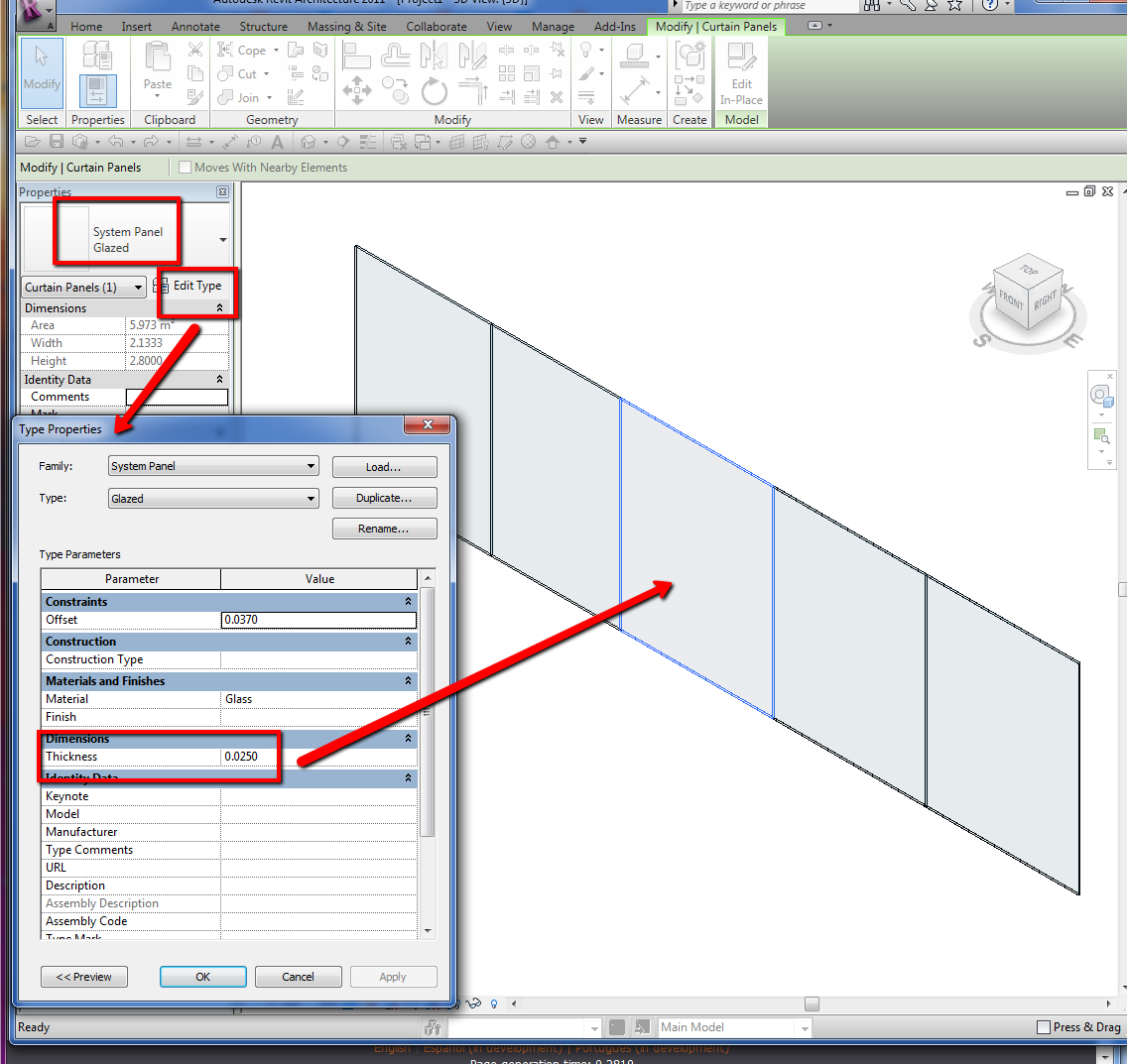
"For some unknown reason, my curtain walls are thick as hell." - Are you talking about the thickness of the glass?? If so, just select one panel (use the TAB key if you need) go to properties>edit Type and change that.
-----------------------------------
I Hope and I Wish to LEARN more, and more, and more.... REVIT |
This user is offline |
|
|
|
active
Joined: Tue, Sep 29, 2009
6 Posts
No Rating |
This is not a standard wall, it is a curtain wall. And yes i was talking bout the glass thickness In revit 2011, you cannot edit the thickness. Maybe you can tell how to edit the keynote, that might help
|
This user is offline |
|
|
|
site moderator|||
Joined: Tue, May 22, 2007
5921 Posts
|
"And yes i was talking bout the glass thickness In revit 2011, you cannot edit the thickness." - Who told you that? Again:..... just select one panel (use the TAB key if you need) go to properties>edit Type and change that.
Edited on: Fri, Mar 11, 2011 at 12:31:15 PM
-----------------------------------
I Hope and I Wish to LEARN more, and more, and more.... REVIT |
This user is offline |
|
|
|
active
Joined: Tue, Sep 29, 2009
6 Posts
No Rating |
Oh, i dont have that.
And sorry about my tone, now i see it was a bit rude(alot actually)
I couldn't do that. Insted i moved the entire project to another file which had a normal thicknes of the curtain wall. That did the trick.
Ty and sorry
|
This user is offline |
|
|
|
Similar Threads |
|
Angled Curtain Walls - fillets and nested |
Revit Building >> Technical Support
|
Thu, Apr 23, 2009 at 5:42:47 PM
|
7
|
|
Curtain walls |
Revit Building >> Technical Support
|
Mon, Nov 7, 2011 at 10:28:33 AM
|
6
|
|
Curtain Walls |
Revit Building >> Technical Support
|
Wed, Apr 16, 2008 at 1:30:46 PM
|
0
|
|
curtain walls in legends |
Revit Building >> Technical Support
|
Tue, Feb 23, 2010 at 9:50:09 AM
|
14
|
|
solid walls transparent to curtain walls and railings in back.. |
Revit Building >> Technical Support
|
Mon, Oct 29, 2012 at 7:34:26 AM
|
6
|
|
|
Site Stats
Members: | 2161655 | Objects: | 23325 | Forum Posts: | 152479 | Job Listings: | 3 |
|
 Search