|
|
|
Home | Forums |
Downloads | Gallery |
News & Articles | Resources |
Jobs | FAQ |
| Join |
Welcome !
|
525 Users Online (31 Members):
Show Users Online
- Most ever was 3914 - Wed, Aug 26, 2026 at 4:53:14 AM |
Forums
|
Forums >> Revit Building >> Technical Support >> Lights and light shades / covers
|
|
|
active
Joined: Mon, May 17, 2010
181 Posts
 |
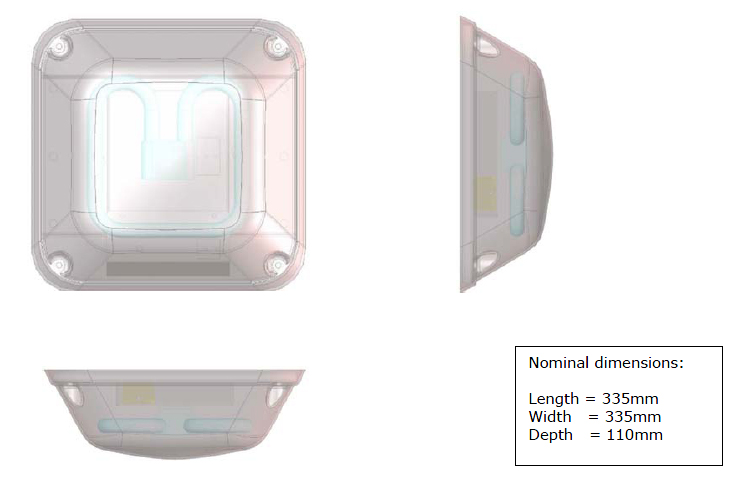
Hi, I'm modelling a light fitting which is fixed to a ceiling and has a plastic cover over the light to stop people getting to the electronics. I'm using a light fitting family, but am unsure how the light will work when I put some geometry over the yellow Revit light icon. Does Revit take the geometry into account, and so effect the light fall - if I put a materual on the light cover - I was going to use glass for the moment - will this effect how the light comes out and so will I have to edit the matierial to get it exactly correct as per the light fitting. I've dont some test, and think look OK, but I am unsure how the plastic cover is affecting the light. Can anyone give me some pointers on the best way of achieving this. Attached is a photo of the light fitting Cheers.
|
This user is offline |
|
 |
|
Similar Threads |
|
Revit 2009 Lights |
Revit Building >> Technical Support
|
Mon, Jul 28, 2008 at 4:43:50 PM
|
8
|
|
Rendering And Light Settings Revit 2009 [ 1 2 ] |
Revit Building >> Tips & Tricks
|
Tue, Oct 20, 2009 at 3:06:23 AM
|
26
|
|
LIGHTS LIGHTS LIGHTS |
Revit Building >> Technical Support
|
Thu, Feb 1, 2007 at 6:13:51 PM
|
1
|
|
Dim Light Setting for Rendering is Not Functional |
Revit Building >> Technical Support
|
Thu, Aug 2, 2018 at 1:20:06 AM
|
3
|
|
lighting scheme and artificial lights |
Revit Building >> Technical Support
|
Mon, May 19, 2008 at 9:21:47 PM
|
1
|
|
|
Site Stats
Members: | 2189398 | Objects: | 23399 | Forum Posts: | 152445 | Job Listings: | 0 |
|
 Search