|
|
|
Home | Forums |
Downloads | Gallery |
News & Articles | Resources |
Jobs | FAQ |
| Join |
Welcome !
|
20 Users Online (18 Members):
Show Users Online
- Most ever was 626 - Mon, Jan 12, 2015 at 2:00:17 PM |
Forums
|
Forums >> Revit Building >> Technical Support >> Solar screen
|
|
|
active
Joined: Mon, Mar 8, 2010
3 Posts
No Rating |
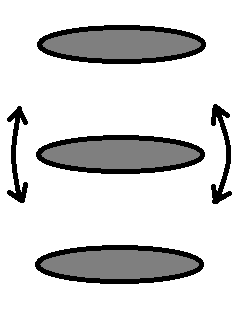
This week i'm trying to make a sunscreen that goes infront of a window. It's made up out of several horizontal elements, which in profile are ellips-shaped (see attachment). Now what i'm trying to do is have each element rotate around it's center. With rectangular elements this was easy, add a reference plane, attach a side to it and at an angular parameter. But with this ellips forms, i've got no side to attach it to. I've alrdy tried using a different bent shape with one straight side, but they deform when i change the angle. Is their any way to attach the ellips to the reference plane or to keep the bent shapes from deforming?
|
This user is offline |
View Website
|
 | |
|
|
site moderator|||
Joined: Tue, May 16, 2006
13079 Posts
 |
Try creating these shapes in a seperate, nested family that you manipulate in the host family.
|
This user is offline |
|
|
|
Similar Threads |
|
Solar Study Animations |
Revit Building >> Technical Support
|
Mon, Jan 19, 2026 at 1:09:00 PM
|
5
|
|
INTERIOR SOLAR STUDIES [ 1 2 ] |
General Discussion >> Revit Project Management
|
Wed, Oct 8, 2014 at 4:42:37 AM
|
23
|
|
Animated Solar Studies in Revit 9 |
Revit Building >> Technical Support
|
Tue, May 26, 2009 at 1:00:58 PM
|
5
|
|
Solar study |
Community >> The Studio
|
Fri, Mar 13, 2009 at 11:59:45 AM
|
4
|
|
Animations - Solar Angles |
Revit Building >> Technical Support
|
Thu, May 5, 2011 at 6:52:23 PM
|
3
|
|
|
Site Stats
Members: | 2161655 | Objects: | 23325 | Forum Posts: | 152479 | Job Listings: | 3 |
|
 Search