|
|
|
Home | Forums |
Downloads | Gallery |
News & Articles | Resources |
Jobs | FAQ |
| Join |
Welcome !
|
17 Users Online (15 Members):
Show Users Online
- Most ever was 626 - Mon, Jan 12, 2015 at 2:00:17 PM |
Forums
|
Forums >> Community >> Newbies >> More Detail In Rendering
|
|
|
active

Joined: Fri, Apr 23, 2010
8 Posts
No Rating |
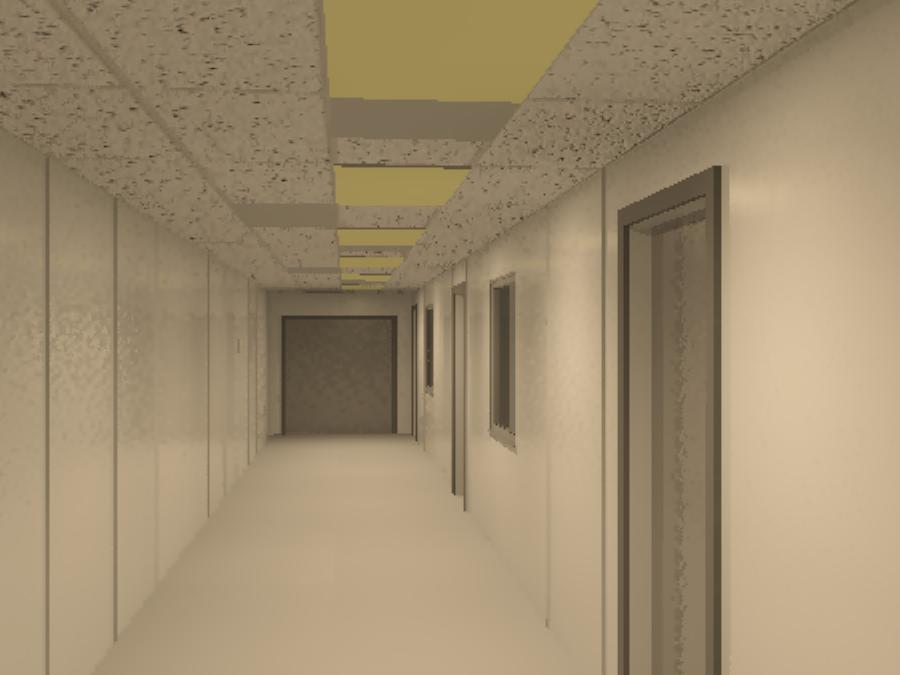
I am running Revit 2010 MEP, I am having a few issues that i could use some help in. 1) I am still fairly new to rendering and making my stuff all nice and showy in walkthroughs. How do you go about setting the rendering for outside and inside with out having to do it in sections. Example: I design an office building I want to show the outside with the sun shine and trees and walkways than dive into the first floor where the waiting room has a few chairs and a table than down the hall to walk by several closed doors. Is there a way to set this once or do I have to do the outside as a section than the inside as a section? 2) i work mainly in mechanical design and want to render a walkthrough, in my walkthrough I would like to see more detail in the light fixtures and in the mechanical grilles (supply and return grilles) but all I get is a grey square blob. I have tried using an image of a light fixture or grille on the bottom face of a mass and the dumb thing tiles the image and so i end up with 4 images instead of 1 centered image. So in a tacky fashion I have taken the mass and painted one of the faces yellow. as you can imagine yuk. 3) While rendering a walkthrough I understand that it takes forever and this I accept, what i don't understand is why can I not set it and forget it. I have tried starting a rendered walkthrough at the end of the day to run over night but come the next morn It has ran into an error and has stopped at about frame 60 of we'll say 500. I have done this with both rendering out to an AVI and to JPEG images and both times it has hit an error and won't continue. This still happens when I spend the day watching it. It renders out about 60 frames before Revit encounters an error and has to shut down. So I ask any who read this post for help on these issues. If you know of a good free tutorial that I might read through, or something it would be most appreciated. Regards, Jack Byrd Attached Is a rendered image of what I have got any advice to pretty it up would help.
|
This user is offline |
|
 | |
|
|
active

Joined: Thu, May 28, 2009
829 Posts
 |
1. To have the rendering change at a certain location... I think you're out of luck. Best to just do two separate renderings, and splice them together at the appropriate time with windows movie-maker or the like. 2. You might need to model a better family. Making grilles or light fixtures shouldn't be so bad. I'm be afraid decals would looks conspicuously 2D. 3. I too have had renders/walkthroughs freeze. Try turning off any power-saving, hibernation, sleep mode settings on your computer. You could also go to the task manager, Ctrl-alt-delete, go to the processes, right click on the rendering process, fbxooprende2 or whatever, and set it's priority to high. You could do the same for revit I suppose. This might make interuptions less likely. This is a superstitious, untested suggestion.
|
This user is offline |
|
|
|
Similar Threads |
|
ROOF TILES -RENDERING |
Revit Building >> Technical Support
|
Wed, Aug 17, 2011 at 1:25:28 AM
|
2
|
|
low detail vs. rendering |
Revit Building >> Technical Support
|
Tue, Aug 7, 2012 at 12:58:17 AM
|
3
|
|
Rendering |
Revit Building >> Technical Support
|
Fri, Dec 12, 2008 at 9:49:30 AM
|
2
|
|
Creating an Enlarged Detail View of a Detail I have Drawn |
Revit Building >> Technical Support
|
Fri, Aug 31, 2012 at 7:05:29 AM
|
1
|
|
Looking for Rendering Suggestions on a Revit 2008 Accurender Rendering.......... |
Revit Building >> Technical Support
|
Wed, Nov 4, 2009 at 4:41:36 PM
|
0
|
|
|
Site Stats
Members: | 2161655 | Objects: | 23325 | Forum Posts: | 152479 | Job Listings: | 3 |
|
 Search