|
|
|
Home | Forums |
Downloads | Gallery |
News & Articles | Resources |
Jobs | FAQ |
| Join |
Welcome !
|
9 Users Online (7 Members):
Show Users Online
- Most ever was 626 - Mon, Jan 12, 2015 at 2:00:17 PM |
Forums
|
Forums >> Community >> Newbies >> Newbie needs some help
|
|
|
active
Joined: Wed, Sep 15, 2010
4 Posts
No Rating |
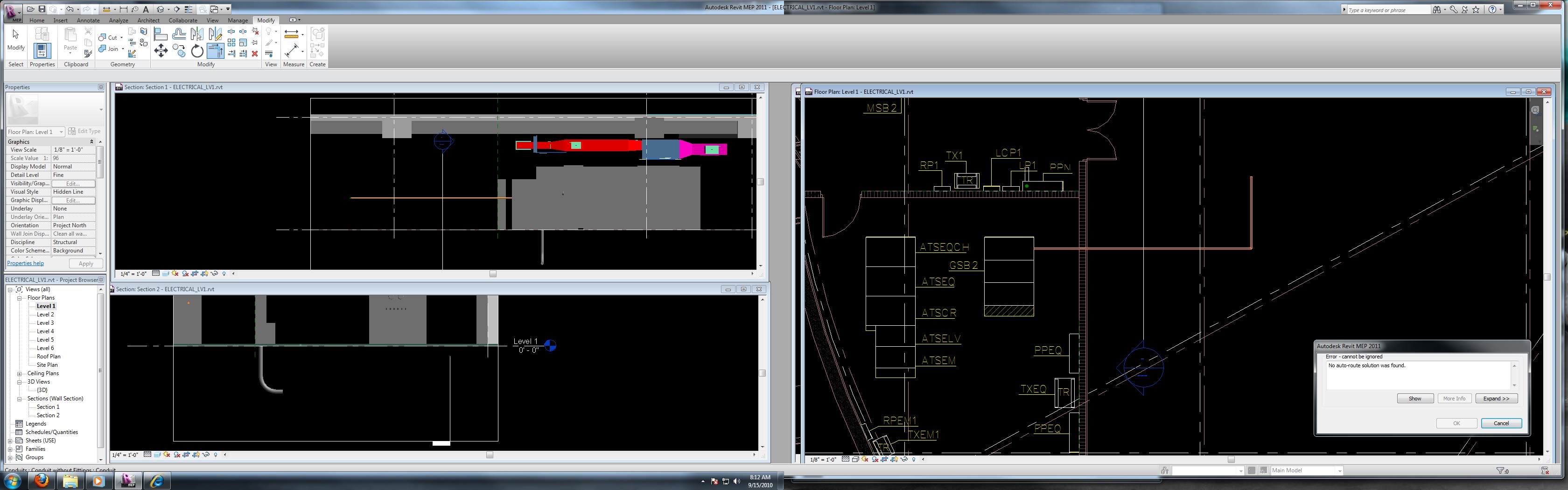
Hello everyone! I can't tell you how nice it is to have such a thriving community here on this site, it has already helped me tremendously. I'm in a bit of a bind at the moment. I'm learning Revit for the first time, and three dimensional work in general. I've been working with standard Autocad in 2 dimensions for several years now. But, the firm decided to go 3D. Now I'm running Revit MEP 2011. I'm going to take some classes in a couple of weeks, but I have to produce a job before then. So I'm learning on the fly. I've placed all of my primary switchgear and panels, now I need to run conduit. I've loaded (I think) all of my conduit fittings families and it will connect to the bottom of a panel. But when I draw a run, it refuses to auto connect. It will only draw one segement at a time. It was my understanding that if you make a 90 it will drop in a fitting for you and you can draw away from it. If I attempt to "trim" the conduit it turns orange and gives me a "No auto-route solution was found." error. I'm sure I just need to toggle a setting somewhere, but for the life of me I cannot find it. I've got to finish this project in the next couple of days, and I'm completely stuck. I would appreciate some help. Thanks, Ian
|
This user is offline |
|
 | |
|
|
active
Joined: Wed, Sep 15, 2010
4 Posts
No Rating |
*Solved* I had to edit my family default settings. The default out of the box for bends is "None". After selecting a conduit, click "edit type" in the properties menu. Then adjust the bend defaults to your preference. I knew it would be a simple fix.
|
This user is offline |
|
|
|
Similar Threads |
|
Newbie |
Community >> Newbies
|
Thu, Apr 27, 2017 at 9:35:53 AM
|
2
|
|
Revit MEP 2008 Newbie! |
Community >> Newbies
|
Mon, Oct 1, 2007 at 10:00:09 AM
|
0
|
|
Newbie needs help |
Revit Building >> Technical Support
|
Mon, Dec 28, 2009 at 8:45:27 AM
|
5
|
|
newbie from ohio |
Community >> Newbies
|
Sat, Jan 2, 2010 at 8:16:07 AM
|
4
|
|
newbie.. |
Community >> Newbies
|
Sun, Nov 28, 2010 at 2:33:02 AM
|
3
|
|
|
Site Stats
Members: | 2161655 | Objects: | 23325 | Forum Posts: | 152479 | Job Listings: | 3 |
|
 Search