|
|
|
Home | Forums |
Downloads | Gallery |
News & Articles | Resources |
Jobs | FAQ |
| Join |
Welcome !
|
32 Users Online (30 Members):
Show Users Online
- Most ever was 626 - Mon, Jan 12, 2015 at 2:00:17 PM |
Forums
|
Forums >> General Discussion >> Revit Project Management >> Preloaded Size Values in Revit MEP
|
|
|
active
Joined: Wed, Aug 11, 2010
7 Posts
No Rating |
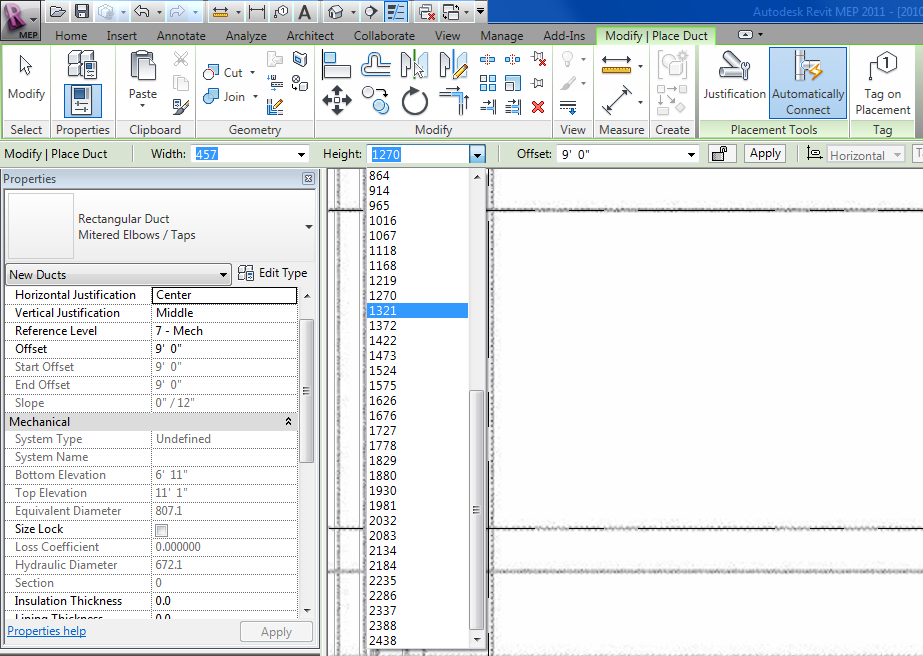
When placing duct, for example, in Revit MEP, the 'Width' and 'Height' drop-down lists come pre-populated with values. When working in metric units, it populates the list with useless, non-round values, and does not seem to want to 'retain' values that I enter, defaulting back to 'odd' values each time I switch back to the Duct tool. Is there a way to clear these lists and enter (and retain) my own values?
|
This user is offline |
|
 | |
|
|
active

Joined: Mon, Jul 16, 2007
237 Posts
 |
I will assume that you had started with an imperial template then had the units changed on you, that is the only way that that would happen. if you start a new project with the mechanical mectric default template you will then be able to transfer the duct sizes into your project using the transfer project standards, make sure to select overwrite and not new only though. hth
-----------------------------------
www.allbimallthetime.blogspot.com
http://familyjewels.typepad.com/ |
This user is offline |
View Website
|
|
|
active
Joined: Wed, Aug 11, 2010
7 Posts
No Rating |
Correct - that's how I ended up in this situation. Someone recommended the following solution to me, which appears to be working: Manage > MEP Settings > Mechanical Settings > Duct Settings, then delete default values and enter preferred ones. A bit tedious to set up, but smooth once you get them entered. Thank you -
|
This user is offline |
|
|
|
active
Joined: Mon, Jul 16, 2007
237 Posts
|
Doug, Yes it is very tedious to define all the sizes that way again. that is why i had suggested you transfer them from a template that has them defined correctly. it save quite a bit of time this way. regardless glad you figured it out.
-----------------------------------
www.allbimallthetime.blogspot.com
http://familyjewels.typepad.com/ |
This user is offline |
View Website
|
|
|
Similar Threads |
|
REVIT MEP typ File size limit |
General Discussion >> Revit Project Management
|
Tue, Mar 12, 2013 at 2:21:48 PM
|
8
|
|
Entering or linking to envelope U-values |
Revit Systems >> Technical Support
|
Tue, Apr 7, 2009 at 10:44:13 AM
|
1
|
|
u and r values for walls |
Revit Building >> Technical Support
|
Mon, May 2, 2011 at 3:51:13 PM
|
0
|
|
Revit MEP or AutoCad MEP |
General Discussion >> Revit Project Management
|
Fri, Oct 14, 2011 at 8:21:49 AM
|
6
|
|
REVIT MEP - Separate models for MEP disciplines |
Revit Building >> Technical Support
|
Tue, Jun 25, 2013 at 1:45:42 PM
|
5
|
|
|
Site Stats
Members: | 2161655 | Objects: | 23325 | Forum Posts: | 152479 | Job Listings: | 3 |
|
 Search