
|
|
|
Home | Forums |
Downloads | Gallery |
News & Articles | Resources |
Jobs | FAQ |
| Join |
Welcome !
|
577 Users Online (53 Members):
Show Users Online
- Most ever was 3914 - Wed, Aug 26, 2026 at 4:53:14 AM |
Forums
|
Forums >> Revit Building >> Technical Support >> Ceiling Based Family Issues
|
|
|
active
Joined: Mon, Jan 5, 2004
69 Posts
No Rating |
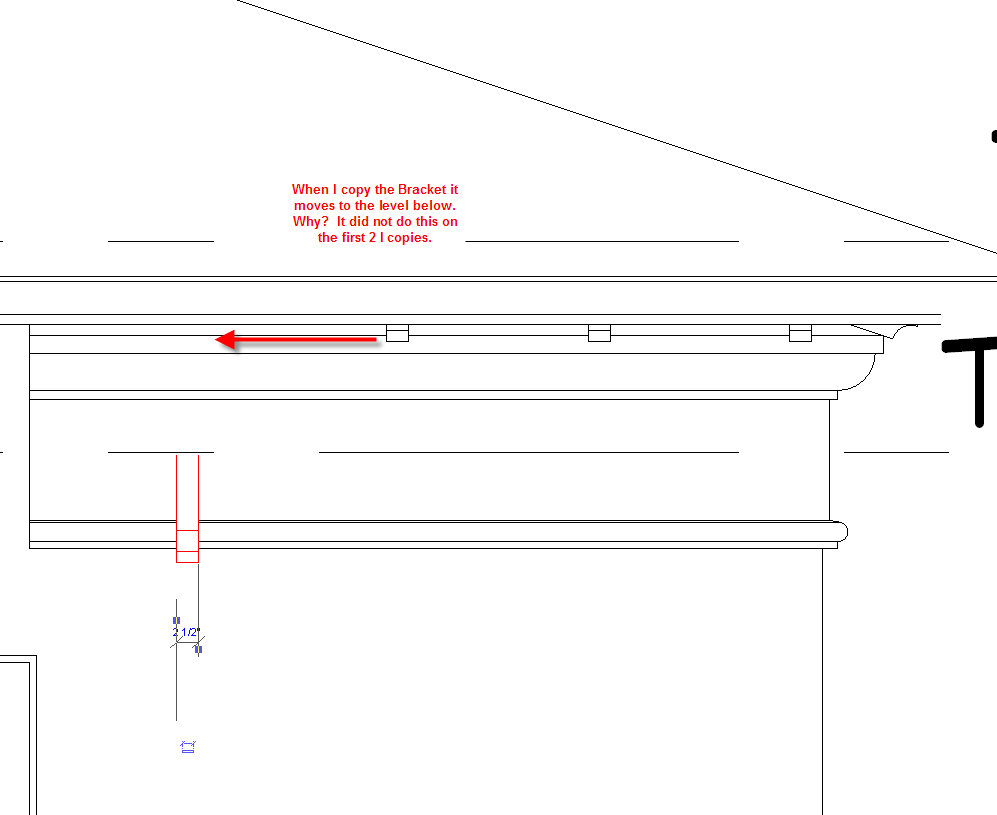
We have a bracket that was created as a ceiling based generic model. It copies fine in most places except for on one roof where when copied it moves to the level below (see image) .
I can't figure out why? There is a roof below but the issue still happened even when I deleted that roof.
Post edited on 2005-10-11 09:57:03
|
This user is offline |
|
 | |
|
|
active
Joined: Mon, Jan 5, 2004
69 Posts
No Rating |
Here is the Bracket
|
This user is offline |
|
|
|
site moderator|||

Joined: Mon, Jan 12, 2004
2889 Posts
 |
Do you have multiple ceilings at this point and revit is picking up the wrong ceiling as the required workplane?
|
This user is offline |
View Website
|
|
|
active
Joined: Mon, Jan 5, 2004
69 Posts
No Rating |
Not multiple ceilings but we do have multiple roofs. But I have used the opening tool to cut the roof away to test it and it still did it. I also deleted the other roof and still had the same result. It is a mystery so I sent it to support.
Thanks
|
This user is offline |
|
|
|
site moderator|||
Joined: Mon, Jan 12, 2004
2889 Posts
|
Does it behave fine when you place a new element rather than copying the existing one? Try placing it in 3d...?
How has the hosted generic model been created? Ie: its always best with hosted elements to create them non-hosted to begin with then nest them into a hosted template and lock them using there references to the host...
|
This user is offline |
View Website
|
|
|
active
Joined: Mon, Jan 5, 2004
69 Posts
No Rating |
Actually Revit support figured it out. It is becasue the main roof is set to 2 different eave heights (which was intentional). But this confused the bracket when being placed! They told me to create to seperate roofs for the two eave heights and that should fix it. It is always something so simple and right in your face that you can't see!
Thanks for the help
|
This user is offline |
|
|
|
Similar Threads |
|
Create.NewFamilyInstance isn't displaying a new family on sheet |
Community >> Newbies
|
Mon, May 9, 2011 at 1:06:22 PM
|
0
|
|
Converting Ceiling Based families to Face Based Families |
Revit Building >> Tips & Tricks
|
Tue, Jun 12, 2018 at 7:13:41 PM
|
5
|
|
RevDev Studios - RevEx and RevXL - Spreadsheet plugins for Revit |
Workflow & Implementation >> API & Third Party Apps
|
Tue, Feb 28, 2017 at 7:32:28 AM
|
0
|
|
Modelling terrain Revit imported from AutoCad |
General Discussion >> Revit Project Management
|
Thu, Oct 20, 2011 at 9:29:49 AM
|
0
|
|
Revit 2016 Annotative Demo Tag Formula |
Revit Building >> Technical Support
|
Mon, Apr 25, 2016 at 2:30:59 PM
|
3
|
|
|
Site Stats
Members: | 2188444 | Objects: | 23399 | Forum Posts: | 152447 | Job Listings: | 0 |
|
 Search
 Bracket Issue.png
 Roof Bracket.rfa