|
|
|
Home | Forums |
Downloads | Gallery |
News & Articles | Resources |
Jobs | FAQ |
| Join |
Welcome !
|
12 Users Online (10 Members):
Show Users Online
- Most ever was 626 - Mon, Jan 12, 2015 at 2:00:17 PM |
Forums
|
Forums >> Revit Building >> Technical Support >> Roof Extrusions - urgent
|
|
|
active
Joined: Fri, Jul 23, 2010
6 Posts
No Rating |
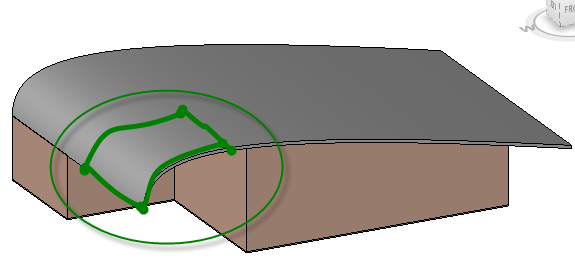
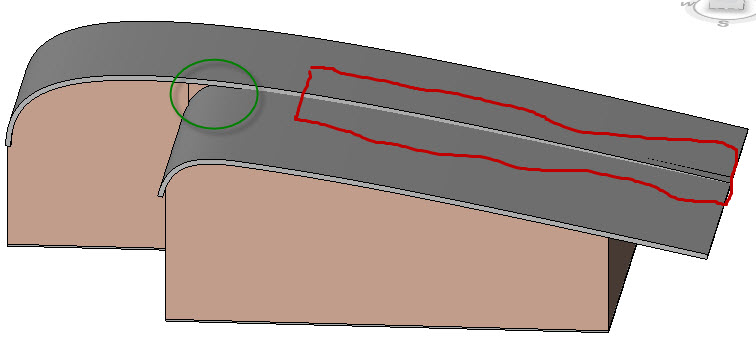
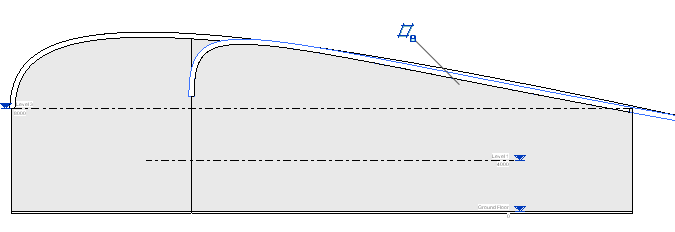
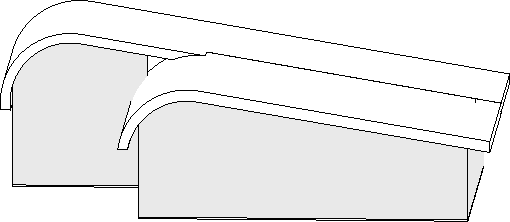
Hello, Please find the attached images of the extruded roof created using a spline tool. The 1st image is a single extrudes roof where I was trying to cut roof portion as indicated in the image. I tried couple of options but nothing seem to work. Is there a way to cut a portion from the roof so that a part of the roof just stick to wall set back. In the second image, I created two different roofs instaed of one with the aim to get the exact roof design but in this case I am not able to join the two roofs to make them look a single big roof, also there is a small gap between the roofs which I am in no way able to get rid of. Please let me know what could be the best approach. I have created the roof profile from an elevation view as hwon in the 3rd image. Any help would be higly appreciated.
|
This user is offline |
|
 | |
|
|
active
Joined: Fri, Jul 23, 2010
6 Posts
No Rating |
herez the third image
|
This user is offline |
|
|
|
site moderator|||
Joined: Tue, May 16, 2006
13079 Posts
 |
Your problem in views two and three are caused because you used a spline. Splines are very hard to control or define. You would be better off using simple geometry of multiple curves. Then the two roofs can share portions of the same geometry in their profiles. In view one, you can use an in-place void to cut out a portion of the roof.
|
This user is offline |
|
|
|
active
Joined: Fri, Jul 23, 2010
6 Posts
No Rating |
Thanks a lot for your response but could you please elaborate on making an in-place void. I tried it bit didnt work well with me. Thanks again
|
This user is offline |
|
|
|
site moderator|||
Joined: Tue, May 16, 2006
13079 Posts
|
Here is a void form (category roof) set to cut an extruded roof form and the finished roof.
|
This user is offline |
|
|
|
active

Joined: Thu, May 28, 2009
829 Posts
 |
Revit doesn't enjoy splines, yeah. Your best bet is to draw a spline, and then trace over it with arcs--as few as satisfies you aesthetically.
|
This user is offline |
|
|
|
active
Joined: Fri, Jul 23, 2010
6 Posts
No Rating |
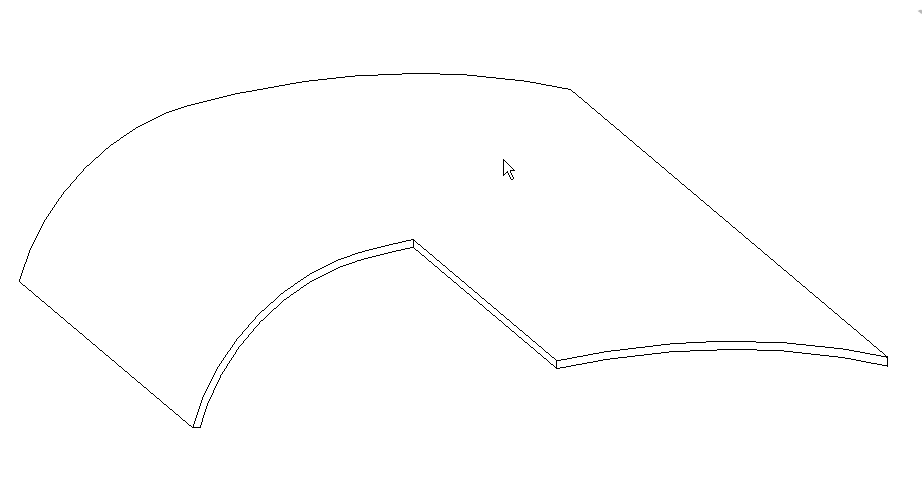
Thanks again for your efforts. I did try the void option but the problem is what I get is not what I wnt it to be. Please find the attached image of what exactli I am after.
|
This user is offline |
|
|
|
site moderator|||
Joined: Tue, May 16, 2006
13079 Posts
|
The void answered you first image. I explained how to fix your second image by using protions of the same profile.
|
This user is offline |
|
|
|
Similar Threads |
|
Joining extrusions |
Revit Building >> Technical Support
|
Tue, Jul 26, 2022 at 3:58:08 PM
|
1
|
|
Irregular roof |
Revit Building >> Technical Support
|
Mon, Jul 12, 2010 at 2:48:47 PM
|
10
|
|
Convert roof to Mass? |
Revit Building >> Technical Support
|
Tue, Jun 14, 2011 at 12:10:34 PM
|
4
|
|
naming extrusions |
General Discussion >> Wishlist
|
Thu, Oct 10, 2013 at 10:00:24 AM
|
3
|
|
help its urgent |
Revit Systems >> Technical Support
|
Thu, Dec 19, 2019 at 6:19:26 AM
|
1
|
|
|
Site Stats
Members: | 2161655 | Objects: | 23325 | Forum Posts: | 152479 | Job Listings: | 3 |
|
 Search