|
|
|
Home | Forums |
Downloads | Gallery |
News & Articles | Resources |
Jobs | FAQ |
| Join |
Welcome !
|
21 Users Online (19 Members):
Show Users Online
- Most ever was 626 - Mon, Jan 12, 2015 at 2:00:17 PM |
Forums
|
Forums >> General Discussion >> Wishlist >> About Reveal
|
|
|
active
Joined: Mon, Feb 15, 2010
1 Posts
No Rating |
Somebady knows how to make an angle reveal? (I can't rotate the existing profile, it only works on vertical and horizontal position)
|
This user is offline |
|
 | |
|
|
site moderator|||

Joined: Tue, May 22, 2007
5921 Posts
 |
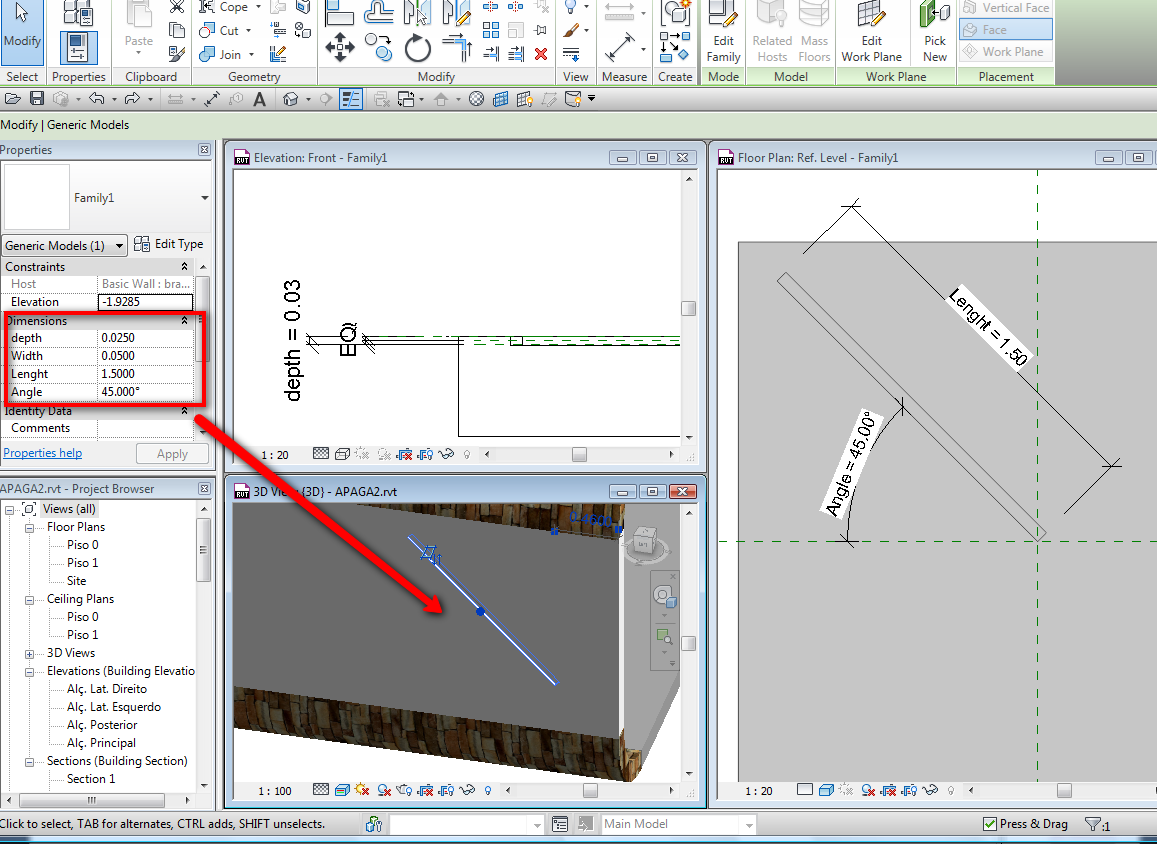
Reveals only work in Hor. and Vert. position, to create with an angle you have two choises, 1º. use the create "in-place" family in the category "Wall" and create a "void" to cut the wall with the angle you want... 2º. Create a Generic Model Face Based / Wall Based with parameters, then you can control that "reveal" in project , like you can see in the image i attached...
Edited on: Sat, May 29, 2010 at 4:43:41 AM
-----------------------------------
I Hope and I Wish to LEARN more, and more, and more.... REVIT |
This user is offline |
|
|
|
Similar Threads |
|
how to add a self made reveal to a wall while edit wall types? |
Revit Building >> Technical Support
|
Sat, Feb 12, 2011 at 10:53:31 PM
|
4
|
|
Wall Reveal-Please HELP!!!!! |
Revit Building >> Technical Support
|
Fri, May 26, 2006 at 9:12:01 AM
|
2
|
|
REVEAL QUESTIION |
Revit Building >> Technical Support
|
Wed, Mar 9, 2005 at 5:07:49 PM
|
9
|
|
Wall Reveal by Face in 2010 |
Revit Building >> Technical Support
|
Wed, Apr 7, 2010 at 10:20:06 AM
|
5
|
|
Can't devide window top reveal (can't apply material on outside reveal) |
Revit Building >> Technical Support
|
Fri, Jul 10, 2015 at 12:29:24 PM
|
3
|
|
|
Site Stats
Members: | 2161655 | Objects: | 23325 | Forum Posts: | 152479 | Job Listings: | 3 |
|
 Search