Forums
|
Forums >> Revit Structure >> Technical Support >> Family Creator - Editing Model Line Color
|
|
|
active
Joined: Tue, Oct 6, 2009
2 Posts
No Rating |
Good Morning, I'm a recent graduate of WCU and self taught Revit user. Using RA2009 through the autodesk free student download, I've learned to love this BIM system for my planning, drawing management, and visualization tools through online autodesk information, walkthroughs, Revit forums, and JD Stine's "Commercial Design" book...have recently purchased "Mastering RA", but have yet to delve into those depths. I'm currently creating a family of Lumicor resin panels (a straight forward generic model), and am interested in adding material details with model lines. I am unable, however, to change the color of my model lines. Is this possible, or shoudl I be using another category of line? Or can I create a new line type for model lines? I would like this to be visible in elevations as well as camera views. Thanks for any aid you can offer, Nick Savell --> this is a link to the intended lumicore product http://www.lumicor.com/naturalleaves/
|
This user is offline |
|
 | |
|
|
site moderator|||
Joined: Tue, May 16, 2006
13079 Posts
 |
Read this topic in your Help: Model Line Instance Properties
|
This user is offline |
|
|
|
active
Joined: Tue, Oct 6, 2009
2 Posts
No Rating |
I appreciate the speedy reply. Unfortunately, that topic does not exist in my 2009 Help literature. I was able to find it for 2010 and 2011, and follow along well enough. I spent a good deal of time working trying to address the problem, rather than askingfor more help immediately. I am still, however, unable to edit the properties of my model lines. Perhaps someone can suggest a way of producing ANY COLORED LINES into my family model that will can be visible in all views? Again, thank you. Sorry for the hassle.
|
This user is offline |
|
|
|
active
Joined: Sun, Apr 25, 2004
1207 Posts
 |
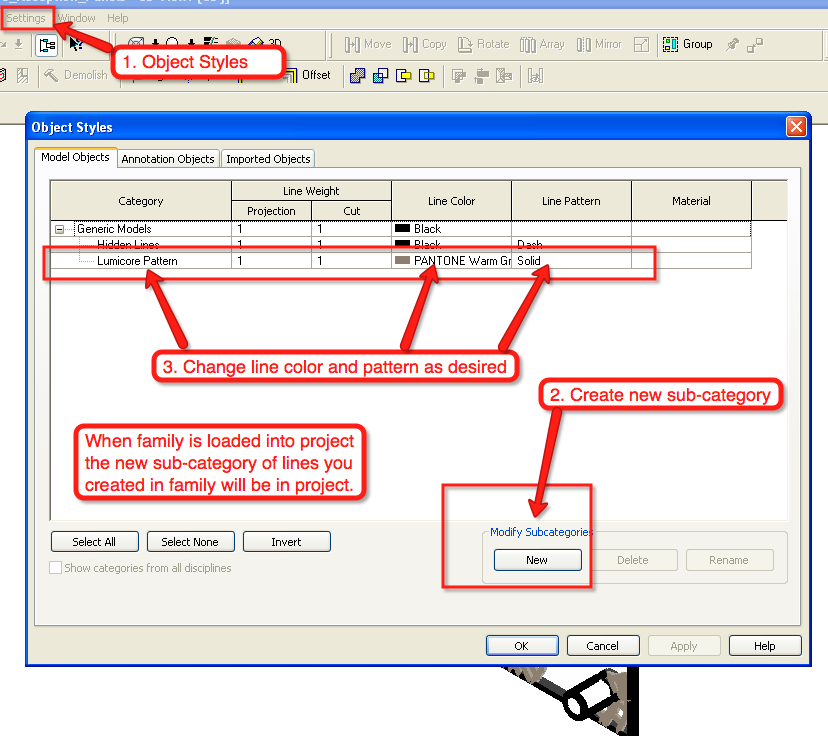
OK, a couple of things. 1. In your current family, you modeled the Lumicore leafs using "generic" model lines. This is OK, but if you have any other generic model lines in your project, the next step might give you unintended results. Load the family into your project, then go to: Settings>Object Styles in the dialog box that appears change the color of the generic model lines to something you want. This will be universal to if any other generica model lines exist in the project they all change. 2. Rather than use generic model lines in the family, create a new sub-category of lines. In the family go to Setting>Object Styles (see image attached) The new sub-category you create in the family will get created in the project when you load the family. In the project you can still change the color by going to Object Styles, expand the "plus" button and the sub-categories will be listed. If you change it in the project it will not modify the family, so if you reload the family be careful.
Edited on: Fri, May 14, 2010 at 10:35:13 AM
-----------------------------------
Tom www.reviteer.com http://twitter.com/Reviteer |
This user is offline |
View Website
|
|
|
Similar Threads |
|
Trouble editing an existing family Window |
Revit Building >> Technical Support
|
Wed, Nov 23, 2011 at 2:40:38 AM
|
0
|
|
Rpc Creator archvison |
Community >> Newbies
|
Sun, Jan 22, 2012 at 10:20:41 PM
|
1
|
|
RPC creator free...What's the end? |
Community >> Newbies
|
Tue, Apr 16, 2024 at 3:53:11 PM
|
5
|
|
Revit Specific PDF Creator |
General Discussion >> Revit Project Management
|
Tue, Aug 22, 2017 at 3:31:52 AM
|
2
|
|
Change family color in model |
Community >> The Studio
|
Fri, Nov 10, 2017 at 9:01:44 AM
|
1
|
|
|
Site Stats
Members: | 2161655 | Objects: | 23325 | Forum Posts: | 152479 | Job Listings: | 3 |
|

 Search
 76925_Lumicore_Reception_Panels.rfa