|
|
|
Home | Forums |
Downloads | Gallery |
News & Articles | Resources |
Jobs | FAQ |
| Join |
Welcome !
|
8 Users Online (6 Members):
Show Users Online
- Most ever was 626 - Mon, Jan 12, 2015 at 2:00:17 PM |
Forums
|
Forums >> Revit Building >> Technical Support >> Split region on a wall surface Revit 2010
|
|
|
active
Joined: Wed, Jul 9, 2008
109 Posts
 |
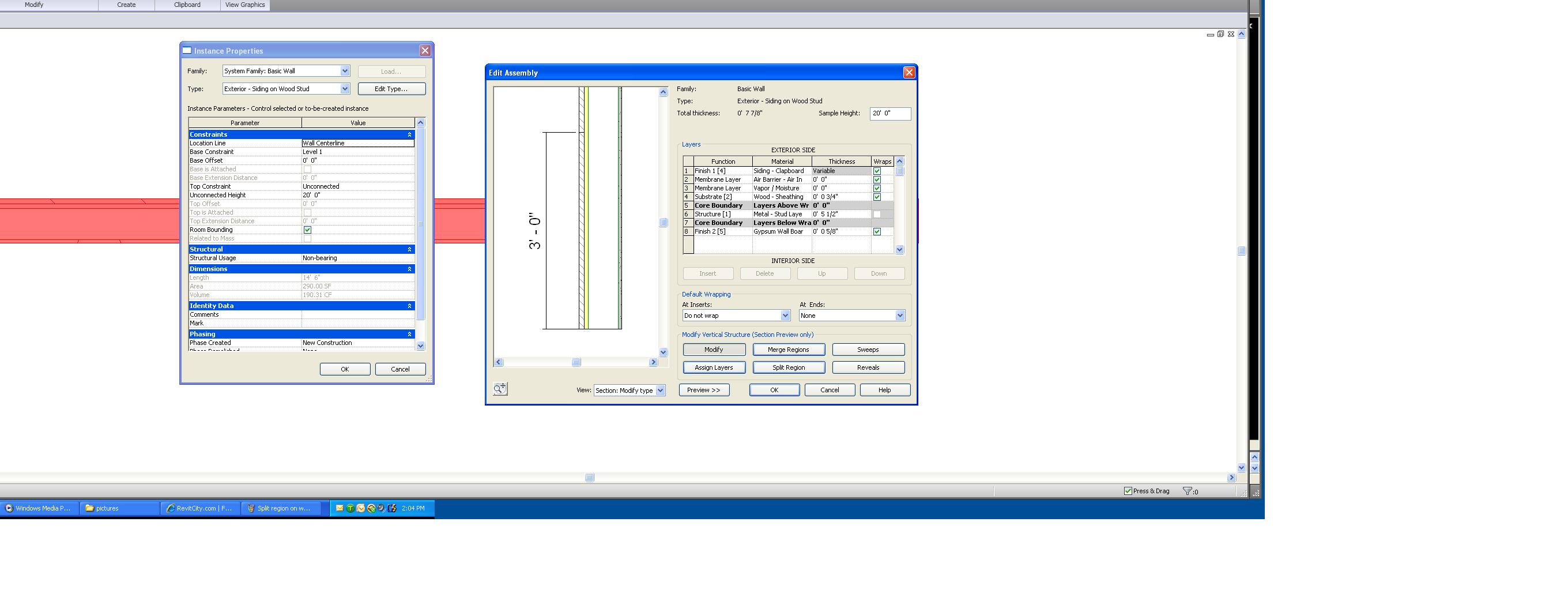
I am trying to split the surface on a wall to create a brick wainscot. As you can see from the attached screen shot I have split the region, the exterior finish material. I want to make the material below the split brick with a different thickness. Does anyone know how to do this? Is it easier to do it with a stacked wall? I thought this was the easy way to do it. Any help will be appreciated, Thank you, AAron
|
This user is offline |
|
 | |
|
|
active

Joined: Mon, Feb 12, 2007
51 Posts
 |
I'm pretty sure that if you split regions on a wall, the thickness of the material will be the same for each region. I usually make walls like this by creating a stack wall with the brick wall type on the bottom, then whatever type of wall on the top. You can stack a few different wall types to get the varying brick thickness or use sweeps and reveals if it is only sections that are of varying thickness'
-----------------------------------
stanmpd
Belz A&C
Memphis, TN |
This user is offline |
View Website
|
|
|
Similar Threads |
|
join wall with split region with wall without split region |
Revit Building >> Technical Support
|
Wed, Dec 21, 2011 at 8:30:01 AM
|
4
|
|
SPLIT SURFACE and GRADE REGION |
Revit Building >> Technical Support
|
Thu, Sep 15, 2005 at 7:54:24 PM
|
1
|
|
Split Region Wall Foundation Issues |
Revit Building >> Technical Support
|
Wed, Jun 1, 2011 at 5:36:25 PM
|
7
|
|
Split surface & paint vs. schedule |
Revit Building >> Technical Support
|
Tue, Oct 12, 2004 at 3:34:32 AM
|
2
|
|
Split Region and Rendering Questions |
Community >> The Studio
|
Tue, Jun 24, 2008 at 8:40:56 AM
|
1
|
|
|
Site Stats
Members: | 2161655 | Objects: | 23325 | Forum Posts: | 152479 | Job Listings: | 3 |
|
 Search