|
Forums >> General Discussion >> Revit ROI >> HELP.....Creating a 2d bed family
|
|
|
active
Joined: Mon, Oct 12, 2009
8 Posts
No Rating |
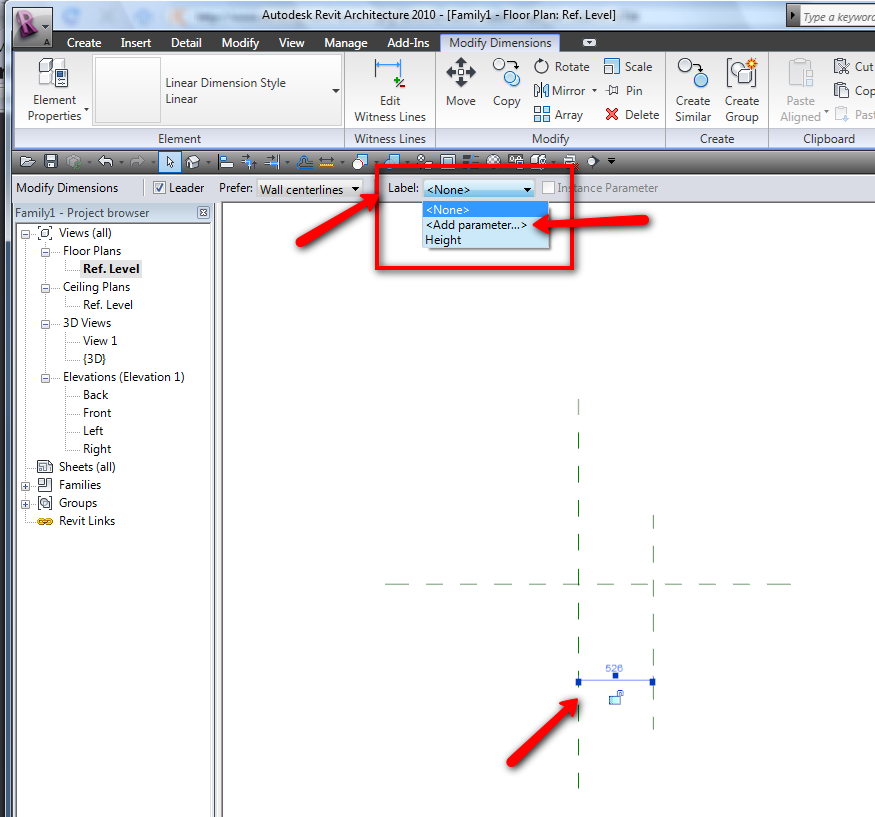
I am new in the Revit Architecture software and have been in the 3rd week of Intermediate class. My homework simply includes the introduction to creating families. I am trying to locate the Parameter Data box that allows to change dimension value. In the literature that I received, the direction indicated to go to the OPTION BAR, LABEL LIST, click ADD PARAMETER. Would anyone help me locate this from the Design bar..?I need to get through this step to change values in the properties dialogue box for the parameter.
|
This user is offline |
|
 |
|
|
|
site moderator|||

Joined: Tue, May 22, 2007
5921 Posts
 |
Pick in the Dimension, go to the Option bar then follow the image....
-----------------------------------
I Hope and I Wish to LEARN more, and more, and more.... REVIT |
This user is offline |
|
|
|
active
Joined: Mon, Oct 12, 2009
8 Posts
No Rating |
Thank you sooooooo much!!!!!!! You have saved my entire week:-)
|
This user is offline |
|
|
|
active
Joined: Mon, Oct 12, 2009
8 Posts
No Rating |
Typhoon, So sorry for reacting right away on your reply...BUT I have a student version revit and does not show the Label Option in the Design Bar when I clicked on Modify Dimensions.....? Is there a different trick to this?
|
This user is offline |
|
|
|
site moderator|||
Joined: Tue, May 22, 2007
5921 Posts
|
I don't have the "Student Version" but that should be the same... Are you do that in a Project or in a Family????
-----------------------------------
I Hope and I Wish to LEARN more, and more, and more.... REVIT |
This user is offline |
|
|
|
active
Joined: Sat, Dec 29, 2007
286 Posts
 |
did you select the dimension?
-----------------------------------
"There is no path to peace,
peace is the path."
Mahatma Gandhi.
|
This user is offline |
|
|
|
active
Joined: Mon, Oct 12, 2009
8 Posts
No Rating |
I NOTICED THAT WITH A STRING OF DIMENSION, I COULD NOT MAKE THE MODIFY DIMENSION DISPLAY THE LABEL OPTION FOR THE PARAMETER....
|
This user is offline |
|
|
|
active
Joined: Mon, Oct 12, 2009
8 Posts
No Rating |
i am doing this in a family.....
|
This user is offline |
|
|
|
site moderator|||
Joined: Tue, May 22, 2007
5921 Posts
|
Wierd.. pick dimension, go to option bar, expand Lable then Add parameter.... show me an image when you do this....
-----------------------------------
I Hope and I Wish to LEARN more, and more, and more.... REVIT |
This user is offline |
|
|
|
active
Joined: Mon, Oct 12, 2009
8 Posts
No Rating |
Typhoon, I was able to figure it out... I actually needed to introduce another overall dimension of the reference planes to get access to the Parameter box.... and thus giving both the names of WIDTH AND LENGTH..........I kept trying to Modify the 2 equal dimensions of both the Horizontal and Vertical refernce planes...daaaahhhh! I knew it was simple BUT I was feeling kinda STUPID already:-) The directions given in the homework were confusing in a way. Thanks a bunch for the help. I am sure that I will be visiting this site a lot!
|
This user is offline |
|
|
|
Similar Threads |
|
Hospital Bed (Hill-Rom) Maybe?? |
General Discussion >> Wishlist
|
Tue, Sep 18, 2012 at 5:29:09 PM
|
5
|
|
normal bed with variable height? |
Revit Building >> Technical Support
|
Wed, Jan 11, 2012 at 7:20:19 AM
|
1
|
|
Heart Shaped Bed |
General Discussion >> Wishlist
|
Wed, Mar 7, 2007 at 7:02:33 AM
|
0
|
|
Family appears different in different views. |
Revit Building >> Technical Support
|
Mon, Oct 21, 2013 at 12:57:30 PM
|
3
|
|
Dog bed |
General Discussion >> Wishlist
|
Sun, May 10, 2020 at 7:34:24 PM
|
2
|
|

 Search