|
|
|
Home | Forums |
Downloads | Gallery |
News & Articles | Resources |
Jobs | FAQ |
| Join |
Welcome !
|
5 Users Online (3 Members):
Show Users Online
- Most ever was 626 - Mon, Jan 12, 2015 at 2:00:17 PM |
Forums
|
Forums >> Revit Building >> Technical Support >> Revit 2010 - changing railing colours
|
|
|
active
Joined: Thu, Sep 3, 2009
3 Posts
No Rating |
Just wondering if someone could help out here. Ive just started using Revit 2010, still trying to get my head around it. I'm stumped on trying to change the colour of the glass panels in some railings(the ones in Revit metric library). Cant seem be able to edit the panels??? Anyone know how??
|
This user is offline |
|
 | |
|
|
site moderator|||

Joined: Tue, May 22, 2007
5921 Posts
 |
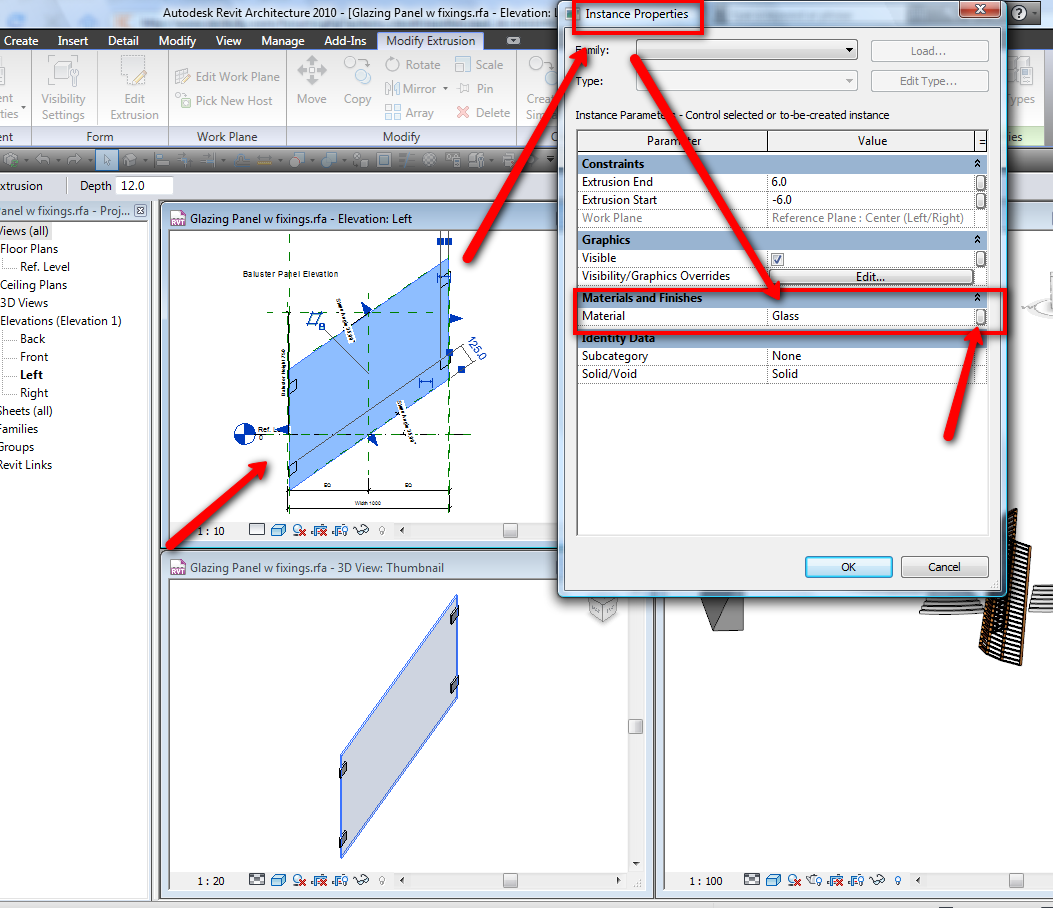
Open that family, pick in the panel and go to the properties, in there you can see what material (name) you have to that panel (glass), so in project go to materials and change that material, but in that little right button (like you can see in the image i attached), if you pick you can add a parameter to create a new material name if you want...
-----------------------------------
I Hope and I Wish to LEARN more, and more, and more.... REVIT |
This user is offline |
|
|
|
Similar Threads |
|
Problems Changing Colours Of Doors! |
Revit Building >> Technical Support
|
Wed, Jul 1, 2009 at 3:24:18 PM
|
4
|
|
Car Colours |
General Discussion >> Revit Project Management
|
Wed, Nov 15, 2006 at 3:44:38 AM
|
0
|
|
RAL colours |
Revit Building >> Technical Support
|
Fri, Sep 11, 2015 at 3:32:21 AM
|
2
|
|
Changing Car colours |
General Discussion >> Wishlist
|
Wed, Nov 29, 2006 at 10:31:17 AM
|
1
|
|
Railing issue |
Revit Building >> Technical Support
|
Wed, Jun 13, 2018 at 2:15:01 AM
|
3
|
|
|
Site Stats
Members: | 2161655 | Objects: | 23325 | Forum Posts: | 152479 | Job Listings: | 3 |
|
 Search