|
|
|
Home | Forums |
Downloads | Gallery |
News & Articles | Resources |
Jobs | FAQ |
| Join |
Welcome !
|
44 Users Online (42 Members):
Show Users Online
- Most ever was 626 - Mon, Jan 12, 2015 at 2:00:17 PM |
Forums
|
Forums >> Revit Building >> Technical Support >> Joining Angled Walls Trouble
|
|
|
active
Joined: Thu, Nov 19, 2009
3 Posts
No Rating |
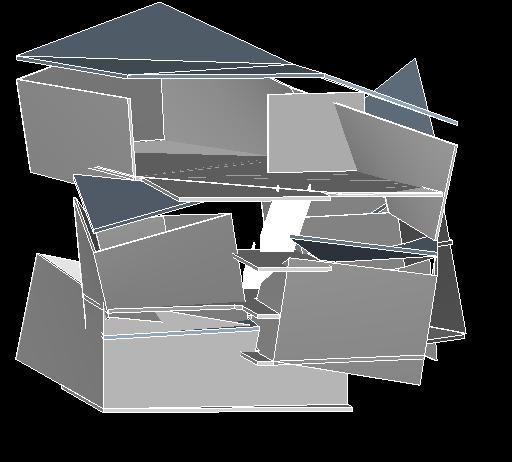
Hello everyone, im an Architecture Student at LSU and I just started to try and teach myself revit and I am having some difficulty going from conceptual massing to a project. I created a mass that I liked and now I am trying to actually put floors and walls in. After I loaded the mass into ther project, I used the wall by face option to create the complex exterior walls and that worked pretty good until I tried to put doors in, it wont let me cut an opening in the wall i created on the mass. Also, when I try to create a wall in the mass it will not join the mass wall i created. I know this probably wasnt a good building to try and learn revit with, but I felt very restricted with sketchup. Any help would be greatly appreciated as we dont have any teacher that knows enough about revit to teach me. Thanks Bryce crishe3@tigers.lsu.edu
|
This user is offline |
|
 | |
|
|
active
Joined: Thu, Nov 19, 2009
3 Posts
No Rating |
I am using Revit Architecture 2010, sorry I forgot to mention that
|
This user is offline |
|
|
|
active

Joined: Sun, Feb 17, 2008
197 Posts
 |
Well Man, Not sure where to start. You picked a hell of a design to start with. First, I do not have much experience with walls by faces. What I have learned though is that once you do a wall by face, it becomes uneditable. I could be wrong about this but I have noticed that the only way to edit them is by editing the mass itself. I noticed that some of the walls are not on what i would call straight planes. I dont really know if you can do this any other way besided wall by face, somethign Ill try to look into. I would say that if you are needing to add some opening for doors in your walls, then add some Voids to the mass if you can. Then the wall would automatically cut around the opening. I would recommend using the mass just as a template and drawing your walls around it. This will take alot longer than walls by face would. But this will give you the freedom to edit their profile and join them. However I dont know a way to make a wall have a 40 degree angle at one end and a 45 at the other off the top of my hand. Witch seems like most of your walls have different angles at each end. Look into some of these things and see what other people have to say. Ill help you where I can.
-----------------------------------
J. Allen Ball Revit Architecture 2010 Certified Professional |
This user is offline |
|
|
|
active
Joined: Thu, Nov 19, 2009
3 Posts
No Rating |
Thanks I think that is the only way to do it, it just seems like there would be a shorter way to do it but oh well I am loving Revit regardless. I cant wait until I can actually fully take advantage of the program
|
This user is offline |
|
|
|
Similar Threads |
|
Joining Walls at Awkward Angles |
General Discussion >> Revit Project Management
|
Tue, Mar 11, 2014 at 8:31:13 AM
|
1
|
|
Angled Walls in Revit |
Revit Building >> Tips & Tricks
|
Mon, Jan 12, 2015 at 8:48:26 AM
|
6
|
|
Joining angled structural beams |
Revit Building >> Technical Support
|
Mon, Aug 27, 2007 at 5:16:02 PM
|
2
|
|
Making Angled or canted walls |
Revit Building >> Technical Support
|
Tue, Jun 3, 2008 at 2:10:07 PM
|
5
|
|
Angled Curtain Walls - fillets and nested |
Revit Building >> Technical Support
|
Thu, Apr 23, 2009 at 5:42:47 PM
|
7
|
|
|
Site Stats
Members: | 2161655 | Objects: | 23325 | Forum Posts: | 152479 | Job Listings: | 3 |
|
 Search