|
|
|
Home | Forums |
Downloads | Gallery |
News & Articles | Resources |
Jobs | FAQ |
| Join |
Welcome !
|
586 Users Online (11 Members):
Show Users Online
- Most ever was 3914 - Wed, Aug 26, 2026 at 4:53:14 AM |
Forums
|
Forums >> Revit Building >> Technical Support >> Lights not acknowledged?
|
|
|
active
Joined: Thu, Jun 19, 2008
1 Posts
No Rating |
I have been playing with Revit for HOURS (and today's not the first time...) and no matter what lights I put in my ceiling (besides studio lights), the render dialogue won't acknowledge them. I can go into the "artificial lights" properties and turn them all on, but when I hit "Render", it says "Artificial Lights: 0". I don't know what I'm doing wrong, most of the lights I've tried I downloaded from this site...please help!!
|
This user is offline |
|
 | |
|
|
site moderator|||

Joined: Tue, May 22, 2007
5921 Posts
 |
Open your "Light" family and check if there are some "light" in there, move down only the light not the geometry, also go to "Settings>Family category and parameters" and see if the family is in the right category...
-----------------------------------
I Hope and I Wish to LEARN more, and more, and more.... REVIT |
This user is offline |
|
|
|
active
Joined: Wed, Feb 10, 2010
38 Posts
No Rating |
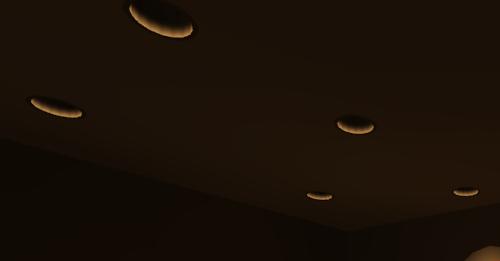
Hey guys Im having the same problem. It says artificial lights:4. but there is probably 25 lights in my view and more outside my view that should still be considered, they are rendering illuminated but they arent giving off any light, ie. the corners that sunlight doesnt reach are black. any suggestions?
|
This user is offline |
|
|
|
active
Joined: Wed, Aug 20, 2008
318 Posts
|
So ive done all that typhoon suggested, and still I get no lights..
|
This user is offline |
View Website
|
|
|
active
Joined: Wed, Aug 20, 2008
318 Posts
|
here is an image. (dont know how to "edit posts" on this site)
|
This user is offline |
View Website
|
|
|
site moderator|||
Joined: Tue, May 22, 2007
5921 Posts
|
after render you have the "Adjust Exposure" where you can play with the values, but first select one of those lights, go to properties, edit type and increase the wattage (lumens).
-----------------------------------
I Hope and I Wish to LEARN more, and more, and more.... REVIT |
This user is offline |
|
|
|
Similar Threads |
|
lighting scheme and artificial lights |
Revit Building >> Technical Support
|
Mon, May 19, 2008 at 9:21:47 PM
|
1
|
|
rendering: can't get itnerior lights turned off |
Revit Building >> Technical Support
|
Mon, Feb 27, 2012 at 6:14:44 AM
|
0
|
|
Revit 2009 Lights |
Revit Building >> Technical Support
|
Mon, Jul 28, 2008 at 4:43:50 PM
|
8
|
|
LIGHTS LIGHTS LIGHTS |
Revit Building >> Technical Support
|
Thu, Feb 1, 2007 at 6:13:51 PM
|
1
|
|
Dim Light Setting for Rendering is Not Functional |
Revit Building >> Technical Support
|
Thu, Aug 2, 2018 at 1:20:06 AM
|
3
|
|
|
Site Stats
Members: | 2187933 | Objects: | 23399 | Forum Posts: | 152454 | Job Listings: | 0 |
|
 Search