|
Forums >> Revit Building >> Technical Support >> In "Fine Detail" Wall structure is missing...
|
|
|
active
Joined: Thu, Dec 6, 2007
8 Posts
No Rating |
Revit Arch 2010. Suddenly it's not letting me dimension to the face of core. I turned on fine detail and thin lines, and the structure of my wall is missing. I checked the type properties of my walls, and they are all correct. Why can't I see the structure of my wall and why can't I dimension to the face of core?
|
This user is offline |
|
 |
|
|
|
site moderator|||
Joined: Tue, May 16, 2006
13079 Posts
 |
Could your view be cutting above this wall?
|
This user is offline |
|
|
|
active
Joined: Thu, Dec 6, 2007
8 Posts
No Rating |
No. I checked that already. The building has many different wall heights and all of the walls are not showing the structure in plan as described above.
|
This user is offline |
|
|
|
active
Joined: Thu, Dec 6, 2007
8 Posts
No Rating |
Any more ideas people? This is really holding me back. Got a deadline looming...
|
This user is offline |
|
|
|
site moderator|||
Joined: Tue, May 16, 2006
13079 Posts
|
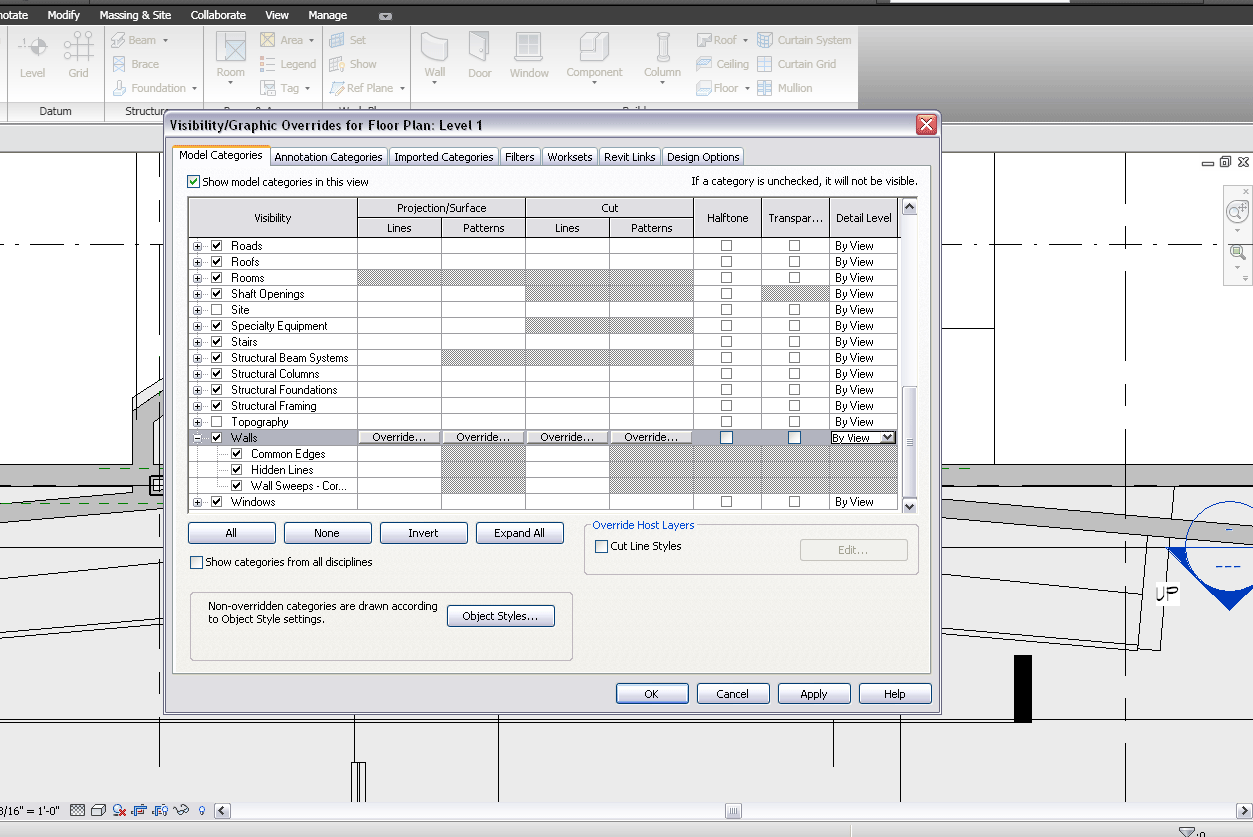
The problem is there are a lot of possibilities. An obvious one that you do not say you checked is VG. - VG .. Walls - - Did you override detail level from by view to coarse setting? (Last column on right)
- VG - walls - sub category - common edges - Did you turn this off?
Also I asked if you were cutting this wall? In addition, even if you are cutting the wall, if it is a low wall, REVIT sometimes has problems and will not show it cut.
|
This user is offline |
|
|
|
active
Joined: Thu, Dec 6, 2007
8 Posts
No Rating |
My VG detail level for this view is set to by view. and the view is set for fine. I also tried changing the vg to fine, and that didn't change anything. Common edges are not off. The wall is being cut at 4'-0" and it goes below 0'-0" and up to 14'-0". The top of the view range is 7'-0". I have been using revit for 6 years. I can't recall this ever happening.
|
This user is offline |
|
|
|
active
Joined: Thu, Dec 6, 2007
8 Posts
No Rating |
This is a pretty big file. It is workshared and has several design options. If any of that helps. I am currently the only one working on it, though. It almost seems to be a glitch of some sort. Seems unlikely. There must be something I am overlooking...phasing?
|
This user is offline |
|
|
|
site moderator|||
Joined: Tue, May 16, 2006
13079 Posts
|
Not sure you answered me. Please post a screen shot of your VG with the walls category expanded. Also, are you using filters in any way at all in the project?
|
This user is offline |
|
|
|
active
Joined: Thu, Dec 6, 2007
8 Posts
No Rating |
I am pretty sure it isn't a VG problem. And I am not using any filters. Sorry if I wasn't clear.
|
This user is offline |
|
|
|
active
Joined: Thu, Dec 6, 2007
8 Posts
No Rating |
It appears to be phasing. So I am adjusting my overrides. But for some reason I can't get the structure to show up using this filter. I don't understand why.
|
This user is offline |
|
|
|
Similar Threads |
|
fine detail missing on duplicated wall, plan view?? |
Revit Building >> Technical Support
|
Mon, May 1, 2006 at 8:31:20 PM
|
0
|
|
Objects not showing in "fine" detail level |
Revit Systems >> Technical Support
|
Tue, Mar 3, 2009 at 10:42:15 AM
|
4
|
|
Create a "Foundation Wall system family?" |
Revit Structure >> Technical Support
|
Tue, Aug 3, 2010 at 9:50:54 PM
|
3
|
|
Moving Detail cuts results in "objects will be deleted" Unacceptable!! |
Revit Structure >> Technical Support
|
Mon, May 10, 2010 at 3:42:52 PM
|
3
|
|
Existing 12" wall w/4" brick-4" cavity-4" brick. Can't get plan brick to s |
Revit Building >> Technical Support
|
Thu, Apr 9, 2009 at 7:58:23 AM
|
2
|
|

 Search