|
|
|
Home | Forums |
Downloads | Gallery |
News & Articles | Resources |
Jobs | FAQ |
| Join |
Welcome !
|
35 Users Online (33 Members):
Show Users Online
- Most ever was 626 - Mon, Jan 12, 2015 at 2:00:17 PM |
Forums
|
Forums >> Revit Building >> Technical Support >> image insert Best Way?
|
|
|
active
Joined: Sat, Oct 25, 2003
411 Posts
 |
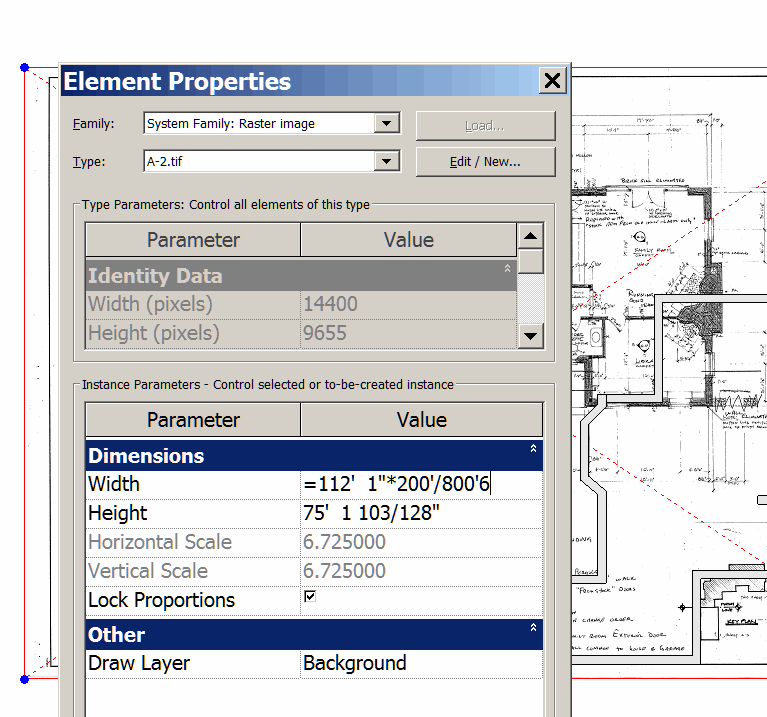
i had a set of paper drawing scanned as .tiff drawings, they're about 2megs each, 72 dpi. I insert them with file/importlink/image and used as a background. They make everything VERY slow to the point of being useless. I note that they come in about 5 times too large, while they are easy to scale to size, maybe there is a way to reduce their size cbefore importing. is there a better format to import as? a better work around? i have the files as pdfs also & can screen capture them in other formats.  revit 2009) revit 2009) Just as a tip, when you insert, you can scale something that you know the dimension of in the scanned image, then open image properties and scale it to the right size. if the paper image has an object that is actually 200' long and it scales in the revit file as 800'-6" horizontally (so it's too large), go the the images element properties, insert and = sign in front of the width and then multiply times the ratio you want it to be scale as, see attached.
|
This user is offline |
View Website
|
 | |
|
|
site moderator|||
Joined: Tue, May 16, 2006
13079 Posts
|
I thionk you are dealing with the nature of the beast. You have raster images - not vector. The cleaner they are the smaller the file. Did you try converting to jpegs? They are amaller. Did you try cleaning these up first? For instance, say you had an old blueline copy of a site plan that you had scanned. It has smudges, creases and a border. Something like that, you may crop in another program to get rid of some of the crap. Scale - you are stuck with what you are doing. BTW- discard the image as soon as you can!
|
This user is offline |
|
|
|
active
Joined: Sat, Oct 25, 2003
411 Posts
|
We're on the same page (i guess that's a pun). I made the insert file smaller and started over. It's a little better. I wonder if someone has a good strategy for getting paper drawings into revit, including outsourcing. I don't see anything on the forum search.
|
This user is offline |
View Website
|
|
|
Similar Threads |
|
How do you insert an image in the background of an elevation? |
Revit Building >> Technical Support
|
Tue, Mar 27, 2012 at 4:58:26 AM
|
2
|
|
Image inserted into 3d |
Revit Building >> Technical Support
|
Mon, Dec 10, 2012 at 2:57:50 PM
|
2
|
|
TIFF image not displaying |
Revit Building >> Technical Support
|
Wed, Nov 13, 2013 at 3:09:58 AM
|
5
|
|
Insert image into 3d view |
Revit Building >> Technical Support
|
Mon, Jun 8, 2009 at 2:41:17 PM
|
3
|
|
inserting image on upper floor |
Revit Building >> Technical Support
|
Thu, Mar 15, 2012 at 9:52:30 AM
|
1
|
|
|
Site Stats
Members: | 2161655 | Objects: | 23325 | Forum Posts: | 152479 | Job Listings: | 3 |
|
 Search