|
|
|
Home | Forums |
Downloads | Gallery |
News & Articles | Resources |
Jobs | FAQ |
| Join |
Welcome !
|
7 Users Online (5 Members):
Show Users Online
- Most ever was 626 - Mon, Jan 12, 2015 at 2:00:17 PM |
Forums
|
Forums >> General Discussion >> Revit Project Management >> SCREENING BACKGROUND IN REVIT
|
|
|
active
Joined: Fri, Aug 22, 2008
25 Posts
No Rating |
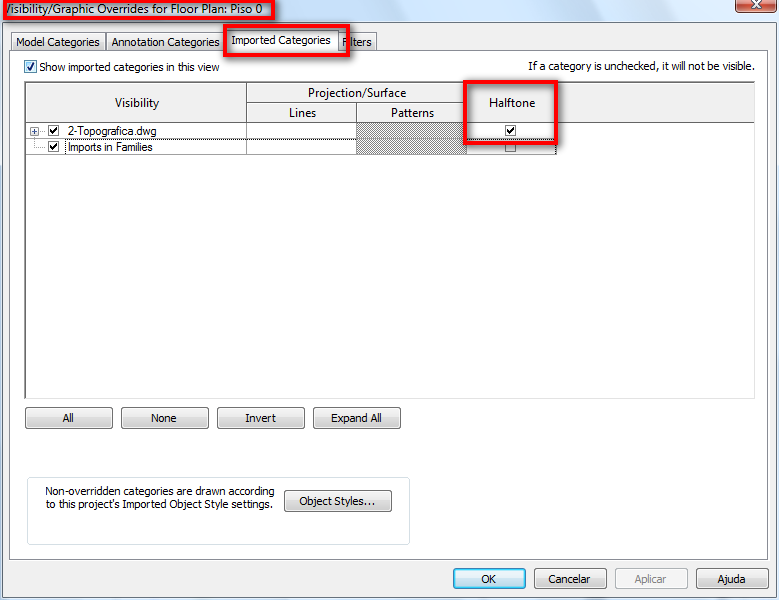
??? IF I IMPORT A AUTOCAD BACKGROUND IN REVIT WHAT IS THE BEST WAY TO "SCREEN" IT SO IT WILL PRINT SHADED GRAYED??
|
This user is offline |
|
 | |
|
|
site moderator|||

Joined: Tue, May 22, 2007
5921 Posts
 |
Did you try to put the "backgroud" in "halftone" and print?
-----------------------------------
I Hope and I Wish to LEARN more, and more, and more.... REVIT |
This user is offline |
|
|
|
active
Joined: Fri, Aug 22, 2008
25 Posts
No Rating |
yes i did i had to set it to halftone then make it real light to work. about 40% thanks.
|
This user is offline |
|
|
|
Similar Threads |
|
Screening |
Revit Building >> Tips & Tricks
|
Sat, Mar 5, 2005 at 1:26:18 PM
|
3
|
|
Screening objects in the background |
Revit Building >> Technical Support
|
Wed, Mar 3, 2010 at 2:12:21 PM
|
0
|
|
Importing AutoCAD Linetype Screening Values into Revit |
Revit Building >> Technical Support
|
Fri, Jul 27, 2007 at 12:53:09 PM
|
0
|
|
Elaveation / Section Lineweights by depth. screening by distance. |
Revit Building >> Technical Support
|
Fri, Aug 18, 2006 at 10:39:34 AM
|
1
|
|
Any way NOT to render a backround in Revit 2013 ?? |
Community >> Newbies
|
Thu, Feb 28, 2013 at 1:00:36 AM
|
6
|
|
|
Site Stats
Members: | 2161655 | Objects: | 23325 | Forum Posts: | 152479 | Job Listings: | 3 |
|
 Search