|
|
|
Home | Forums |
Downloads | Gallery |
News & Articles | Resources |
Jobs | FAQ |
| Join |
Welcome !
|
5 Users Online (3 Members):
Show Users Online
- Most ever was 626 - Mon, Jan 12, 2015 at 2:00:17 PM |
Forums
|
Forums >> Revit Building >> Technical Support >> Filled Regions Not Masking?
|
|
|
active
Joined: Mon, Sep 8, 2008
13 Posts
No Rating |
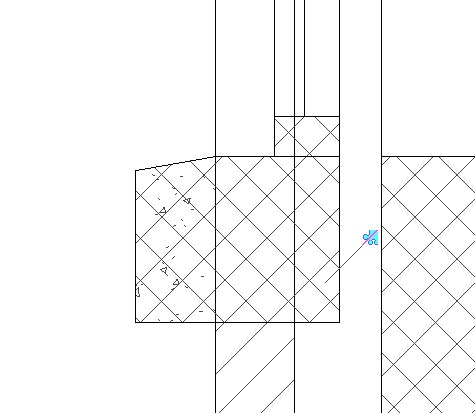
My filled region's aren't masking the wall behind it. I have the region propeties set to opaque. Is this a VG issue?
|
This user is offline |
|
 | |
|
|
active
Joined: Mon, Sep 8, 2008
13 Posts
No Rating |
Ive tried bringing to front.
|
This user is offline |
|
|
|
site moderator|||

Joined: Tue, May 22, 2007
5921 Posts
 |
Are you in "Wireframe mode"???
-----------------------------------
I Hope and I Wish to LEARN more, and more, and more.... REVIT |
This user is offline |
|
|
|
site moderator|||

Joined: Mon, Jan 12, 2004
2889 Posts
 |
In your filled region properties ensure it is set to "Opaque" and not "Transparent" background.
-----------------------------------
Regards,
Chris.
Co-Founder | BIM Consultant | Software Designer  B. Arch) B. Arch)
Xrev Revit API Addins | Revit Rants |
This user is offline |
View Website
|
|
|
Similar Threads |
|
Masking Regions and Filled Regions - Which Is In Front? |
Revit Building >> Technical Support
|
Fri, Oct 28, 2011 at 2:26:55 PM
|
7
|
|
Masking and filled regions dont cover dimensions and tags?? |
Revit Building >> Technical Support
|
Wed, Apr 9, 2008 at 11:12:17 AM
|
4
|
|
Masking Regions and Filled Regions BEHIND 3D Objects |
Revit Building >> Technical Support
|
Wed, Aug 1, 2012 at 8:10:27 AM
|
2
|
|
Getting rid off masking regions? |
General Discussion >> Wishlist
|
Fri, Feb 4, 2011 at 4:12:56 AM
|
1
|
|
Roof/wall join: Cut roof |
Revit Building >> Technical Support
|
Thu, Sep 25, 2008 at 7:30:44 AM
|
0
|
|
|
Site Stats
Members: | 2161655 | Objects: | 23325 | Forum Posts: | 152479 | Job Listings: | 3 |
|
 Search