|
|
|
Home | Forums |
Downloads | Gallery |
News & Articles | Resources |
Jobs | FAQ |
| Join |
Welcome !
|
7 Users Online (5 Members):
Show Users Online
- Most ever was 626 - Mon, Jan 12, 2015 at 2:00:17 PM |
Forums
|
Forums >> Revit Building >> Technical Support >> paint pattern adjustment
|
|
|
active
Joined: Wed, Jul 9, 2008
109 Posts
 |
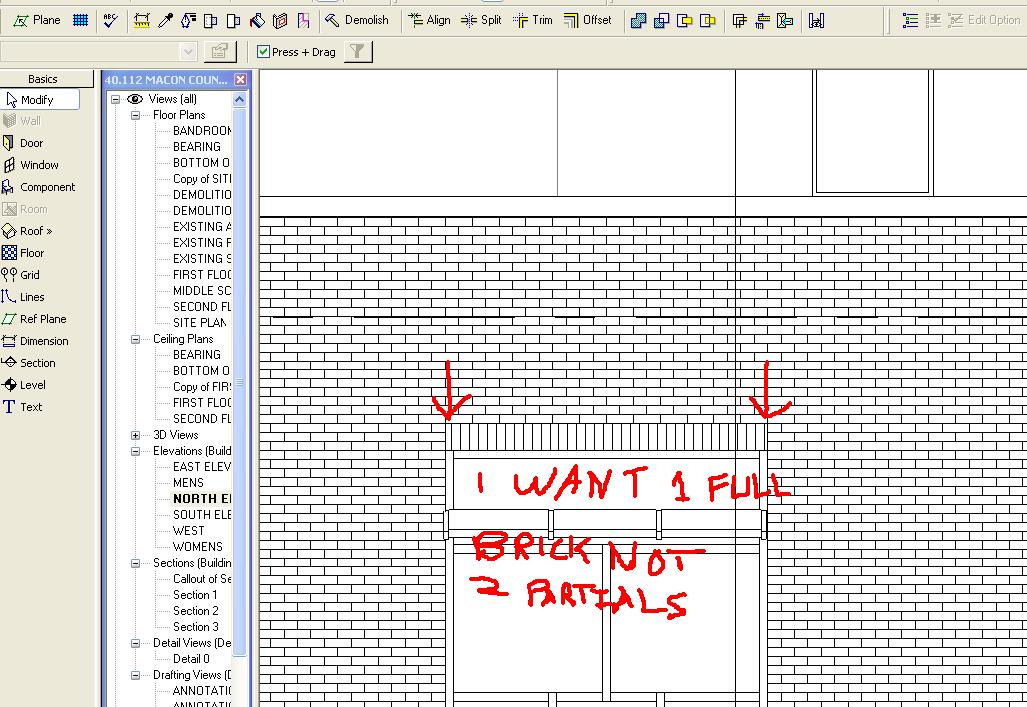
I am having a problem with splitting a face and applying a pattern to it. I cannot adjust the position of the pattern. I want to show a soldier course that has all complete bricks not two that are cut like in the attachment. Is it possible to adjust it like you can do with a dropped ceiling pattern?
|
This user is offline |
|
 | |
|
|
site moderator|||
Joined: Tue, May 16, 2006
13079 Posts
 |
Are you using a model pattern - if so, you can adjust it.
|
This user is offline |
|
|
|
site moderator|||

Joined: Tue, May 22, 2007
5921 Posts
 |
Did you use the "Align" tool???
-----------------------------------
I Hope and I Wish to LEARN more, and more, and more.... REVIT |
This user is offline |
|
|
|
Similar Threads |
|
"paint" pattern id? |
Revit Building >> Technical Support
|
Thu, Jul 24, 2008 at 1:14:42 PM
|
1
|
|
paint fill pattern complete image reference |
Revit Building >> Technical Support
|
Fri, Jul 18, 2008 at 3:55:54 PM
|
1
|
|
Model Pattern Upside Down |
Revit Building >> Technical Support
|
Tue, Dec 18, 2007 at 4:30:50 PM
|
5
|
|
Paint Help |
Revit Building >> Technical Support
|
Wed, May 22, 2013 at 5:33:21 PM
|
7
|
|
How do you tell what finish has been applied with Paint? |
General Discussion >> Revit Project Management
|
Sat, Jan 26, 2013 at 5:14:41 AM
|
4
|
|
|
Site Stats
Members: | 2161655 | Objects: | 23325 | Forum Posts: | 152479 | Job Listings: | 3 |
|
 Search