|
|
|
Home | Forums |
Downloads | Gallery |
News & Articles | Resources |
Jobs | FAQ |
| Join |
Welcome !
|
6 Users Online (4 Members):
Show Users Online
- Most ever was 626 - Mon, Jan 12, 2015 at 2:00:17 PM |
Forums
|
Forums >> Revit Building >> Technical Support >> Alter 2d appearance of Family
|
|
|
active
Joined: Fri, May 9, 2008
13 Posts
No Rating |
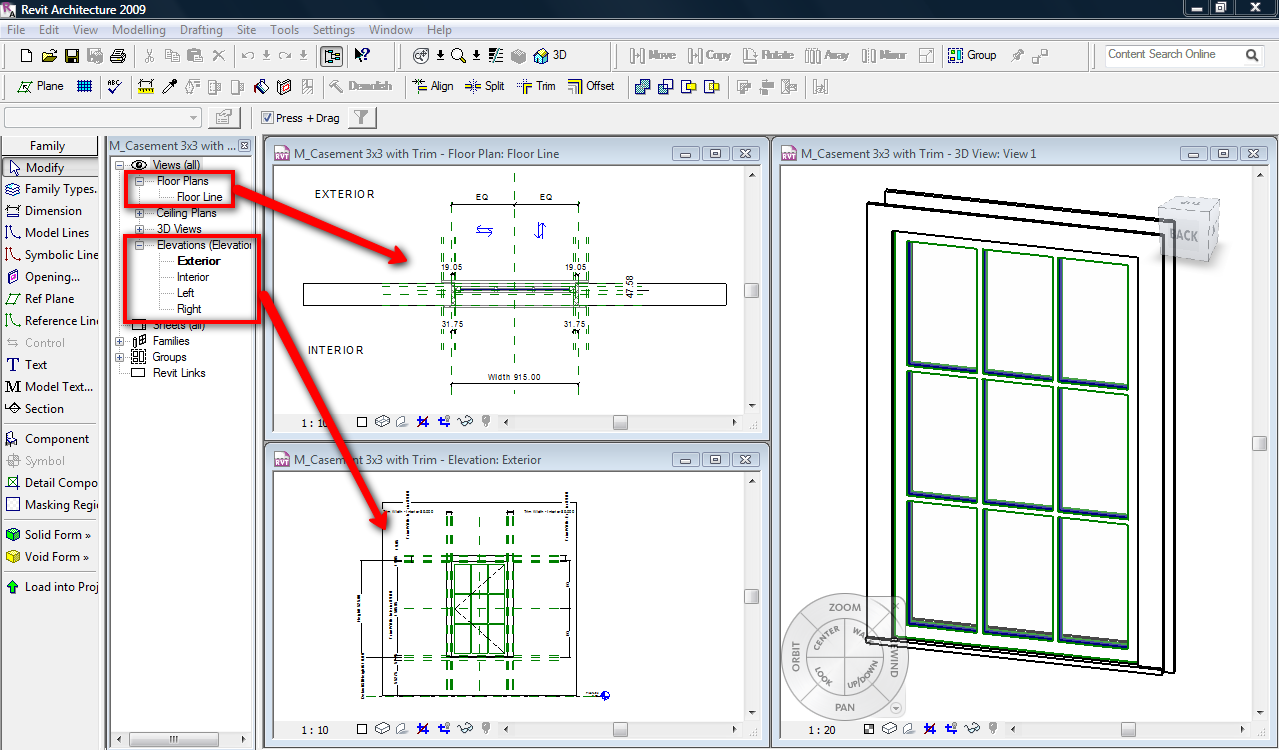
Can someone please point me in the right direction to instructions to edit the 2D appearence of a Family. EG Window appearance in plan view or elevations. If I select the family and then "Edit Family" it only shows it in 3d. How do I see what it will look like in plan view/elevations and edit how it will appar in in 2d views. Thanks in advance.
|
This user is offline |
|
 | |
|
|
active
Joined: Mon, Dec 10, 2007
64 Posts
 |
For starters, look in the help file for "Setting Family Geometry Visibility" Also, look for "Family Editor Commands" and study the difference between Model Lines and Symbolic Lines. In addition to the 3D view, the Ref. Level view under floor plans is the top view. There's also the four standard elevation views. You can also cut your own sections by selecting from the pulldown menu "View, New, Section." Good Luck.
|
This user is offline |
|
|
|
active

Joined: Fri, Sep 7, 2007
738 Posts
 |
Hi Scopedrafting, Also, you should know that editing a family in a plan view or elevations, you are altering all the family in all views (not only 2D views but 3D's too), so you have to have knowledges about families. If you want to see the family in plan view or elevation, display the views you want in the Project Browser (shown in the image). So, be careful with this.....
-----------------------------------
“Learning never exhausts the mind.” — Leonardo Da Vinci
|
This user is offline |
|
|
|
active
Joined: Fri, May 9, 2008
13 Posts
No Rating |
Thanks Guys for your quick reply. That's exactly the info I needed it's helped me alot.
|
This user is offline |
|
|
|
Similar Threads |
|
Revit 2013: Family Materials Graphics vs Appearance |
Revit Building >> Technical Support
|
Wed, Mar 20, 2013 at 7:38:52 AM
|
1
|
|
Alter the way 2 joined roofs look in floorplan |
Revit Building >> Technical Support
|
Mon, Oct 31, 2011 at 3:29:01 AM
|
7
|
|
Material Appearance in Revit 2019 |
Revit Building >> Technical Support
|
Tue, Apr 28, 2020 at 10:44:51 AM
|
6
|
|
2013 Revit Materials |
Revit Building >> Technical Support
|
Mon, Oct 8, 2012 at 8:43:00 AM
|
3
|
|
Appearance Property Set default |
Revit Building >> Technical Support
|
Mon, Mar 5, 2012 at 3:00:19 PM
|
2
|
|
|
Site Stats
Members: | 2161655 | Objects: | 23325 | Forum Posts: | 152479 | Job Listings: | 3 |
|
 Search