|
Forums >> Revit Structure >> Technical Support >> Text background mask
|
|
|
active
Joined: Thu, Aug 21, 2008
44 Posts
No Rating |
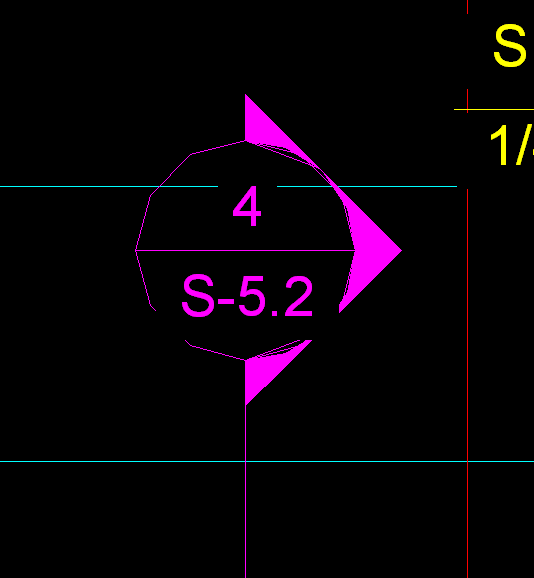
Is there a way to change the size of the area around text that masks the area around it? I know that you can set it to transparent or opaque, but I would like to change the size of the area that is opaque. In AutoCAD there is the background mask area that can be changed to be tight to the text or larger. The reason I am asking is when I export Revit to CAD formats, the area around the text is cutting things that I do not want. Specifically on my section cuts, the lines and shaded areas of the section mark are getting cut. Attached is a picture of what I am refering to.
|
This user is offline |
|
 |
|
|
|
site moderator|||

Joined: Tue, May 22, 2007
5921 Posts
 |
That image is in CAD???? if so, did you change the "Viewres"???
-----------------------------------
I Hope and I Wish to LEARN more, and more, and more.... REVIT |
This user is offline |
|
|
|
site moderator|||
Joined: Tue, May 16, 2006
13079 Posts
 |
Change your family so that the circle masks and the text doesn't.
|
This user is offline |
|
|
|
active
Joined: Thu, Aug 21, 2008
44 Posts
No Rating |
I tried that. I edited the family and put a masking region the same size as the callout circle. I made the label transparent. However, on the plans it doues not "trim" around the text. Any suggestions?
|
This user is offline |
|
|
|
site moderator|||
Joined: Tue, May 16, 2006
13079 Posts
|
The masking region should not "trim around the text" - it should mask a circle ... and then your text is over that.
|
This user is offline |
|
|
|
active
Joined: Thu, Aug 21, 2008
44 Posts
No Rating |
When I do this it is not masking the circle. You can still see the framing and other things "behind" the section cut.
|
This user is offline |
|
|
|
active
Joined: Fri, Jan 12, 2007
4 Posts
No Rating |
"When I do this it is not masking the circle. You can still see the framing and other things "behind" the section cut." If you mask the circle- it should mask out things behind it. If your text is set to opaque- ther is a rectangular mask around the limits of the text- which is going to wipe out your symbols- And anyone know of how to get the mask NOT to wipeout the horizontal line separating the Detail# & Seet# Without resorting to text. Semi-circular masking regions don't stay alined wiht the text- they rotate with the section mark- hmm... maybe a generic tag linked in to the section... Will try that next.
|
This user is offline |
View Website
|
|
|
site moderator|||
Joined: Tue, May 16, 2006
13079 Posts
|
Regrettably, Revit's opaque text mask is too large. That is why the soltion to this problem was to use a masking region behind transparent text.
|
This user is offline |
|
|
|
active
Joined: Fri, Jan 12, 2007
4 Posts
No Rating |
"Regrettably, Revit's opaque text mask is too large. That is why the soltion to this problem was to use a masking region behind transparent text." Our IT Guy contacted AutoDesk Revit support- There is not a way to lock down the mask- so the line between the detail and sheet numbers will not show. Imagine it isn't on their list of priorities.
|
This user is offline |
View Website
|
|
|
site moderator|||

Joined: Mon, Jan 12, 2004
2889 Posts
 |
You didn't get a very good answer. Of course you can still keep the line using masking regions. Just do 2x semi-circle masking regions instead of 1x circle....
-----------------------------------
Regards,
Chris.
Co-Founder | BIM Consultant | Software Designer  B. Arch) B. Arch)
Xrev Revit API Addins | Revit Rants |
This user is offline |
View Website
|
|
|
|
|
active
Joined: Fri, Jan 12, 2007
4 Posts
No Rating |
"You didn't get a very good answer. Of course you can still keep the line using masking regions. Just do 2x semi-circle masking regions instead of 1x circle...."  That doesn't work either- That doesn't work either-
The masking regions rotate with the section mark- the text doesn't- so the line gets masked out too- the only work around is the underscore- since its text it doesn't rotate with the symbol- and the mask still works : ) -hth
|
This user is offline |
View Website
|
|
|
active
Joined: Mon, Mar 24, 2008
87 Posts
 |
I had the same issue - what I did was make the mask region circular, then added a piece of text in the middle which was just dashes one after the other to fill or mimic the length of the line (--------). When printed these lines bleed together and it looks like a solid line. Hope this helps!
|
This user is offline |
|
|
|

 Search