|
Forums >> Community >> Newbies >> Hello everyone
|
|
|
active
Joined: Thu, Oct 23, 2008
7 Posts
No Rating |
Hello everybody:
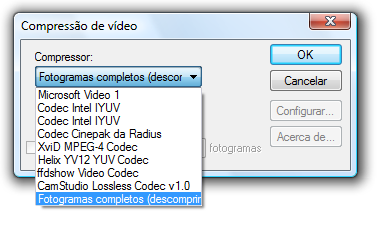
I'm quite new in the REVIT world and was trying to develop a walkthrough and export it as AVI file. But once the file is completed using windows media player the resolution is very bad. It looks fuzzy once the camera starts moving. Does anyone know if it is a problem in my graphics card or some setting that I haven’t check? Thank you all.
To conclude I wanted to say that this web page rocks. I was an AutoCAD guy for basically more than 12 years but since I start using Revit, it basically drew a line where I won’t go back to my AutoCAD days. I love working with it and I love everything about it. Thank you JG
|
This user is offline |
|
 |
|
|
|
site moderator|||

Joined: Tue, May 22, 2007
5921 Posts
 |
Hi, you don't tell what version of Revit are you working and if you are creating the walkthrough in "Hidden, shading, rendering" but you must check the codecs...
-----------------------------------
I Hope and I Wish to LEARN more, and more, and more.... REVIT |
This user is offline |
|
|
|
active

Joined: Fri, Sep 7, 2007
738 Posts
 |
As Typhoon says, what version do you have?, but check your hardware too, your processor,RAM,etc....Well, everyday is more the people that switch from the obsolete Autocad to Revit, so it demostrates the versatility of this software and the future of the architects with it. So, congratulation JGIM for this switch and welcome to the Revit's world....
-----------------------------------
“Learning never exhausts the mind.” — Leonardo Da Vinci
|
This user is offline |
|
|
|
active
Joined: Thu, Oct 23, 2008
7 Posts
No Rating |
Hello,Typhoon and Erland73; I apologize for not specifying the set ups and Revit version on my previous email and thank you both for answering. I'm using Revit 2009 and the walkthrough is set to rendering 25 frames per second using 150 DPI res. I tried to use uncompressed but the result was frame by frame, then I tried option "compressed player 1"with key frames every 6. It looked smother but again once the file starts paying the image gets very fuzzy. Typhoon, for some reason the list of codec's shown on my list is not even close to yours, mine is only shown 3 to choose from. Where can I get the rest? I totally agree with you Erland73, I'm so comfortable using Revit that just trying to use CAD again doesn't feel the same anymore.Thank you guysJGIM
|
This user is offline |
|
|
|
site moderator|||
Joined: Tue, May 22, 2007
5921 Posts
|
Hi, did you upgrade for the last Service Pack 3???? if you go to the Help menu in top, click in "About Revit Architecture 2009" then on the right of the box you have the version installed, "Build: 20081118_1045" - This is the last version...
-----------------------------------
I Hope and I Wish to LEARN more, and more, and more.... REVIT |
This user is offline |
|
|
|
active
Joined: Thu, Oct 23, 2008
7 Posts
No Rating |
Nope I havent' upgrade... I will do so right now. Thank you very much... I will let you know how it goes after that. JG
|
This user is offline |
|
|
|
site moderator|||
Joined: Tue, May 22, 2007
5921 Posts
|
go here: http://usa.autodesk.com/adsk/servlet/item?siteID=123112&id=11091739
-----------------------------------
I Hope and I Wish to LEARN more, and more, and more.... REVIT |
This user is offline |
|
|
|
active
Joined: Thu, Oct 23, 2008
7 Posts
No Rating |
BTW. I'm with you on that. Revit is addictive!
|
This user is offline |
|
|
|
active
Joined: Thu, Oct 23, 2008
7 Posts
No Rating |
Typhoon, I used the link but is doen't give any information about the latest upgrade...I already downloaded basically the entire familly files with the training file as well.
|
This user is offline |
|
|
|
site moderator|||
Joined: Tue, May 22, 2007
5921 Posts
|
Sorry for that, that link is for tutorials, this is the link: http://usa.autodesk.com/adsk/servlet/index?siteID=123112&id=9262388
Edited on: Sun, Jan 11, 2009 at 9:42:03 AM
-----------------------------------
I Hope and I Wish to LEARN more, and more, and more.... REVIT |
This user is offline |
|
|
|

 Search