|
|
|
Home | Forums |
Downloads | Gallery |
News & Articles | Resources |
Jobs | FAQ |
| Join |
Welcome !
|
8 Users Online (6 Members):
Show Users Online
- Most ever was 626 - Mon, Jan 12, 2015 at 2:00:17 PM |
Forums
|
Forums >> Revit Building >> Technical Support >> Rendering Revit Architecture 2009 - Little Black dots!!!!
|
|
|
active
Joined: Wed, Jul 11, 2007
1 Posts
No Rating |
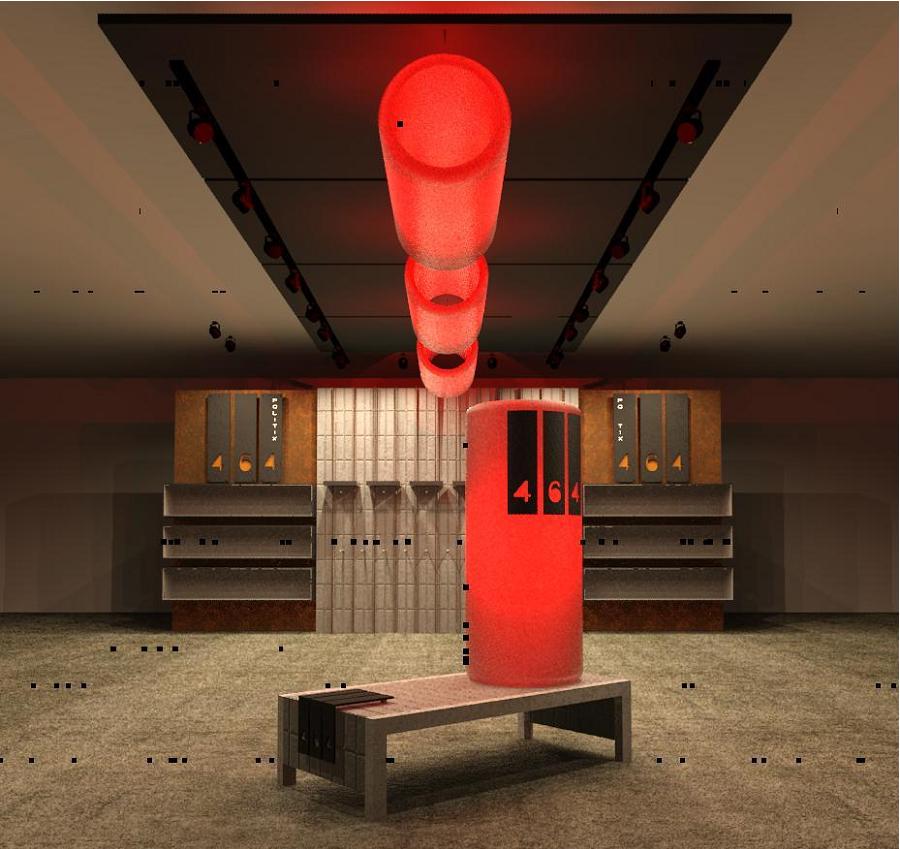
I'm having an extreamly annoying problem when I render in revit. It seems that whenever I try to do a higher quality render for example a Medium 300dpi, or High 300dpi these little black dots appear sparadicaly accross the page. I'm wondering if anyone else has had this problem before and if so have you been able to rectify it? I have attached an example of my problem. Thanks in advance for any help in the matter, Rhys
|
This user is offline |
|
 | |
|
|
site moderator|||

Joined: Tue, May 22, 2007
5921 Posts
 |
It seams like "He" don't finish the render... Graphic Card name? Did you upgrade to "Web Update 3"???
-----------------------------------
I Hope and I Wish to LEARN more, and more, and more.... REVIT |
This user is offline |
|
|
|
Similar Threads |
|
Revit 2009 Rendering Problem(Black screen) [ 1 2 ] |
Revit Building >> Technical Support
|
Mon, Apr 1, 2013 at 2:45:28 PM
|
27
|
|
Rendering problem (dots) |
Revit Building >> Technical Support
|
Thu, Dec 31, 2009 at 12:00:28 PM
|
8
|
|
Linework Tool and remaining black dots |
Revit Structure >> Technical Support
|
Mon, Jan 19, 2009 at 9:54:45 PM
|
2
|
|
Cloud Rendering Very Black |
Revit Building >> Technical Support
|
Tue, Mar 25, 2014 at 11:19:05 AM
|
1
|
|
Black or Blue dots in linked Structure file |
Revit Structure >> Tips & Tricks
|
Sun, Oct 29, 2006 at 8:00:27 PM
|
0
|
|
|
Site Stats
Members: | 2161655 | Objects: | 23325 | Forum Posts: | 152479 | Job Listings: | 3 |
|
 Search