|
|
|
Home | Forums |
Downloads | Gallery |
News & Articles | Resources |
Jobs | FAQ |
| Join |
Welcome !
|
442 Users Online (13 Members):
Show Users Online
- Most ever was 3914 - Wed, Aug 26, 2026 at 4:53:14 AM |
Forums
|
Forums >> Revit Building >> Technical Support >> Rendering
|
|
|
active
Joined: Wed, Aug 27, 2008
6 Posts
No Rating |
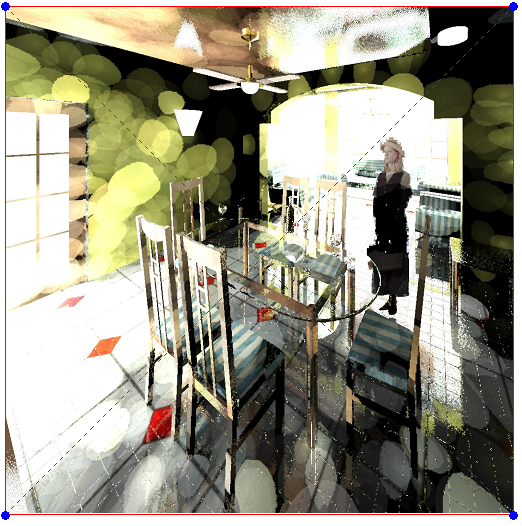
Dear All I rendered a room with the setting of 'Exterior sun only' but after rendering it gives me patches.I am using Revit architecture 2009. plz give solution & I am very thankful if anyone explain rendering in detail.I am attahing the images
|
This user is offline |
|
 | |
|
|
site moderator|||

Joined: Tue, May 22, 2007
5921 Posts
 |
You always have the "Adjust Exposure" to control the image.... also see this: http://www.revitcity.com/forums.php?action=viewthread&thread_id=11284&start=0 there are several threads about this in the forum, try to search...
Edited on: Fri, Dec 12, 2008 at 5:39:01 AM
-----------------------------------
I Hope and I Wish to LEARN more, and more, and more.... REVIT |
This user is offline |
|
|
|
active
Joined: Mon, Jun 9, 2008
72 Posts
No Rating |
@Typhoon : I export my file to *.fbx and import to 3ds max designing 2009 . Sunlight import so , but render i can not see everything ?
|
This user is offline |
|
|
|
Similar Threads |
|
Walkthrough rendering stops [ 1 2 ] |
Revit Building >> Technical Support
|
Mon, Feb 22, 2010 at 4:30:51 AM
|
17
|
|
help with rendering! |
Revit Building >> Technical Support
|
Wed, Aug 10, 2016 at 10:47:17 PM
|
2
|
|
Learning to render in revit [ 1 2 ] |
Revit Building >> Technical Support
|
Thu, Mar 25, 2010 at 6:12:40 PM
|
16
|
|
Interior Rendering - White Splotches on Painted Wall Surface |
Revit Building >> Technical Support
|
Thu, Jun 20, 2013 at 6:33:03 AM
|
3
|
|
Support your new software with the processing power it requires |
Community >> The Studio
|
Fri, Jun 13, 2008 at 3:05:14 PM
|
0
|
|
|
Site Stats
Members: | 2187939 | Objects: | 23399 | Forum Posts: | 152454 | Job Listings: | 0 |
|
 Search