|
|
|
Home | Forums |
Downloads | Gallery |
News & Articles | Resources |
Jobs | FAQ |
| Join |
Welcome !
|
7 Users Online (5 Members):
Show Users Online
- Most ever was 626 - Mon, Jan 12, 2015 at 2:00:17 PM |
Forums
|
Forums >> Revit Building >> Technical Support >> Revit 2009: Hidding the stairs over the cut plaqn
|
|
|
active
Joined: Mon, Aug 8, 2005
45 Posts
No Rating |
Hi all. I want to know, is it possible to hide the lines (overhead lines) that display when I draw a stairs (in plan view)? I know I can use the linework tool (invisible lines) but I'd like to find a fastest way! Thanks all!
|
This user is offline |
|
 | |
|
|
active
Joined: Wed, May 14, 2008
55 Posts
No Rating |
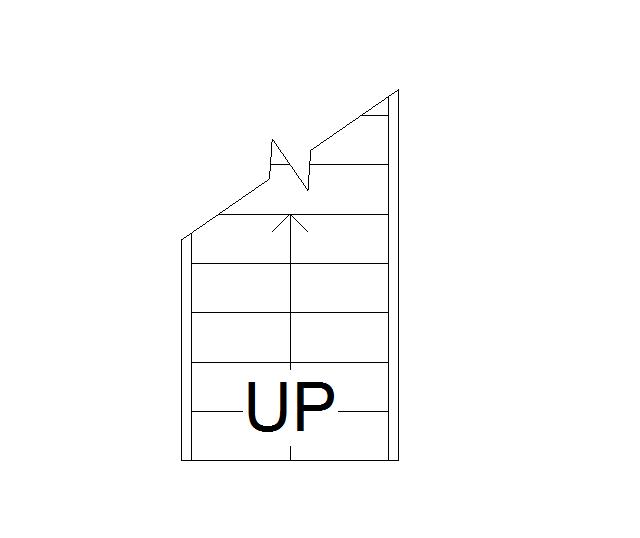
Yes you can... go to VG, under Model Tab, and under visibility column, click the + sign in front of stairs, you will find stairs and stringers beyond cut line... un-tick those.. and then, click the + sign in front of railings, you will find railings beyond cut line... un-tick that... And you will get something like the attached image...
|
This user is offline |
|
|
|
Similar Threads |
|
Stairs and plan regions (cut height) |
Revit Building >> Technical Support
|
Mon, Apr 21, 2014 at 10:22:57 AM
|
4
|
|
Revit 2013 - Cut Wall under stairs. |
Revit Building >> Technical Support
|
Thu, Oct 18, 2012 at 3:23:10 AM
|
1
|
|
Hidding |
Revit Building >> Technical Support
|
Fri, Apr 1, 2011 at 2:40:15 PM
|
5
|
|
cut symbol on stairs |
Revit Building >> Technical Support
|
Sun, Dec 4, 2011 at 8:21:55 AM
|
2
|
|
Plan Region & stairs |
Revit Building >> Technical Support
|
Thu, Jun 18, 2009 at 1:28:36 PM
|
9
|
|
|
Site Stats
Members: | 2161655 | Objects: | 23325 | Forum Posts: | 152479 | Job Listings: | 3 |
|
 Search