|
|
|
Home | Forums |
Downloads | Gallery |
News & Articles | Resources |
Jobs | FAQ |
| Join |
Welcome !
|
3 Users Online (1 Members):
Show Users Online
- Most ever was 626 - Mon, Jan 12, 2015 at 2:00:17 PM |
Forums
|
Forums >> Revit Building >> Technical Support >> surface material visibility
|
|
|
active
Joined: Tue, Aug 26, 2008
5 Posts
No Rating |
hello i'm using revit 2009. i am working on some interior elevations and was wondering if there is a way to show the 'depth' of the views by changing the colour/tone of black of walls' surface patterns depending on if they're closer or farther from the elevation view line. right now the CMU patterns on the walls are all the same tone no matter if they are farther or closer. thanks in advance.
|
This user is offline |
|
 | |
|
|
site moderator|||

Joined: Tue, May 22, 2007
5921 Posts
 |
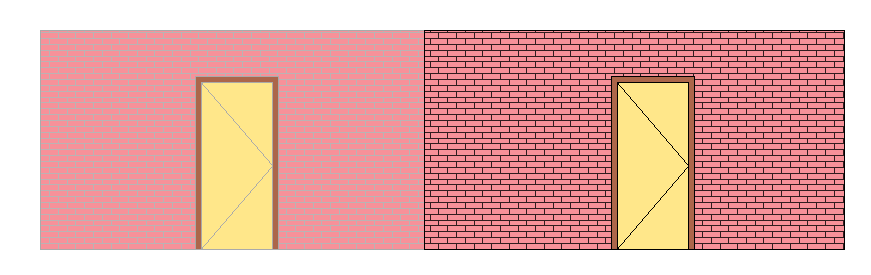
Hi, this is what do you want/need? If it is, you can pick in the elements you want to change the tone and right click buttom of mouse and go to "Override Graphics in View > By Element" and Check on the box "Halftone", this is one wayto do this...
-----------------------------------
I Hope and I Wish to LEARN more, and more, and more.... REVIT |
This user is offline |
|
|
|
Similar Threads |
|
surface pattern visibility |
Revit Building >> Technical Support
|
Fri, Sep 13, 2013 at 9:46:29 AM
|
6
|
|
Existing Phase Surface Patterns visibility |
Revit Building >> Technical Support
|
Tue, Nov 14, 2006 at 6:37:24 PM
|
5
|
|
View dependent material surface patterns |
General Discussion >> Revit Project Management
|
Wed, Apr 22, 2015 at 1:57:55 PM
|
4
|
|
Adding Material to Divided Surface |
Revit Building >> Technical Support
|
Thu, Apr 17, 2014 at 10:40:12 AM
|
1
|
|
surface pattern visibility |
Revit Building >> Technical Support
|
Mon, Dec 8, 2008 at 4:14:14 PM
|
1
|
|
|
Site Stats
Members: | 2161655 | Objects: | 23325 | Forum Posts: | 152479 | Job Listings: | 3 |
|
 Search